Overview
2-9
2.3.2 Menus
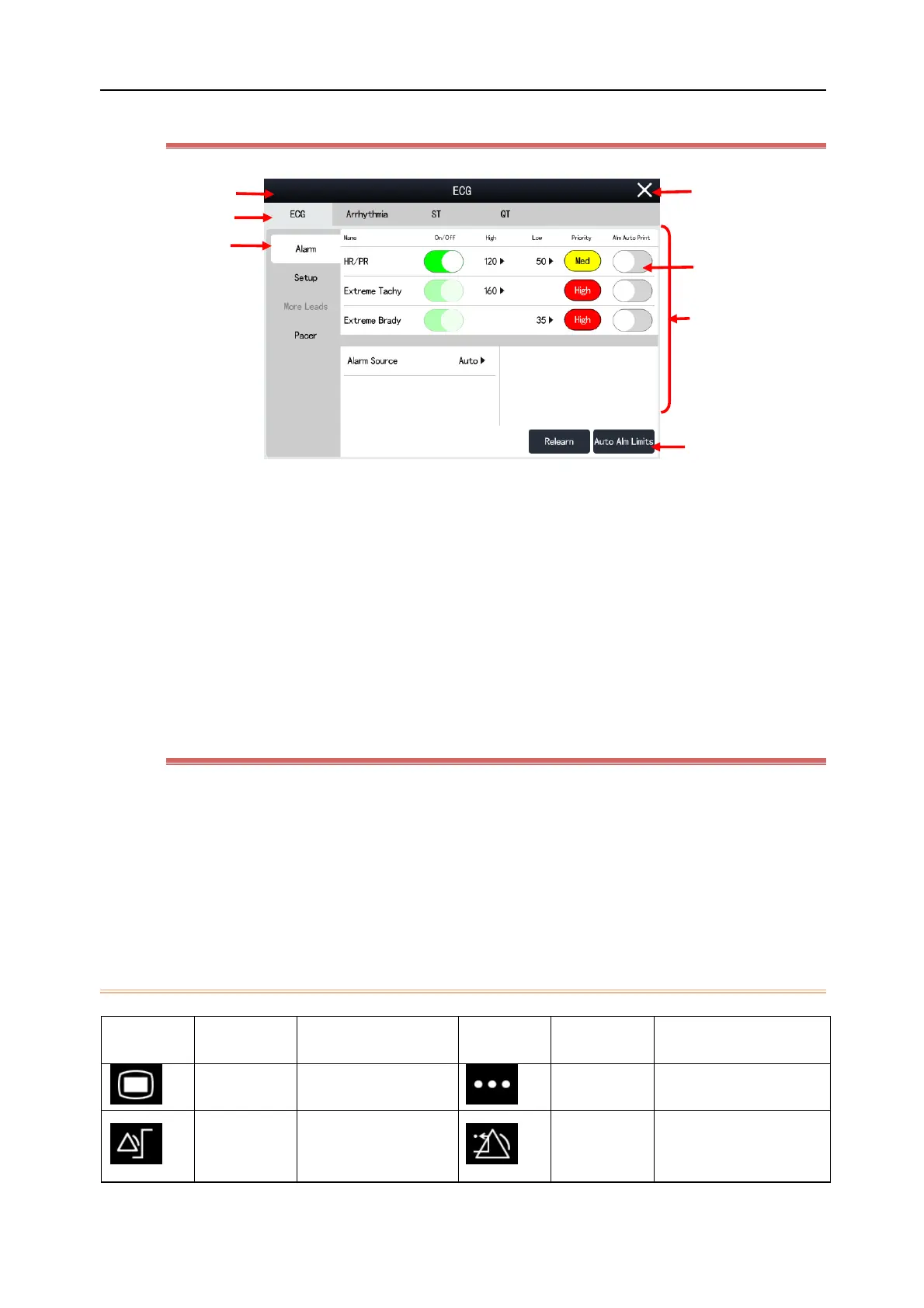
(1) Menu Tile: Name of current menu
(2) Exit Button: Select it to exit the current menu
(3) Function On/Off:
Green: This function is turned on
Grey: This function is turned off
(4) Main Display Area: Displays menu options
(5) Operation Button: Click to initiate an operation
(6) Sub-menu tab buttons: Press each button to enter the corresponding sub-menu page
2.3.3 Quick Keys
Quick keys refer to some graphic hot keys shown in the lower part of the screen, allowing you to quickly access
some functions. Generally, 14 hot keys are displayed in the Hot Key Area (except N10/N10A/N10C displays 10 hot
keys). The [Main Menu] button is always displayed at the lower right corner of the Hot Key Area, and the [More]
button is always displayed at the lower left corner of the Hot Key Area. Click [More] to show more predefined hot
keys. You can define the hot keys to be displayed and their order on the screen.
2.3.3.1 Quick Key List



 To Next Page