173
PHONE
Initiating a call/accepting or rejecting a call
For information on general system
operation, please refer to the chapter
“Functional introduction” from page 17.
Initiating an outgoing call
The following options for initiating an
outgoing call are available:
Entering a phone number, see
page 173
Using redial, see page 174
Call history list, see page 176
Using the phonebook, see the section
“Phonebook” on page 188
Entering a phone number
Open the PHONE main menu, see the
section “Opening the PHONE main
menu” on page 152.
In the PHONE main menu, select the
menu item
Dial Number.
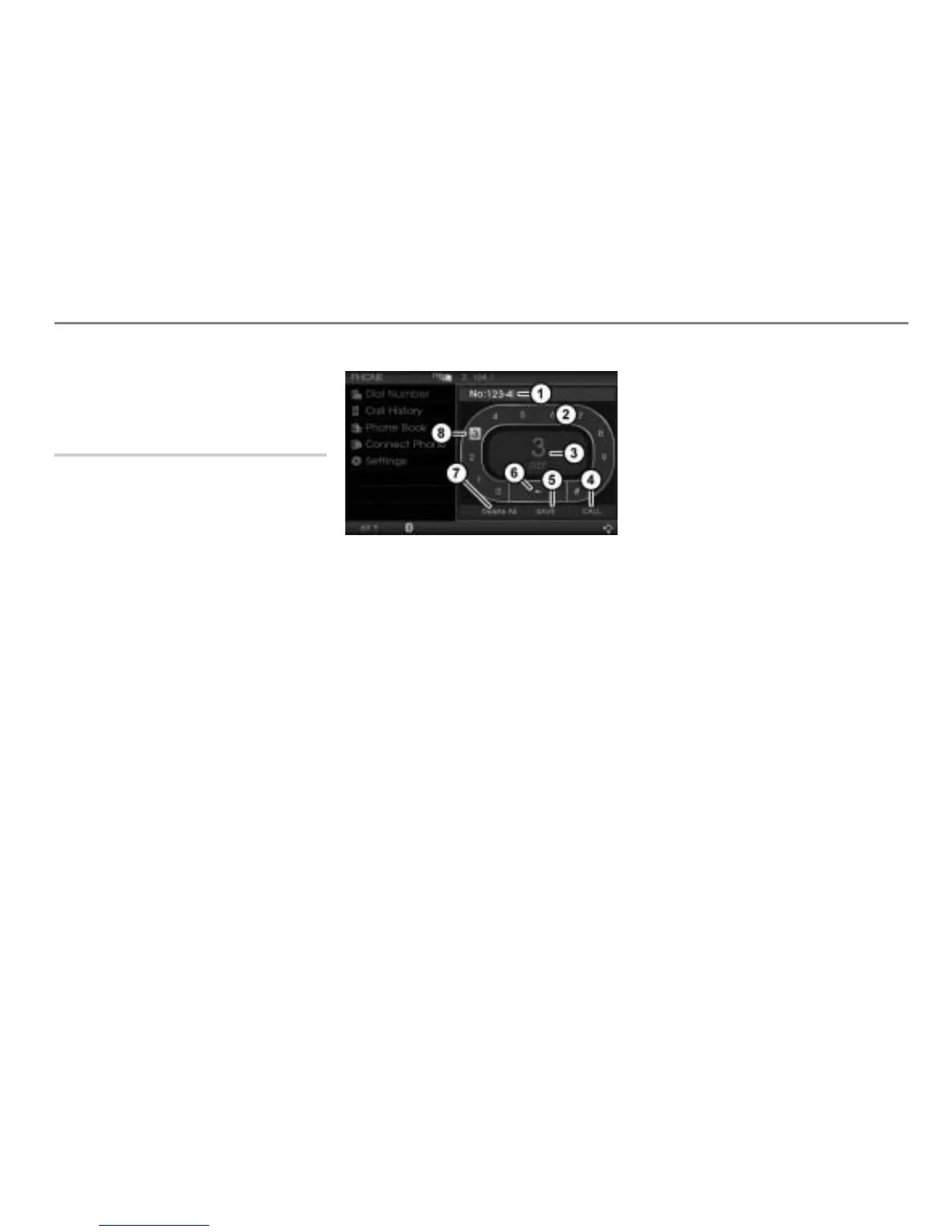
The input menu appears.
Input field with digits already entered
Speller
Enlarged display of the currently
highlighted character in the speller
Initiate a call
Store number in the phonebook
Delete the last digit in the input field
Delete all digits in the input field
Currently highlighted digit
At the beginning, the input field is empty.
The input menu has two user-control areas:
The area with the speller
and the area
with the menu items , and .
To move from one area to another:
Push
the controller .
To enter a number: In the speller
,
highlight a digit by turning
the
controller and press the
controller .
The digit is entered and appears in
input field
.
To delete the last digit in the input
field: In the speller, select the menu
item
.
The last entered digit is deleted.
To delete all digits in the input field:
From the speller, push
the
controller and select the menu item
Delete All.
All digits are deleted.
To make a new entry: Push
the
controller
to move back to the
speller and enter a number as
described previously.



 To Next Page