190
PHONE
Phonebook
To cancel the download: Press the
controller
.
After the download has been finished,
the message disappears automatically.
If the limit of 1000 entries is reached
during the download process, you will
see an appropriate message.
To close the message: Press the
controller
.
Creating a new entry
You can also save entries in the call history
list as new phonebook entries, see the
section “Saving a list entry to the
phonebook” on page 178.
Call up the phonebook, see the section
“Calling up the phonebook” on
page 188.
The phonebook appears in the form of
a list.
You will find an operating example for a list
in the section “Lists” on page 29 of the
chapter “Functional introduction”. There you
will also find the description of how to scroll
through a list.
Phonebook
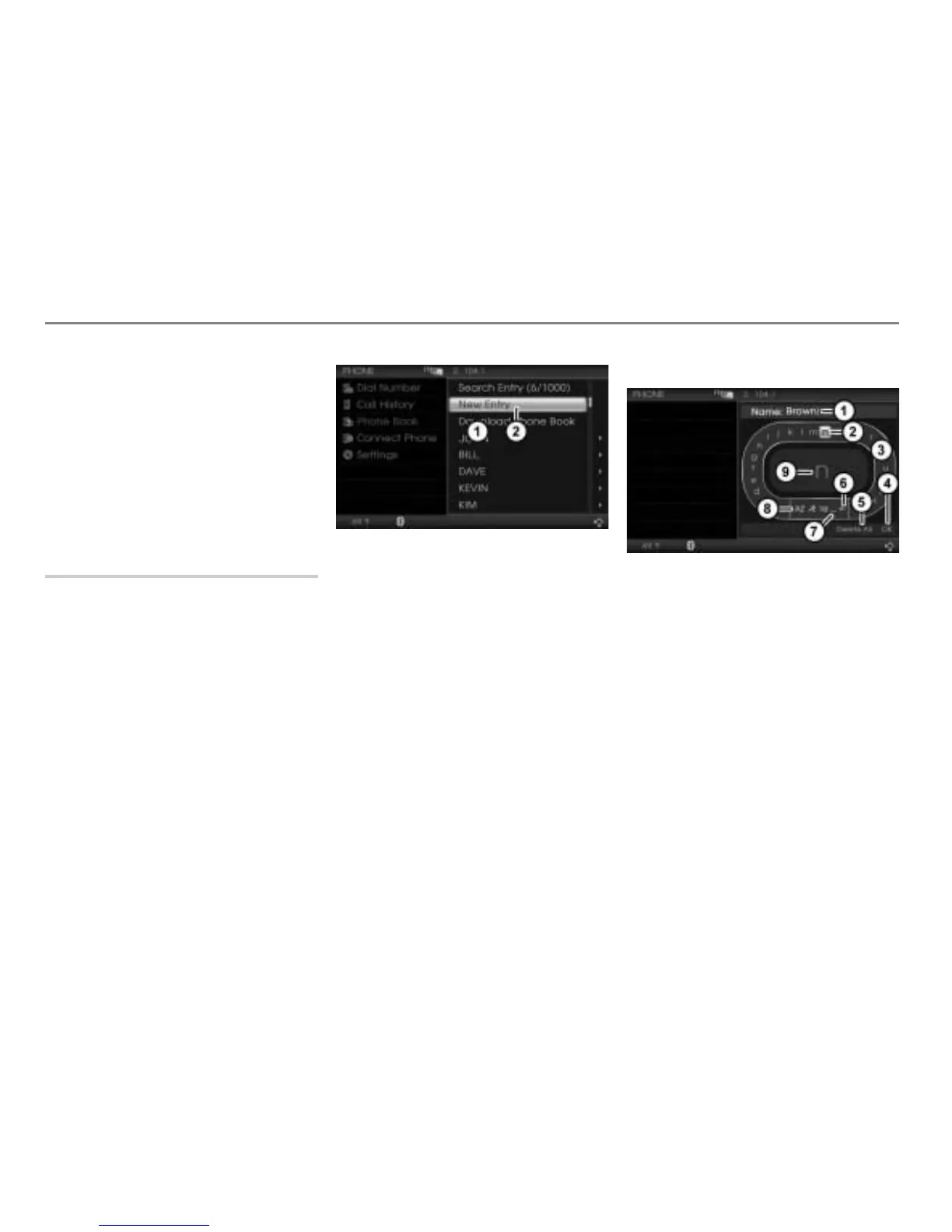
Menu item New Entry
In the phonebook, select the menu item
New Entry.
The phonebook for each paired mobile
phone holds a maximum of 1000 entries.
The menu item
New Entry cannot be
selected if the phonebook is full.
The name input menu appears. You
can now enter the name.
Name input menu
Input field with characters already
entered
Currently highlighted character
Speller
Complete entry
Delete all characters in the input field
Delete the last character in the input
field
Enter space
Switch character set
Enlarged display of the currently
highlighted character in the speller
At the beginning, the input field is empty.



 To Next Page