Altera Corporation 11–39
July 2005 Stratix Device Handbook, Volume 2
Configuring Stratix & Stratix GX Devices
Stratix and Stratix GX devices have dedicated JTAG pins. You can
perform JTAG testing on Stratix and Stratix GX devices before and after,
but not during configuration. The chip-wide reset and output enable pins
on Stratix and Stratix GX devices do not affect JTAG boundary-scan or
programming operations. Toggling these pins does not affect JTAG
operations (other than the usual boundary-scan operation).
When designing a board for JTAG configuration of Stratix and Stratix GX
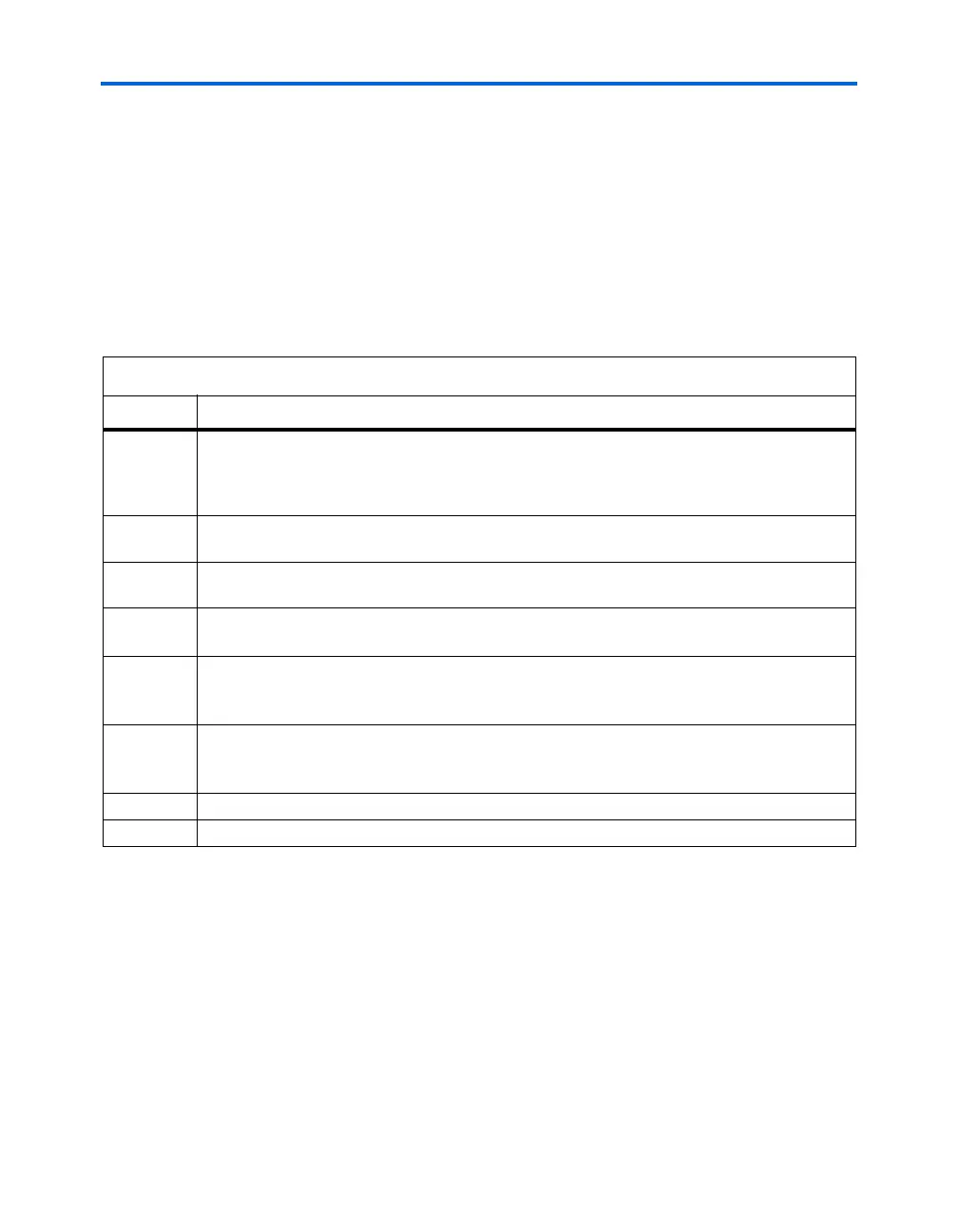
devices, you should consider the regular configuration pins. Table 11–12
shows how you should connect these pins during JTAG configuration.
JTAG Programming & Configuration of Multiple Devices
When programming a JTAG device chain, one JTAG-compatible header,
such as the ByteBlasterMV header, is connected to several devices. The
number of devices in the JTAG chain is limited only by the drive capacity
of the download cable. However, when more than five devices are
connected in a JTAG chain, Altera recommends buffering the TCK, TDI,
and TMS pins with an on-board buffer.
Table 11–12. Dedicated Configuration Pin Connections During JTAG Configuration
Signal Description
nCE
On all Stratix and Stratix GX devices in the chain,
nCE should be driven low by connecting it to
ground, pulling it low via a resistor, or driving it by some control circuitry. For devices that are also
in multi-device PS, FPP or PPA configuration chains, the
nCE pins should be connected to GND
during JTAG configuration or JTAG configured in the same order as the configuration chain.
nCEO
On all Stratix and Stratix GX devices in the chain,
nCEO can be left floating or connected to the
nCE of the next device. See nCE pin description above.
MSEL These pins must not be left floating. These pins support whichever non-JTAG configuration is used
in production. If only JTAG configuration is used, you should tie both pins to ground.
nCONFIG
nCONFIG must be driven high through the JTAG programming process. Driven high by connecting
to V
CC
, pulling high via a resistor, or driven by some control circuitry.
nSTATUS Pull to V
CC
via a 10-kΩ resistor. When configuring multiple devices in the same JTAG chain, each
nSTATUS pin should be pulled up to V
CC
individually. nSTATUS pulling low in the middle of JTAG
configuration indicates that an error has occurred.
CONF_DO
NE
Pull to V
CC
via a 10-kΩ resistor. When configuring multiple devices in the same JTAG chain, each
CONF_DONE pin should be pulled up to V
CC
individually. CONF_DONE going high at the end of
JTAG configuration indicates successful configuration.
DCLK Should not be left floating. Drive low or high, whichever is more convenient on your board.
DATA0 Should not be left floating. Drive low or high, whichever is more convenient on your board.



 To Next Page