8. System Alignment Marathon Express
Vacuum Cassette Elevator Configuration
and Alignment
Part Number: 605914 Rev. B
Step Action
1.
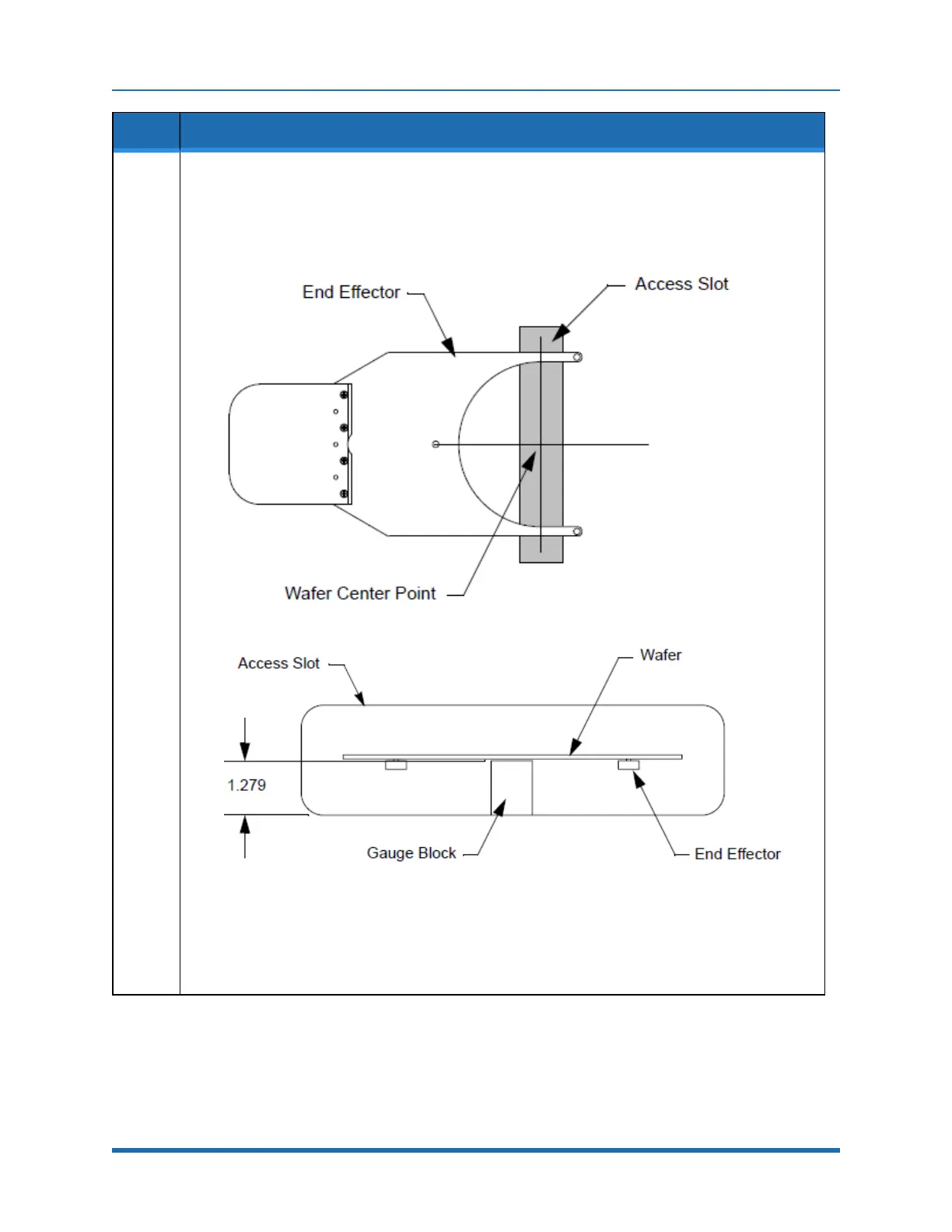
Usingtherobot’sCDM,movetherobot’span’A’endeffectortotheappropriateLoadLock’saccess
slot.
SETUP -> STATIONS -> 1 -> CR -> LEARN R, T, BTO -> HAND LOCATE
a. Manuallymovetherobot’sendeffectoruntiltheendeffectorislocatedinsidetheaccessslotas
shown.
b. Placethegaugeblockintheaccessslot,adjacenttotherobot’sendeffectorwiththe1.279inch
dimensionvertical,asshown.
c. Placeawaferontheendeffectorandsightalongthebottomofthewafer.Thebottomofthe
wafershouldalmosttouchthetopofthegaugeblockwhenrestingontheendeffector(moving
thegaugeblockshouldnotcausethewafertomove).IftheBTOvalueneedsadjustmentjogto
theappropriateheight,andstorethecorrectedBTOvalue.
d. OncetheendeffectorispositionedcorrectlysavetheBTOvaluefortherobotusingtheCDM.
ESCAPE -> STORE -> BTO -> QUIT
160
Copyright © 2023, Brooks Automation, Inc.



 To Next Page