3. Installation Marathon Express
Installation Procedure Part Number: 605914 Rev. B
InstallingtheTie-downBrackets
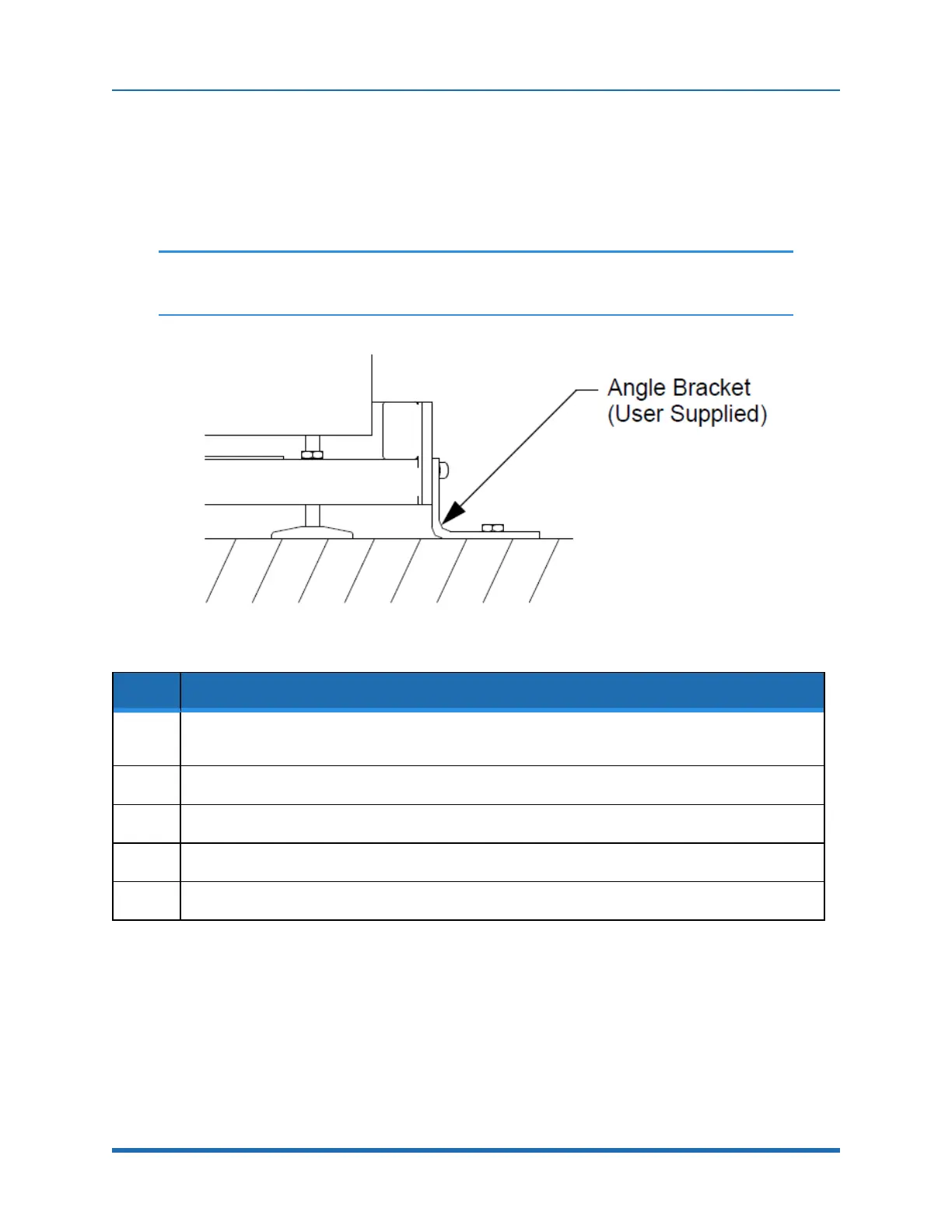
SeismicbracketsmustbeprovidedtosecuretheMarathonExpresstothefloortoeliminate
movementandforearthquakeprotection.Thecasterbracketsmustberemovedfromthesystem
andthesystemsecuredwithanglebrackets(notsupplied)usingthetappedholesinthesideofthe
frameasshowninFigure3-4.
NOTE: Seismichold-downforfacilitiesrequiringearthquakeprotectionarethe
responsibilityoftheuser.
Figure 3-4: Seismic Bracket Mounting
Step Action
1.
LocatetheSeismicBracketsatthepointsthecasterswereattachedtotheframeasshowninFigure3-
4.
2.
Positionthebracketssothattheseismicmountingholesareagainstthefloor.
3.
Replacethefourboltsandwasherstosecurethebrackettotheframe.
4.
InstalloneM12orequivalentsizebolt(notsupplied)throughthebracketandintothefloor.
5.
VerifytheWTPheightfromthefloortothecenterofeachvacuumfacetalignmentpin.
Mounting the Process Modules to the MX System
AnycomponentsthatwillbemountedtotheMarathonExpressTransportChamberareassumedto
conformwithSEMIMESCstandards.
66
Copyright © 2023, Brooks Automation, Inc.



 To Next Page