CHAPTER 11
Global Functions
DL.3 Digital Light User Manual 131
Framing Parameters
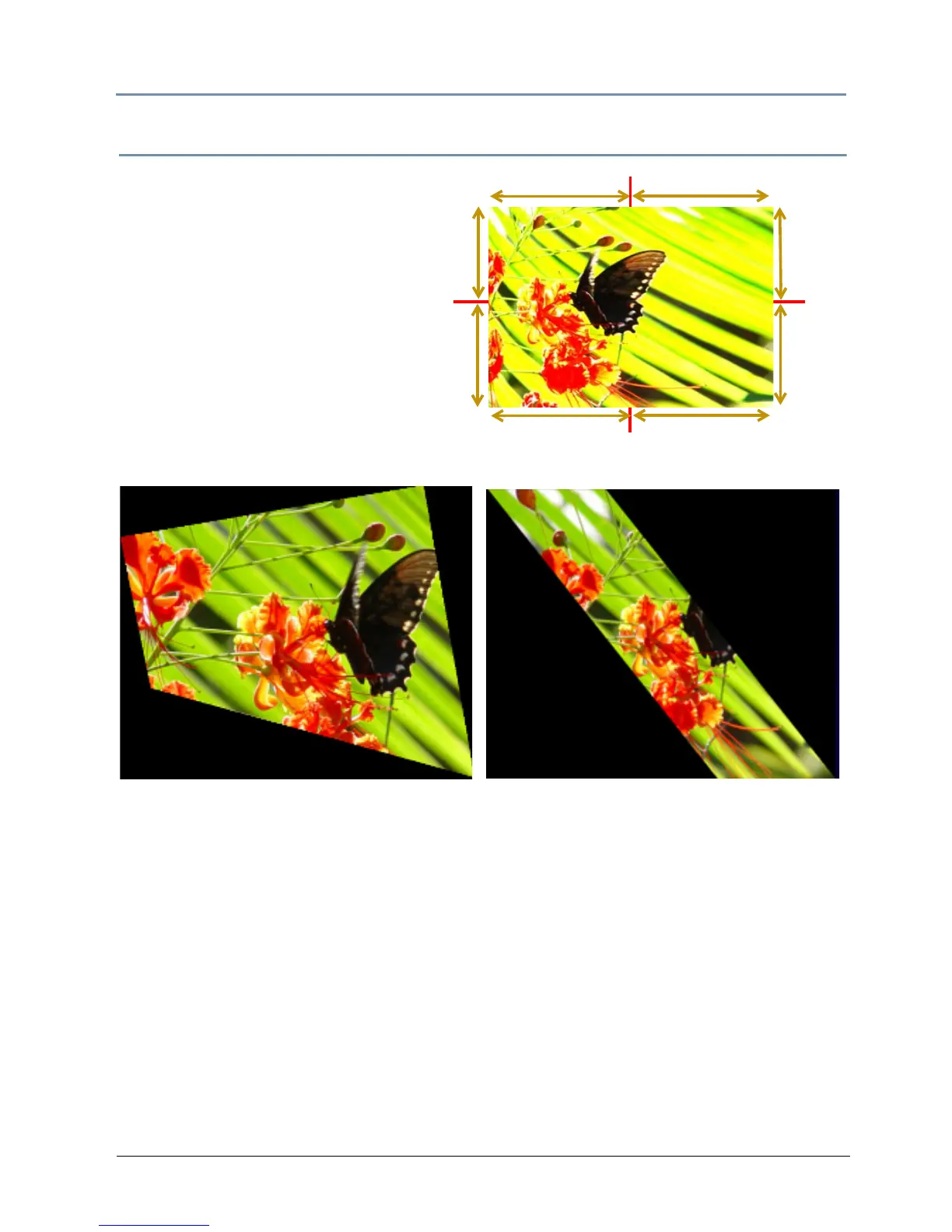
Eight Framing parameters allow you
to clip an image from each corner in
ho
rizontal and vertical directions.
Default DMX Value: 0 = no effect
applied.
Each corner has an x and a y value
that adjust and co
rrect scale of the
projection from any corner toward
the image center on that axis.
Setting all Framing X an
d Y parameters DMX values to zero will place the four corners of the
image at the four corners of the projector output. Adjusting framing x values across 255
(100%) clips the image from the selected x corner position horizontally toward the image.
Adjusting keystone y values toward 255 (100%) clips the image from the selected y corner
position vertically across the image.
Top
Top Left X
Top Right X
Top
Bottom
Right Y
Bottom Right X
Bottom Left X
Bottom
Left Y
Right Y
Left Y
Original Content
Framing Top Left X DMX value = 8
Framing Top Left Y DMX value = 31
Framing Top Right X DMX value = 32
Framing Bottom Left X DMX value = 23
Framing Bottom Left X DMX value = 67
Other Framing parameter DMX values = 0
Framing Top Left X DMX value = 5
Framing Top Right X DMX value = 188
Framing Bottom Right X DMX value = 5
Framing Bottom Left X DMX value = 188
Other Framing parameter DMX values = 0



 To Next Page