CHAPTER 16
Content Management Application (CMA)
278 DL.3 Digital Light User Manual
Viewing Server Configuration
The CMA lets you remotely view and modify fixture settings.Some settings like Lamp Hours,
Software Versions, etc. are view only. Other settings such as Fixture ID, various Projector
settings, DMX Start Channel, etc. can be modified (configured).
NOTE: All of these settings are also available for DL.3 and DL.2 fixtures
through the Digital Light onboard menu system.
The CMA also has some additional configuration features that let you:
• Assign a name to servers connected over the network for easier identif
ication of servers on
your network.
• Compare all the Configuration Items of a certain type
for a group of fixtures. For example,
viewing the DMX Start Channels of all the fixtures on a network.
• Control monitor display settings for Axon media servers.
Viewing Current Configuration of All Servers
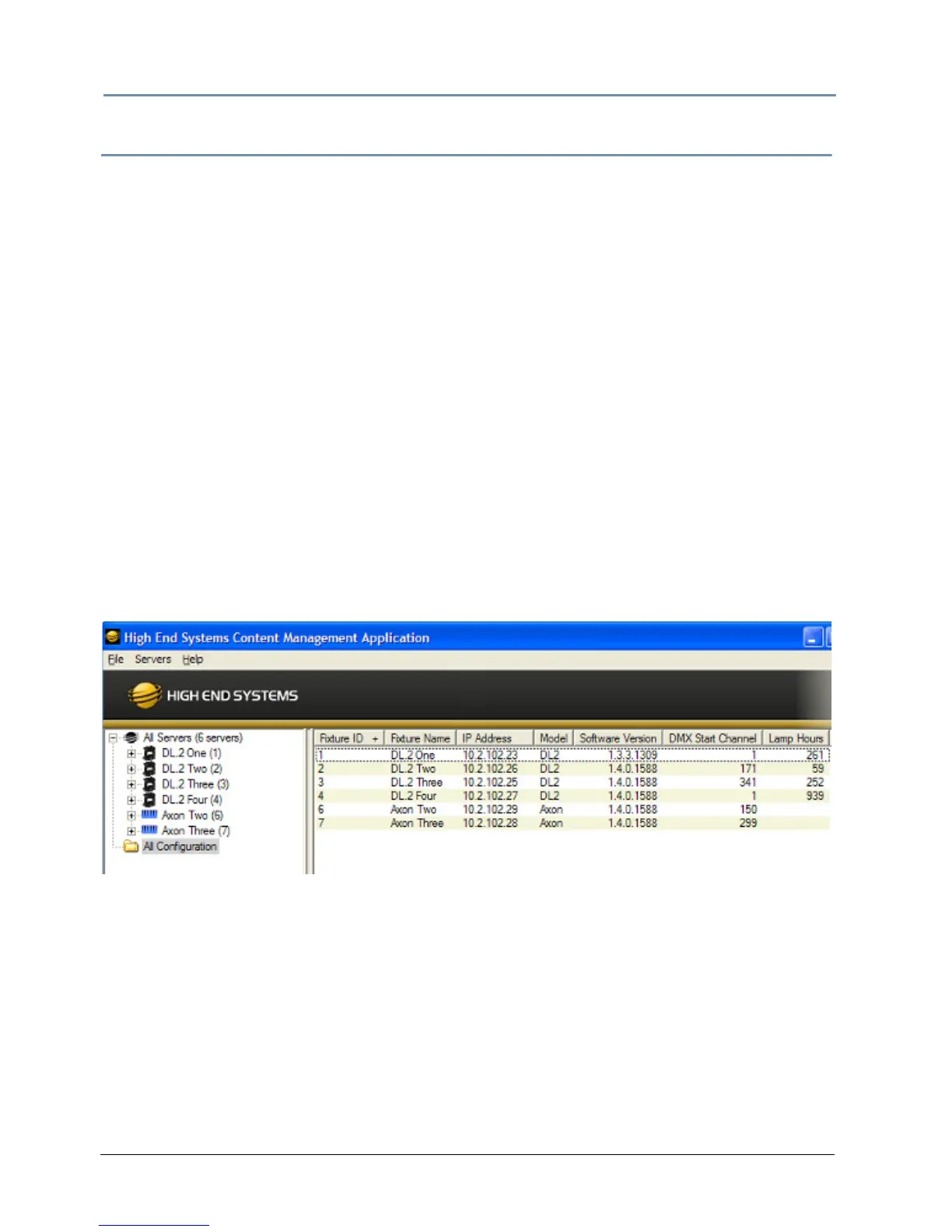
To view configuration information for all Servers on the network, select All Configurations in the
left pane. The right pane now displays configuration values for all the media servers on the
fixture link in a sortable table. Click in the column heading to sort by that column’s values. A +
symbol appears in the “sort by” column heading.
The example above contains the following information for one or all servers:
• The Fixture ID from 1-255
•
The Fixture Name you have assigned
• The IP Address
•Model type
• The DMX Start Channel currently assigned to each server
• The current lamp hours for each server



 To Next Page