DL.3 Digital Light User Manual 23
Chapter 3:
The Digital Light Menu System
DL.3 and DL.2 digital lights have an onboard Menu System you can use to
configure the fixture, review diagnostic feedback, and view content
information.
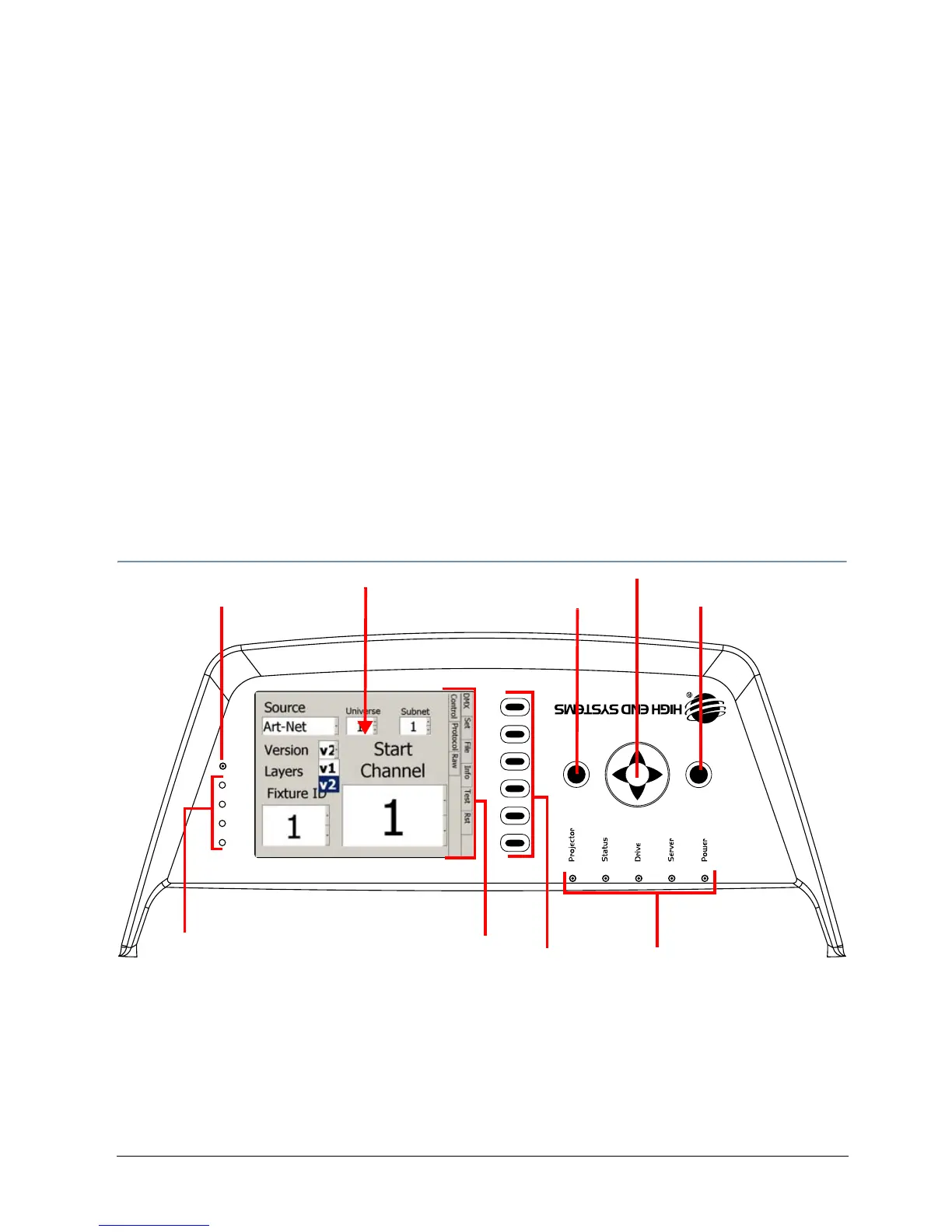
DL.3 and DL.2 fixtures use a 5” LCD screen to displa
y the onboard menu system. Navigation
and select buttons let you move to different tab levels and options displayed on the Menu
screen.
NOTE: You can access most Menu options through the CMA (see Chapter 16: Content
Management Application (CMA) on
page 251.) You can also remotely control
certain options via a DMX console usi
ng the Control channel (see Control
Function Options on
page 242).
Menu Panel Components
The LCD screen displays the menu system arranged with a series of Menu Tabs along the side
for accessing configuration screens and options on the currently active screen. Clicking on one
of the Tab Select buttons selects the screen tab next to it.
The large Multidirectional Navigatio
n button controls movement between fields. Use the Menu
button right of the Navigation button to access the Menu system or to cancel a selection. The
Enter button left of the Navigation button selects and stores a selection.
Menu Display Adjustments
(not available on some models)
Tab Select
Buttons
Display LED
Active Screen displays the
currently selected screen
System State LEDs
Enter
Multidirectional navigation
button
Menu
Tabs
Menu



 To Next Page