CHAPTER 8
Graphic Functions: Rotation, Position, Scale
72 DL.3 Digital Light User Manual
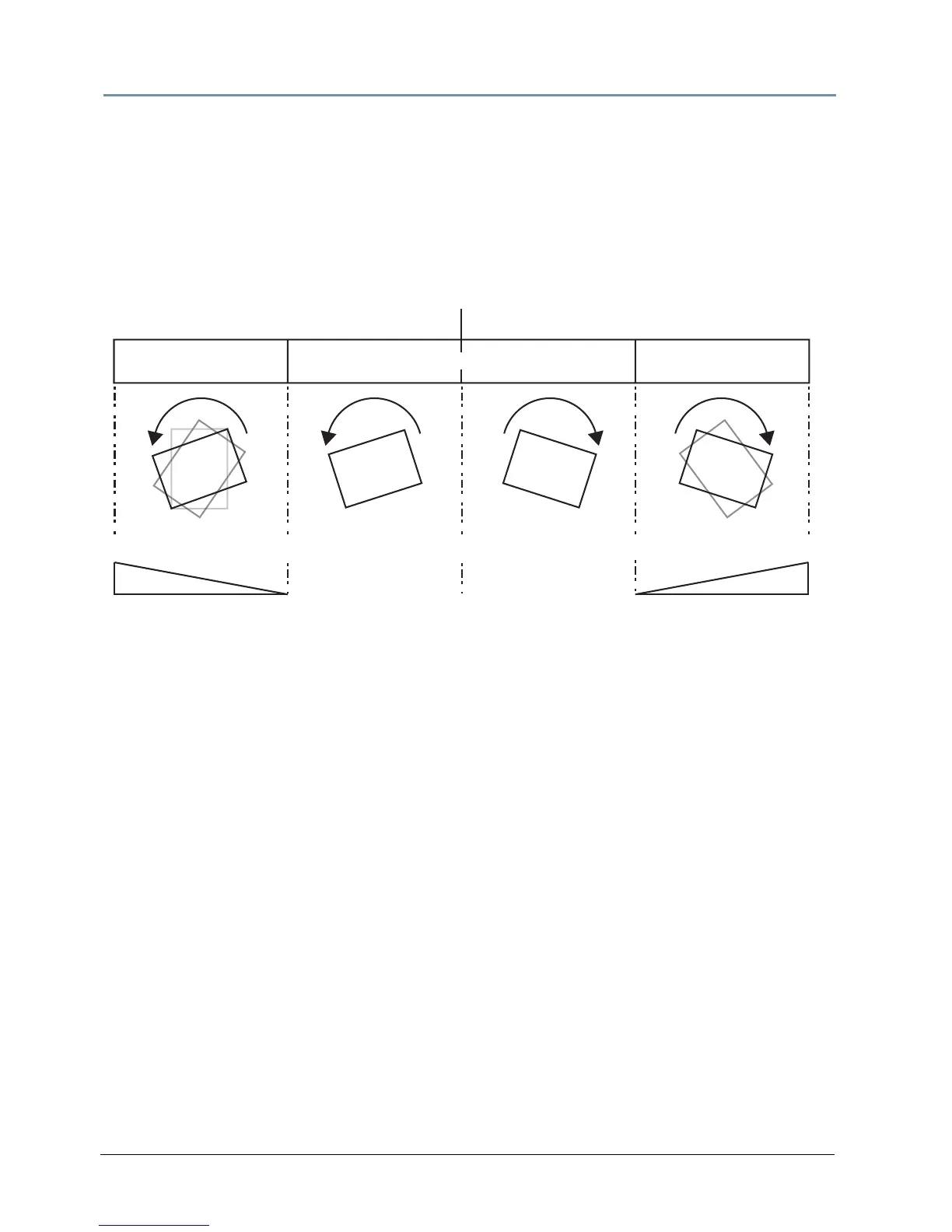
The Rotation parameters’ suggested default values are the midpoint of the 16-bit DMX value
range, which is equal to no rotation. Increasing the DMX value from the midpoint indexes the
object in a clockwise direction. Reducing the DMX value below the midpoint indexes the object in
a counterclockwise direction.
When the DMX value for a rotation parameter is gre
ater than the 720° limit in either direction,
the object begins rotating continuously. Additional adjustment to the DMX values increases the
speed of continuous rotation.
NOTE: Global and Graphic Effects Mode parameters contain a Prerotation
Translation effect option. When a Global or Graphic Effects Mode DMX
value = 102, you can use the Effect Modifier parameters to locate the
image in a virtual three dimensional space. Applying the Rotation
parameters then cause the image to orbit around the selected axis
from that location, see Prerotation Translation on p
age 220.
Continuous RotationContinuous Rotation
25% 50% 75%
Rotation Speed
0% 100%
Counter-clockwise Clockwise
Rotation Speed
0
o
720-0 0-720
oo
Indexed Rotation
Indexed Rotation



 To Next Page