7 Gas purifier operation
Circulation
Page
7 - 12
MB-20-G/MB-200G-W_MB-LABmaster_MB-200 MOD_TP700
Operating Manual - V5.0 - 04/2018 - STD
Start Screen ⇨ RKM icon
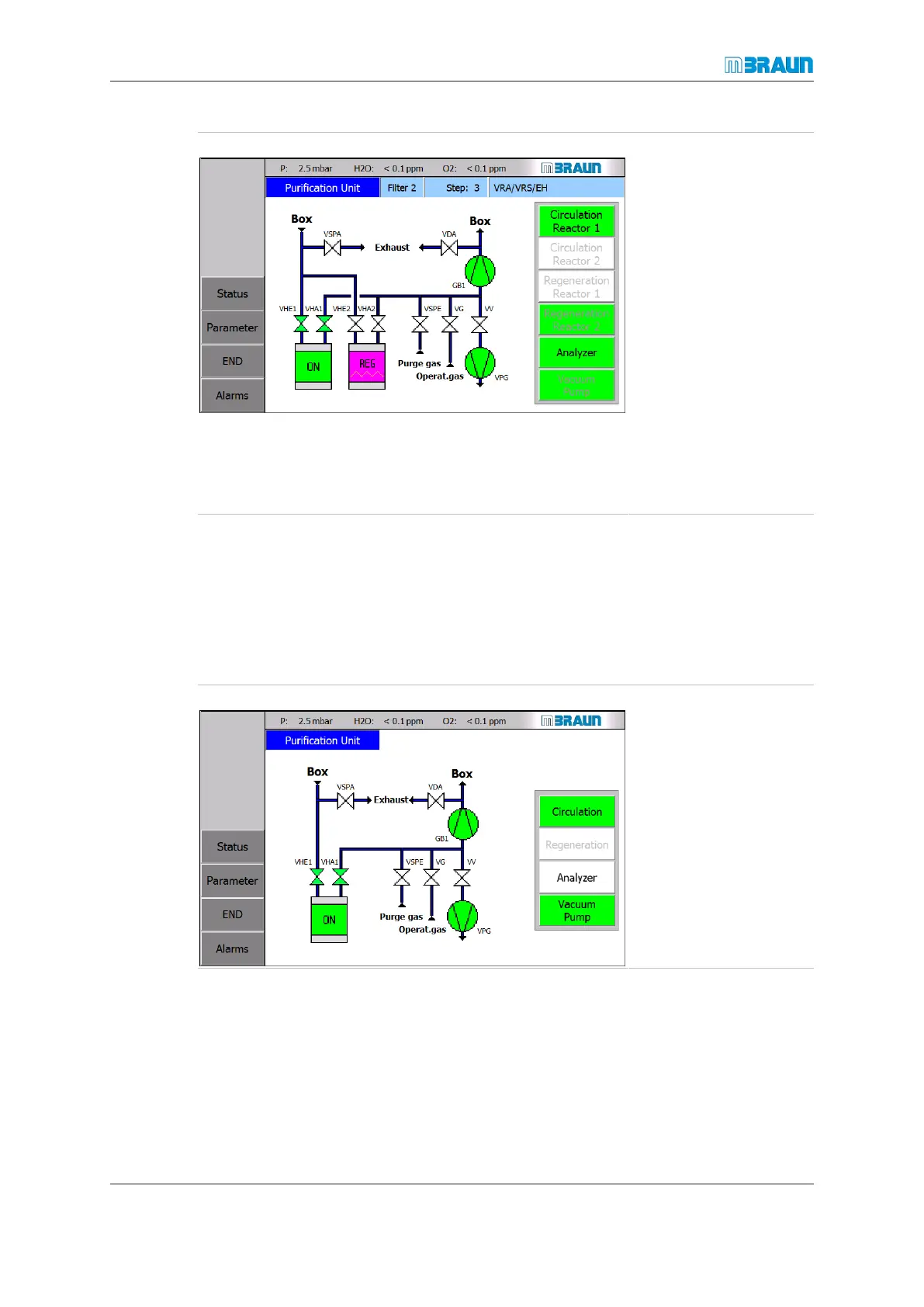
Reactor2 is manually
switched to regeneration
mode.
Status reactor 1:
¡ Circulation takes
place over reactor 1.
¡ Valves VHE1 and
VHA1 are open.
¡ Valves VHE2 and
VHA2 are closed.
¡ The Regeneration
Reactor 1 button is
disabled.
¡ The Circulation Re-
actor 2 button is dis-
abled.
7.3.2 Automatic circulation activation
To configure an automatic activation of circulation after a regeneration cycle, refer to Puri-
fication unit [}7 - 4].
Single purifier system
Purification unit screen after automatic circulation activation.
Start Screen ⇨ RKM icon
Circulation in the sp sys-
tem – status:
¡ The blower is
switched on.
¡ The vacuum pump is
switched on.
¡ The VHE and VHA
valves are opened.
¡ Regeneration is dis-
abled.



 To Next Page