8 Glovebox or enclosure operation
Glovebox purge
MB-20-G/MB-200G-W_MB-LABmaster_MB-200 MOD_TP700
Operating Manual - V5.0 - 04/2018 - STD
Page
8 - 15
8.10.1 Manually start and stop
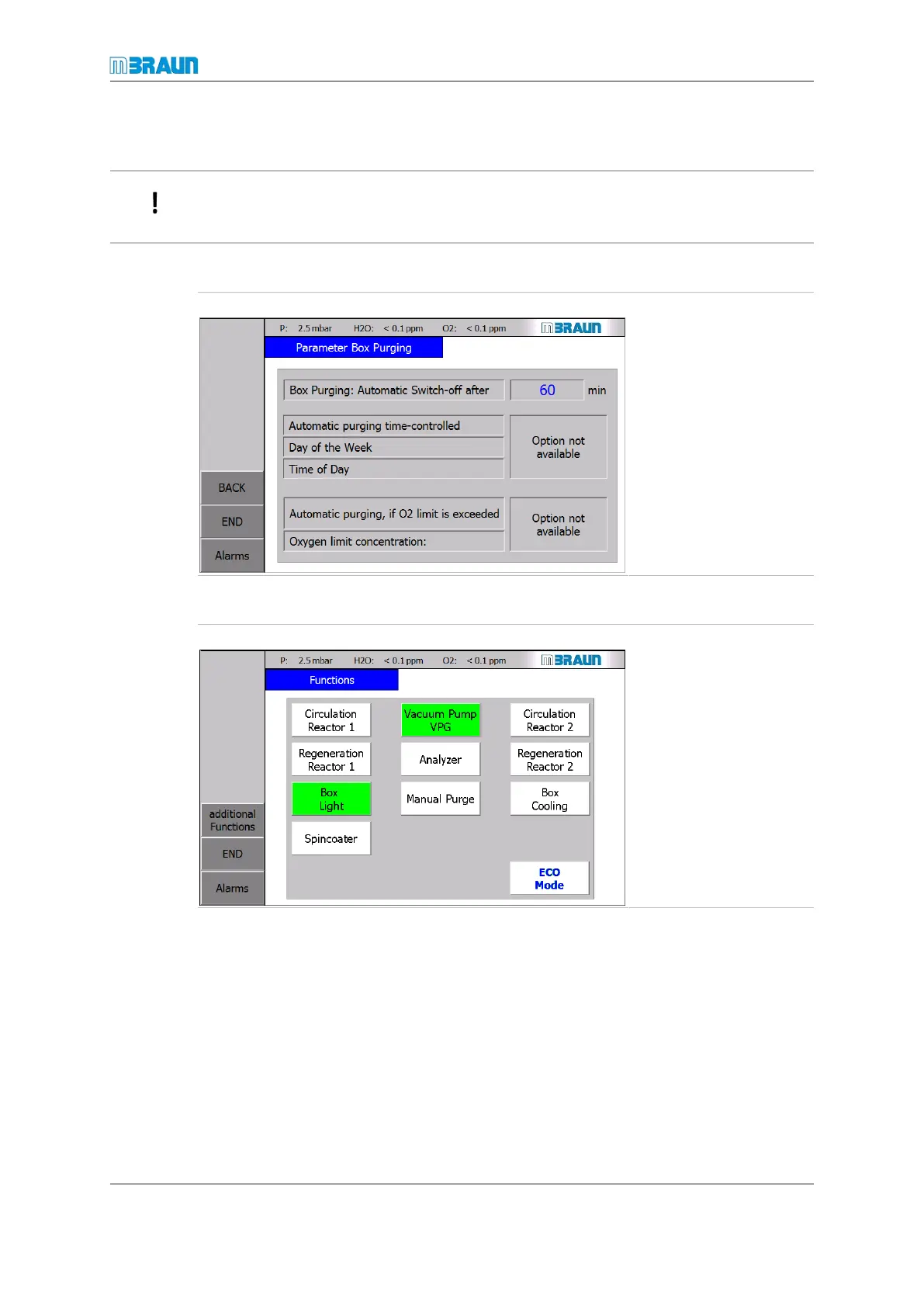
The manual purge is stopped automatically after an adjustable time value. This value can
be set in the Parameter Box Purging screen.
Set parameter for manual glovebox purge
Start Screen ⇨ Menu ⇨ Parameter Box Purging
Parameter "Box Purging:
Automatic Switch-off
after": time until the purge
function stops (range 1 …
999 min):
¡ Default = 60 min.
¡ 0 min = function is de-
activated
Activation of manual purge
Start Screen ⇨ Functions
> Circulation is switched
off.
► Touch the button
Manual Purge.
ð The button colour
changes from white to
green.
ð The glovebox purge
starts.
Deactivating of manual purge
► Touch the Manual Purge button again.
ð Button colour changes from green to white.
ð The glovebox purge stops.
► Start circulation.
8.10.2 Automatic start and stop
The automatic box purge feature triggers the box purge at an adjustable O
2
concentration
in the glovebox atmosphere and / or on a recurring basis at an adjustable set time.



 To Next Page