9 Antechamber operation (Vacuum antechamber)
PLC-controlled loading and unloading
Page
9 - 10
MB-20-G/MB-200G-W_MB-LABmaster_MB-200 MOD_TP700
Operating Manual - V5.0 - 04/2018 - STD
Automatic mode with
pressure controlled Ante-
chamber cycle
Manuel mode (Hand-
mode) possible: manual
start / stop of evacuation
and refill
9.5.1 Touch panel navigation
Screens
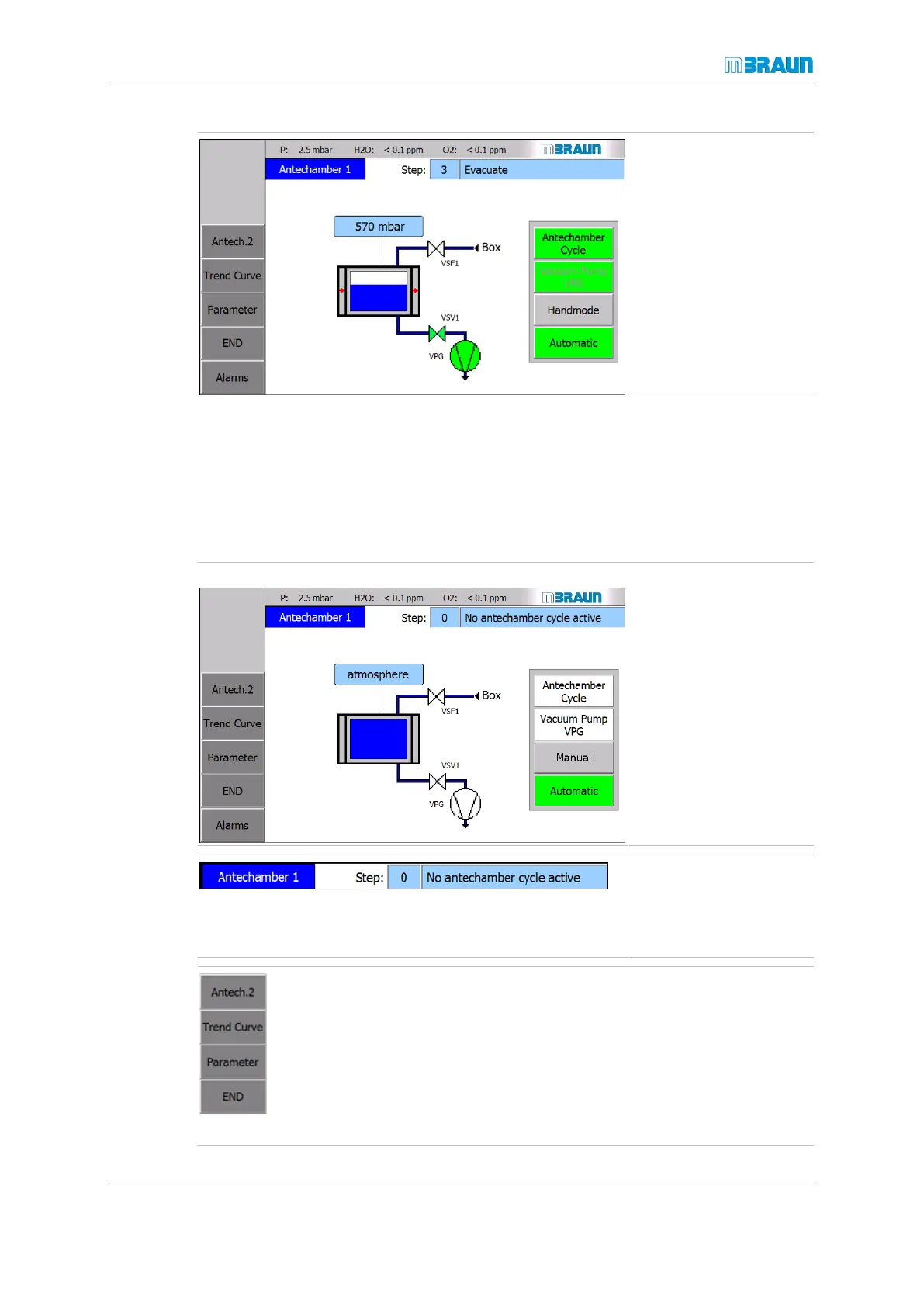
The antechamber screens display the status of the antechamber processes.
The antechamber processes are activated and deactivated using buttons on the touch
panel.
Start Screen ⇨ Antechamber icon
On the top light blue bar
of the Antechamber
screen, the status of the
antechamber cycle is dis-
played.
The Antechamber status
bar displays the current
step of the running auto-
matic antechamber pro-
cess.
► Touch the Antech.2 button to open the Antechamber
2 screen (only for systems with 2Siemens PLC-con-
trolled antechambers).
► Touch the Trend Curve button to open the Ante-
chamber Trend Curve screen.
► Touch the Parameter button to open the Parameter
screen of the antechamber.
► Touch the END button to go back to the Start screen.



 To Next Page