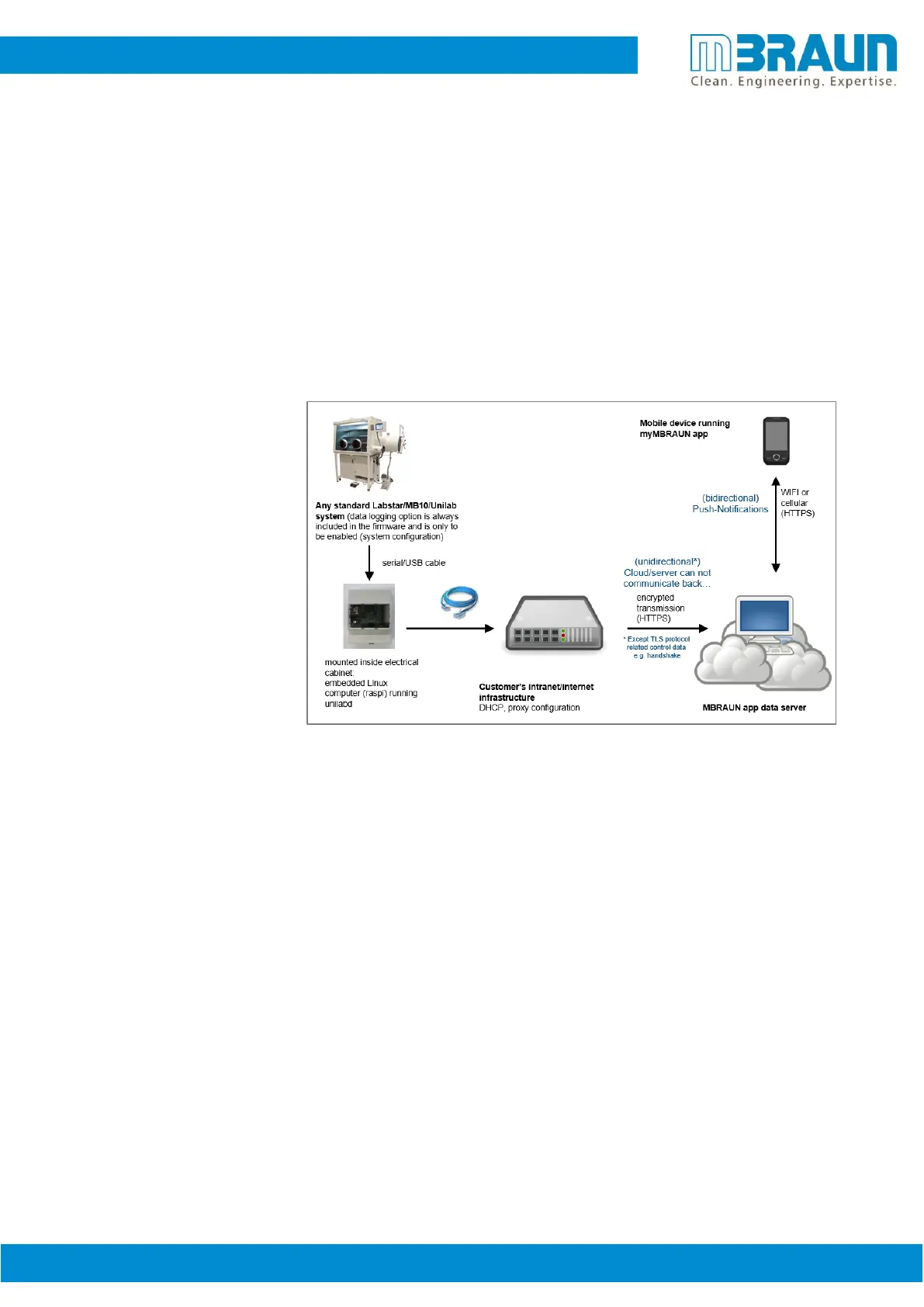
The myMBRAUN App gives the Glovebox operator the opportunity to live monitor the glovebox on a
mobile device (tablet and/or smart phone with Android or iOS) from anywhere at any time. Important
values of the box will be displayed and even alarms can be set. The operator is therefore always up to
date and knows the condition of the Glovebox system.
But as we all know the one man’s meat is another man’s poison. MBRAUN is aware that the benefits of
remote monitoring equipment inside the lab can be seen as a unique benefit to the customer but seen as
a potential threat from the IT administration. This White Paper was created to inform you that there is no
need for any concerns when it comes to data protection and data safety related to the myMBRAUN mobile
web application.
In addition to operating and software modules the only other module that runs on the Raspi is our data
management program called UNIlabD.
The Raspi does not require any updates and is not reachable within the network. It’s also a closed system
and it will not request any data within the network including other programs (except the network
processes to establish connection; e.g. DNS, NTP). Furthermore, absolutely no additional third-party
software is or will be installed. As result the closed system should be considered as a virus-free system. In
case the system might need a working process related update e.g. of the UNIlabD program MBRAUN will
send a new hardware (SD memory card) – this card should be re-checked and re-verified by the local IT
administration.
The system is transmitting and sending the exact same data the user can receive and view within the App
itself. We do not transmit other system data. The data itself can be described in the current condition
parameters of the system and if existing current warnings, alarms or errors. The collected data from the
system will be used by MBRAUN for statistical purposes only, e.g. run-time/life-time of components or a
simple fault rate. A link to customer information only takes place to optimize service assignments in the
event of a specific error (Quickly identifying the root cause of an error).



 To Next Page