6. Other Field Service Ver. 1.0 Jun. 2008
90
Maintenance
6.3.42 Inverter board (INVB)
1. Access [Carriage Move] in the following order and then, using [Carriage Move], move
the exposure unit to a location, at which the subsequent steps can be performed:
[Service Mode] o [Machine Adjustment] o [Scan Area] o [BK-S Adjustment] o [Car-
riage Move].
2. Turn OFF the main power switch.
3. Remove the original glass assy.
See P.51
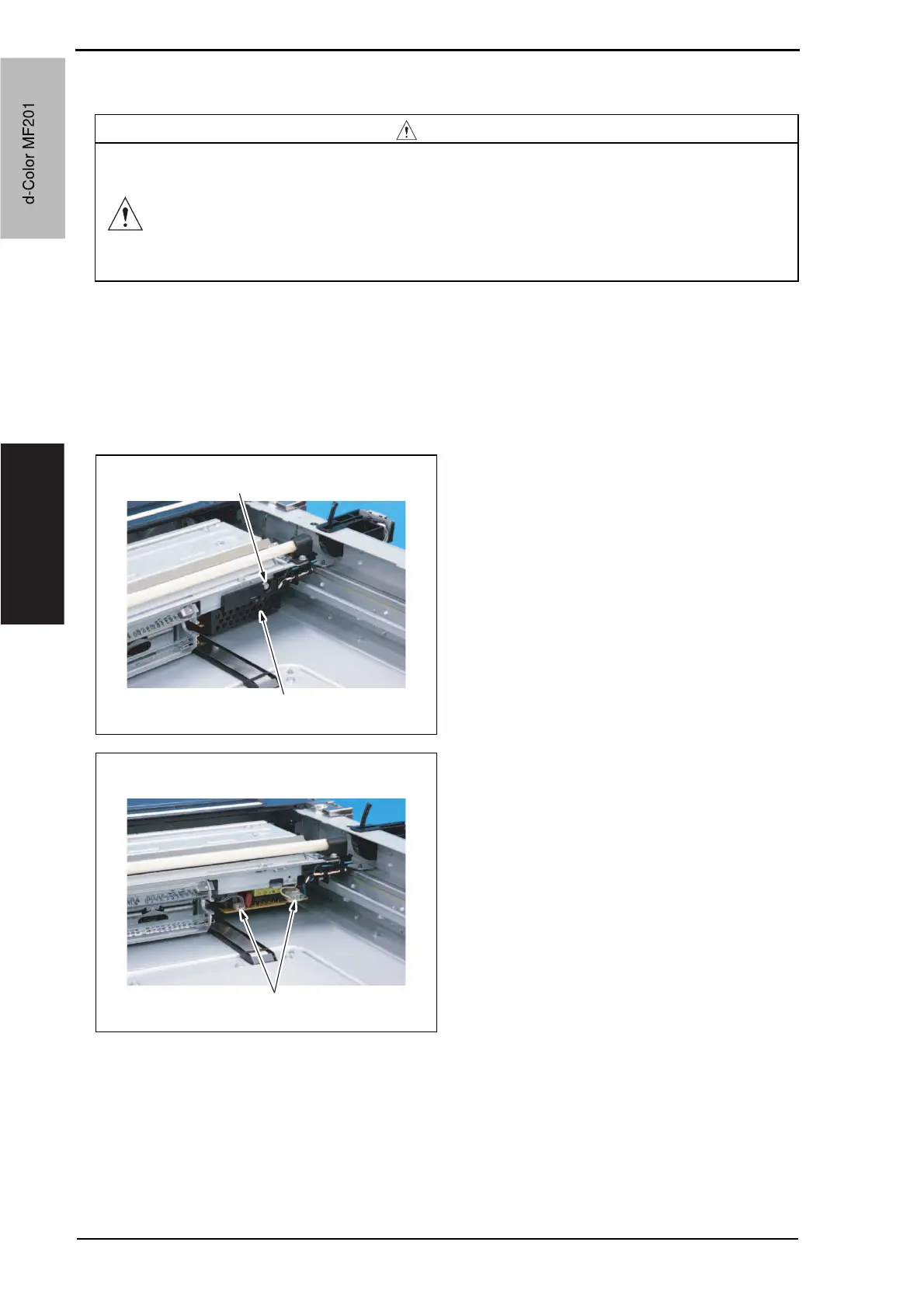
4. Remove the screw [1], and remove
the inverter cover [2].
5. Disconnect two connectors [1].
CAUTION
• Always turn off the main power switch and disconnect the power code
from an AC outlet when you remove the inverter board or exposure lamp.
• High voltage will be applied to inverter board while scanning a document.
Never touch it while scanning to avoid electrical shocks.
• The exposure lamp may be very hot. Care should be taken not to burn
your skin.
A02FF2C124DA
[1]
[2]
A02FF2C125DA
[1]
d-Color MF201
Service Manual Y109660-1
d-Color MF201


 To Next Page
 Loading...







