Field Service Ver. 1.0 Jun. 2008 19. Image quality problem
317
Troubleshooting
19. Image quality problem
19.1 How to read element date
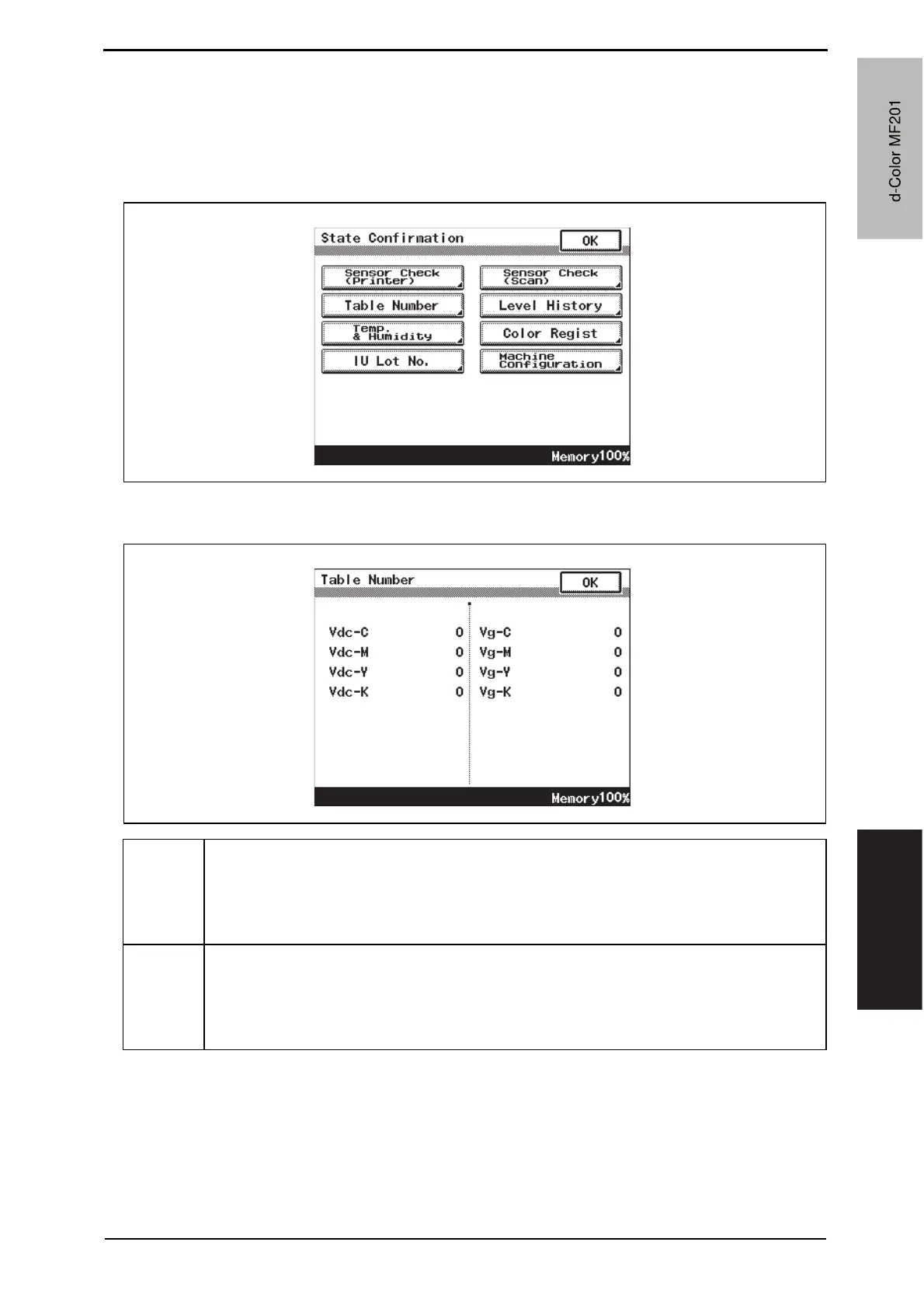
• As part of troubleshooting procedures, the numeric values set for “State Confirmation”
available from “Service Mode” can be used to isolate the cause of the image problem.
19.1.1 Table number
A02FF4E515DA
Vdc-C
Vdc-M
Vdc-Y
Vdc-K
• Shows the developing bias value of each color of toner when an image is produced.
• Standard values: around 100 to 800 V
• A correction is made to make the image lighter when the numeric value is greater.
• A correction is made to make the image darker when the numeric value is smaller.
• Relevant components: Imaging unit, high voltage unit (HV)
Vg-C
Vg-M
Vg-Y
Vg-K
• Shows the grid voltage value of each color of toner when an image is produced.
• Standard values: around 300 to 1100 V
• A correction is made to make the image lighter when the numeric value is greater.
• A correction is made to make the image darker when the numeric value is smaller.
• Relevant components: Imaging unit, high voltage unit (HV)
A02FF4E516DA
d-Color MF201
Y109660-1 Sevice Manual
d-Color MF201


 To Next Page
 Loading...







