Creating Users
1.
Navigate to MANAGEMENT > NETWORK: SNMP Setup.
2.
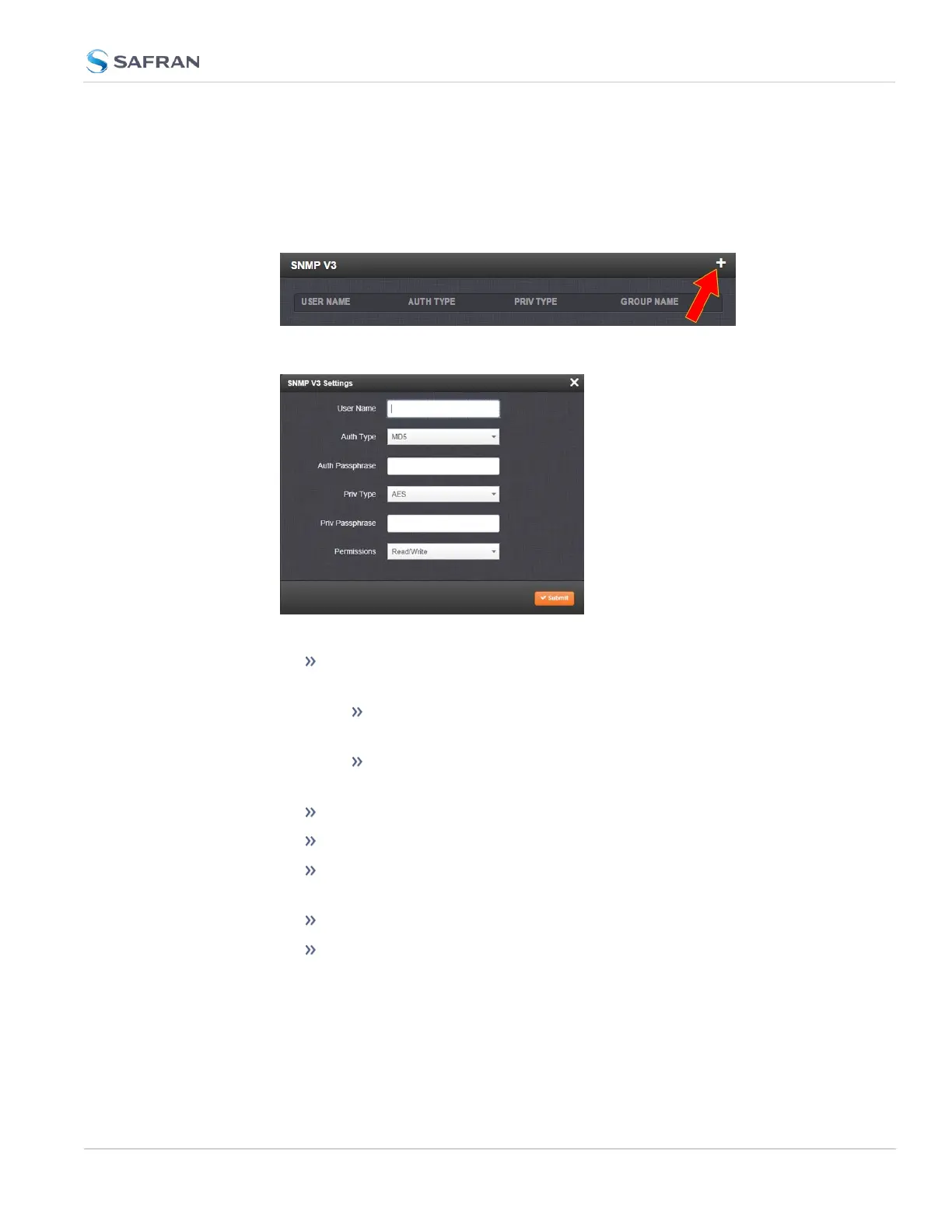
In the SNMP V3 panel, click the PLUS icon in the top-right corner.
3.
The SNMP V3 Settings window will display.
4. Enter the required information in the fields provided.
SNMP User Names and passwords are independent of users that are
configured on the Tools/Users page.
User names are arbitrary. SNMP User Names should be
between 1 and 31 characters in length.
The User Name must be the same on SecureSync and on the
management station.
The Auth Type field provides a choice between MD5 and SHA.
The Auth Password must be between 8 and 32 characters in length.
The Priv Type field provides a choice between AES, DES, and No Pri-
vacy.
The Priv Passphrase must be between 8 and 32 characters in length.
The Permissions field provides a choice between Read/Write and
Read Only.
5.
Click Submit. The created user will appear in the SNMP V3 panel:
2.14 Configure Network Settings
CHAPTER 2 • SecureSync 2400 User Manual Rev. 5.2
107



 To Next Page