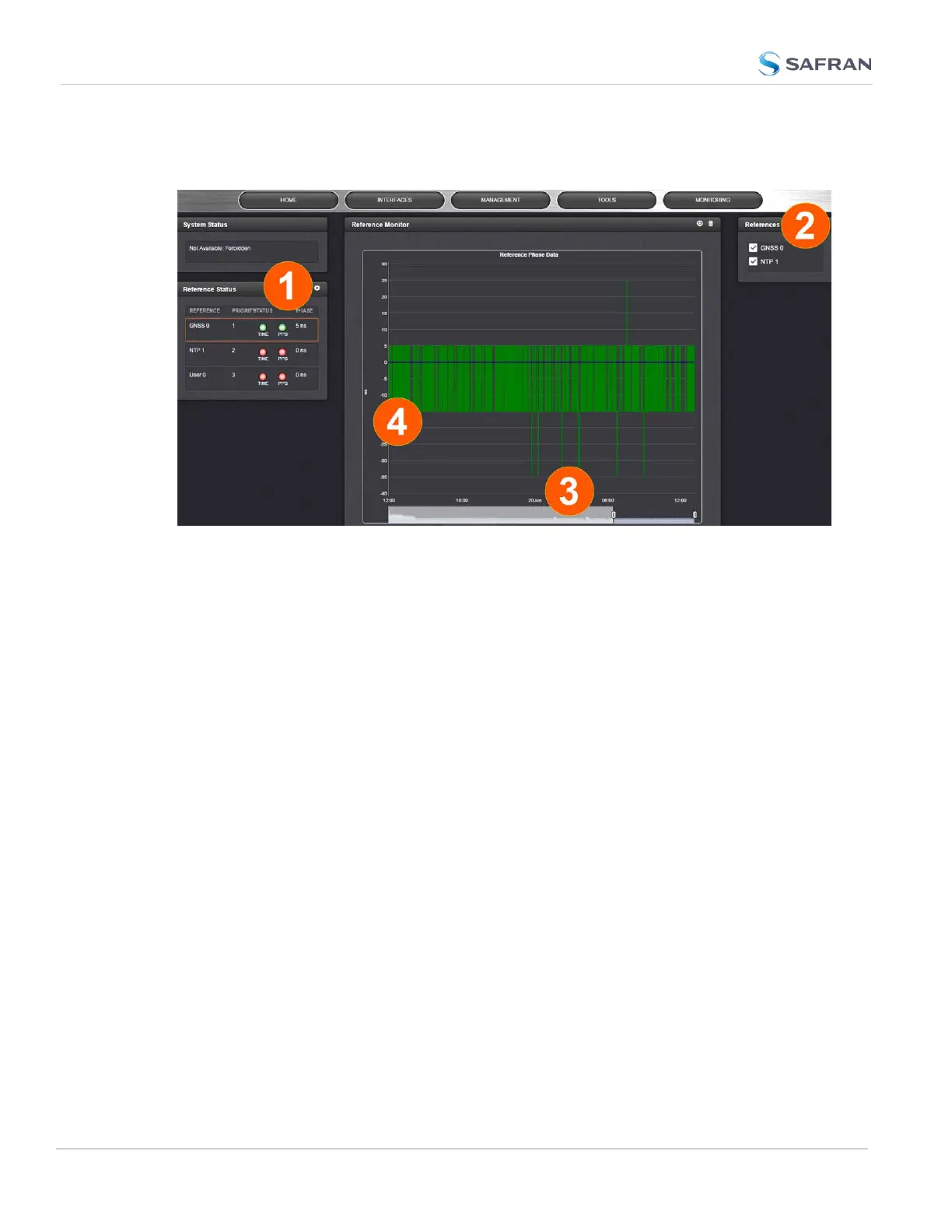
To monitor the quality of references, navigate to TOOLS > SYSTEM: Reference
Monitor. The Reference Monitor screen will display:
On the left side of the screen, Status information is displayed for the System and
the References. Note that the Reference Status panel also displays the latest
PHASE OFFSET reading (1) for active references against the System Ontime
Point. The reading is updated every 30 seconds.
This Reference Phase Offset Data is plotted over time (abscissa) in the Reference
Monitor panel in the center of the screen. Use the check boxes in the References
panel (2) to select the reference(s) for which you want to plot the phase offset
data. Use the handles (3) to zoom in on a time window.
The scale of the axis of ordinate (4) is determined by the largest amplitude of any
of the references displayed in the current time window. Use the checkboxes in
the References panel on the right to remove references from the graph, or add
them to it.
3.3.2.2 BroadShield
What is BroadShield?
BroadShield is an optional software module for SecureSync that is capable of
detecting the presence of GPS jamming or spoofing in real time.
How BroadShield Works
BroadShield monitors the GPS signal frequency band by applying proprietary
error detection algorithms. If a threshold signal monitoring value level is
exceeded, SecureSync will emit a Major Alarm and – depending on your system
216
CHAPTER 3 • SecureSync 2400 User Manual Rev. 5.2
3.3 Managing References



 To Next Page