Require Authentication (checkbox)—Check this box if you
want the additional security of authorized access. SecureSync
to accept only authenticated requests (MD5) from this user or
network segment.
Allow NTP Queries (checkbox)—Check this box if you want to
allow external NTP queries into SecureSync services.
5.
Click the Submit button.
2.15.11 Enabling/Disabling NTP Broadcasting
The NTP Broadcast mode is intended for one or a few servers and many clients.
SecureSync allows the NTP service to be configured to broadcast the NTP time
only to the network’s broadcast address at scheduled intervals.
NTP Broadcasting is used to limit the NTP service to only certain clients on the
network. NTP Broadcasting also reduces the amount of network traffic, but is
therefore less accurate since there is no compensation for cable delays, or other
delays between NTP Server and Client.
Note that NTP Broadcasting is rarely used and typically limited to special applic-
ations.
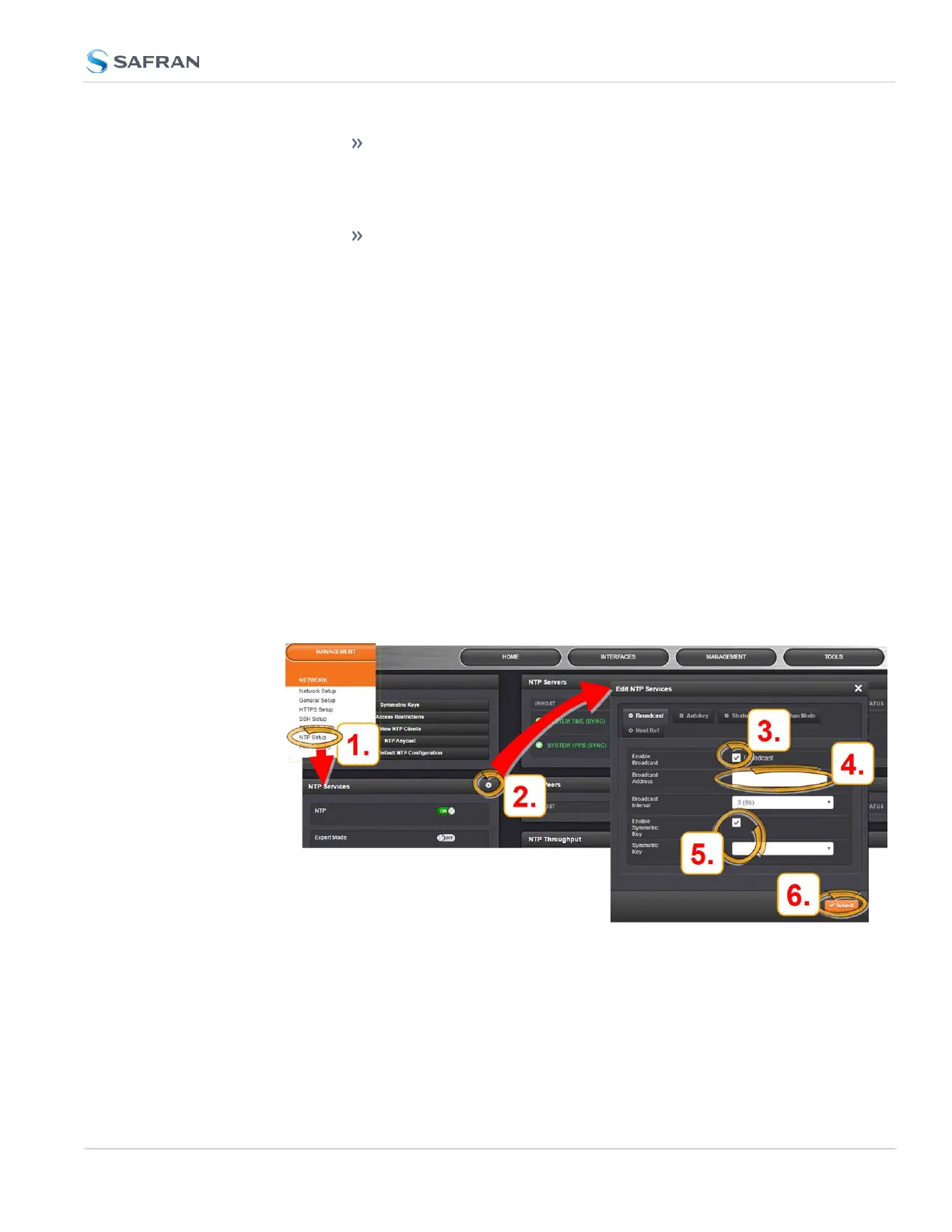
To enable NTP Broadcasting:
1.
Navigate to MANAGEMENT > NETWORK: NTP Setup.
2.
On the NTP Services panel, click the GEAR icon.
3.
The Edit NTP Services window will display. Check the Broadcast box.
4.
Select a Broadcast Interval. When NTP Broadcasting is selected, in addi-
tion to still responding to NTP time requests sent from network appliances,
2.15 Configure NTP
CHAPTER 2 • SecureSync 2400 User Manual Rev. 5.2
135



 To Next Page