2.14.9 VLAN Support
VLAN support in SecureSync allows you to assign a VLAN ID to a specific port to
facilitate communication within your network. These VLAN interfaces have the
same configuration options as the standard untagged Ethernet interfaces.
To set up VLAN interface identification tags:
1.
Navigate to MANAGEMENT > Network Setup. In the Actions panel, select
VLAN.
2.
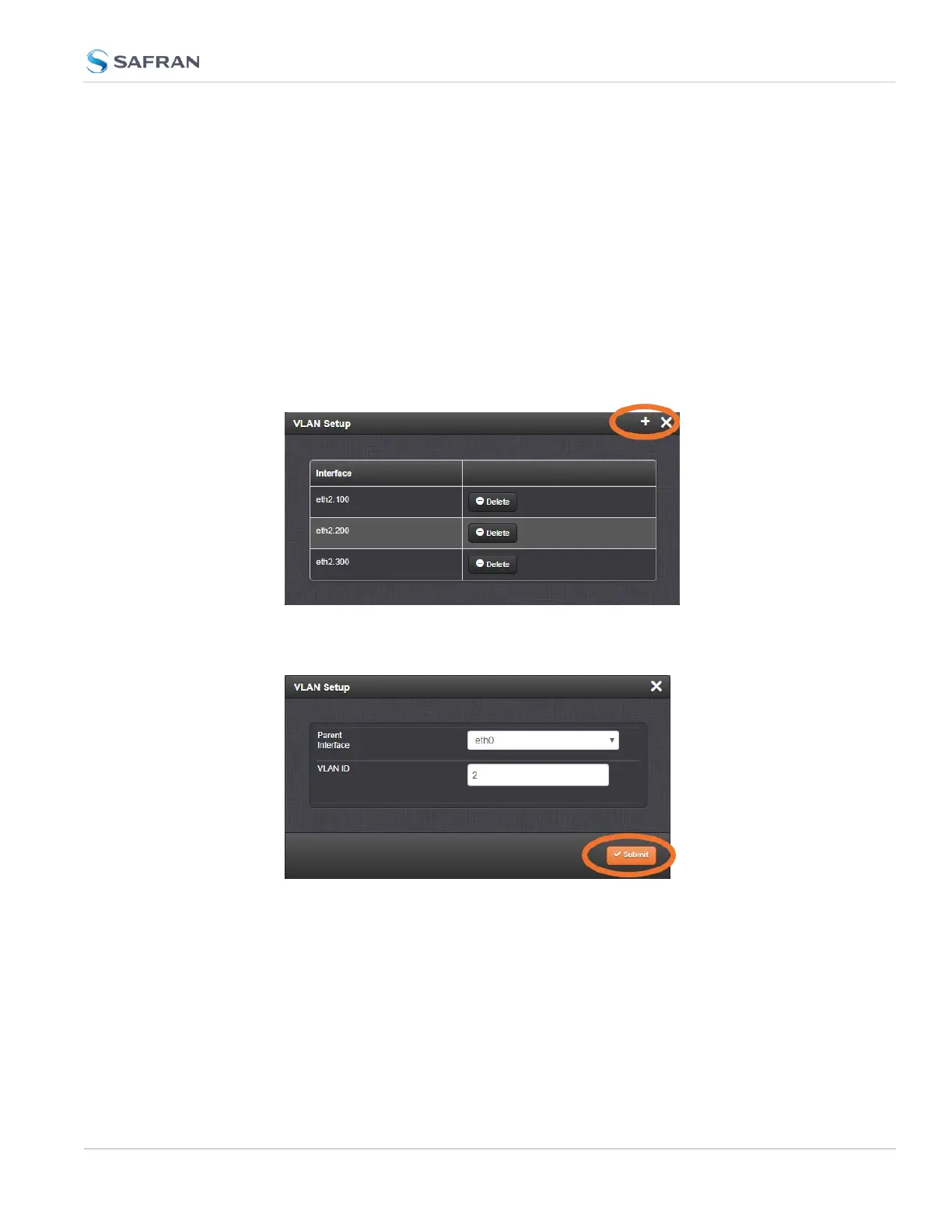
In the popup panel labeled VLAN Setup, click on the plus sign to add your
VLAN interfaces. (You can also view or delete any configured VLAN tags
from this panel).
3. Select the parent interface [eth0-eth1], type in your VLAN ID, and click sub-
mit. Repeat the process as necessary.
Your new VLAN interfaces will now be displayed in the VLAN Setup panel, listed
as eth[#].[VLAN ID].
2.14.10 System Time Message
The System Time Message is a feature used for special applications that require
a once-per-second time message to be sent out by SecureSync via multicast.
2.14 Configure Network Settings
CHAPTER 2 • SecureSync 2400 User Manual Rev. 5.2
111



 To Next Page