Downloading Logs" on the previous page) to your email addressed to
Safran Technical Support.
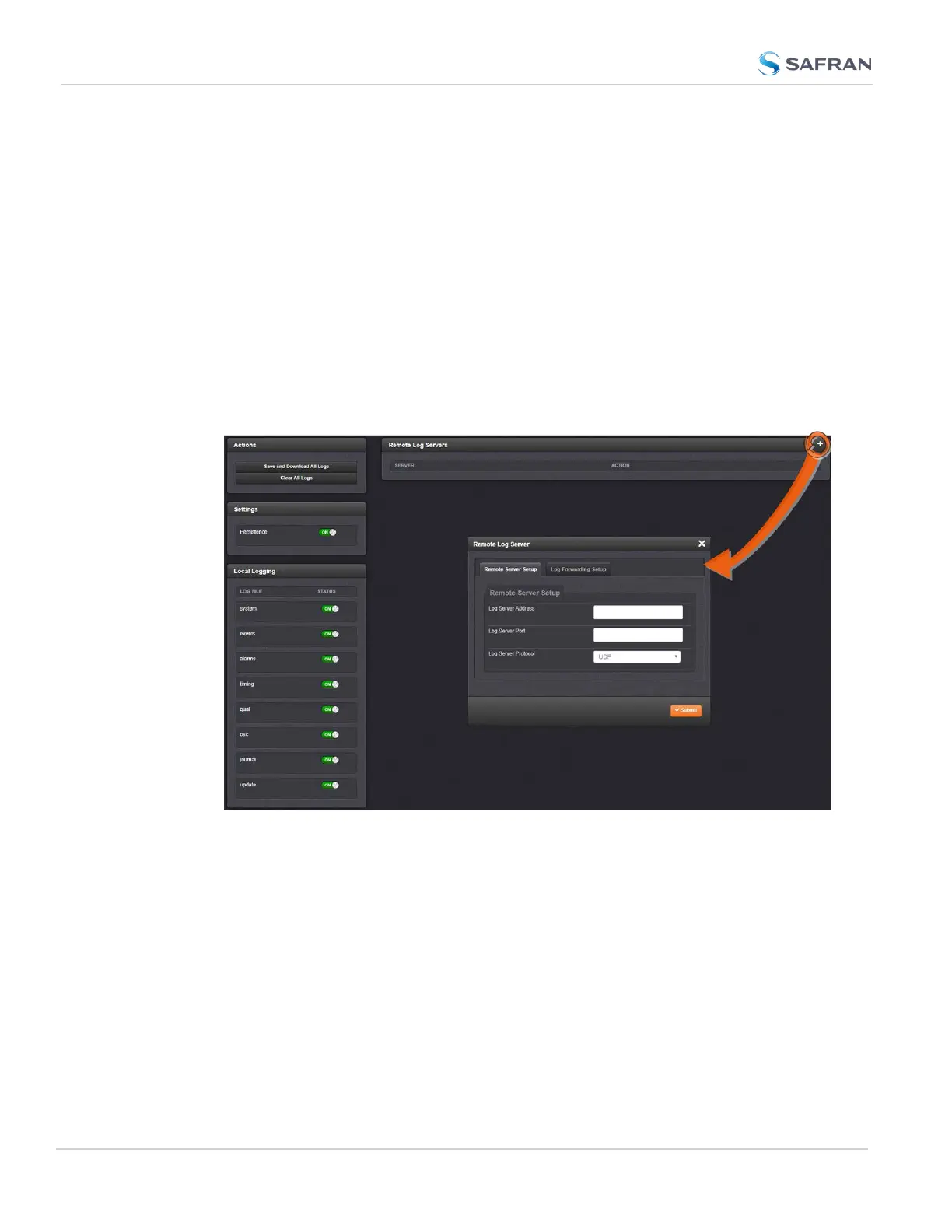
4.5.2.5 Setting up a Remote Log Server
Storing log files on a remote log server supports advanced logging functionality.
Adding a remote log server:
1.
Navigate to MANAGEMENT > OTHER: Log Configuration.
2.
In the Remote Log Servers panel, click on the PLUS icon in the top-right
corner of the panel. The Remote Log Serverwindow displays.
3.
In the Remote Server Setup tab, enter the IP address or host server name
(e.g., “MyDomain.com”) you want to use as a remote log server under Log
Server Address.
4. Fill out your desired Log Server Port.
5. Select your Log Server Protocol [UDP, TCP].
6.
In the Log Forwarding Setup tab, click the checkbox of each type of Log
File to be used by your remote log server. You can also select the Facility
and Severity of the message.
7.
Click the Submit button.
8.
Your remote log server will appear in the Remote Log Server panel.
336
CHAPTER 4 • SecureSync 2400 User Manual Rev. 5.2
4.5 Quality Management



 To Next Page