To edit the settings of a given output, click the GEAR button (see also "Con-
figuring Outputs" on page169.)
To refresh the information displayed, click the REFRESH button (circling
arrows icon).
In the illustration of the rear panel, click on a connector to highlight the cor-
responding list entry.
Displaying the settings of a specific output
The outputs installed in your SecureSync unit have specific settings that can be
reviewed, and—to some extent—edited.
To display the settings of an output:
1.
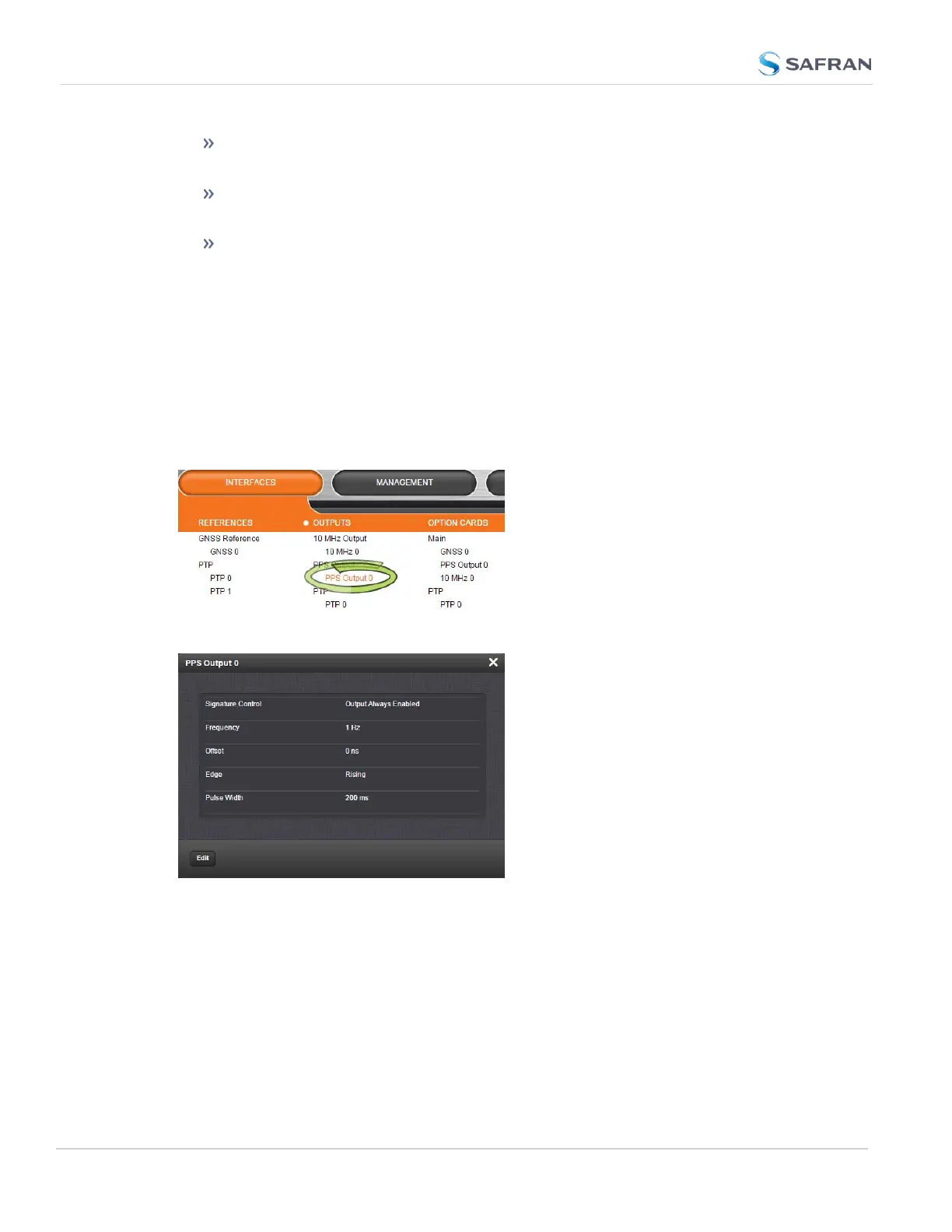
Navigate to INTERFACES > OUTPUTS, and click on the desired output (recessed
e.g., PPS Output 0):
2. The corresponding Status window will display:
Click the Edit button in the bottom-left corner to configure settings that are user-
editable. See also "Configuring Outputs" on page169.
4.5.1.7 Monitoring the Oscillator
The Oscillator Management screen provides current and history status inform-
ation on disciplining state and accuracy.
To access the Oscillator Management screen:
312
CHAPTER 4 • SecureSync 2400 User Manual Rev. 5.2
4.5 Quality Management



 To Next Page