4.1 Powering Up/Shutting Down
4.1.1 Powering Up the Unit
1. After installing your SecureSync unit, and connecting all references and net-
work(s), verify that power is connected, and wait for the device to boot up.
Note: SecureSync does not have a power switch. When the
unit is plugged in, the power will be on (unless you have an addi-
tional condition, such as your unit has been halted).
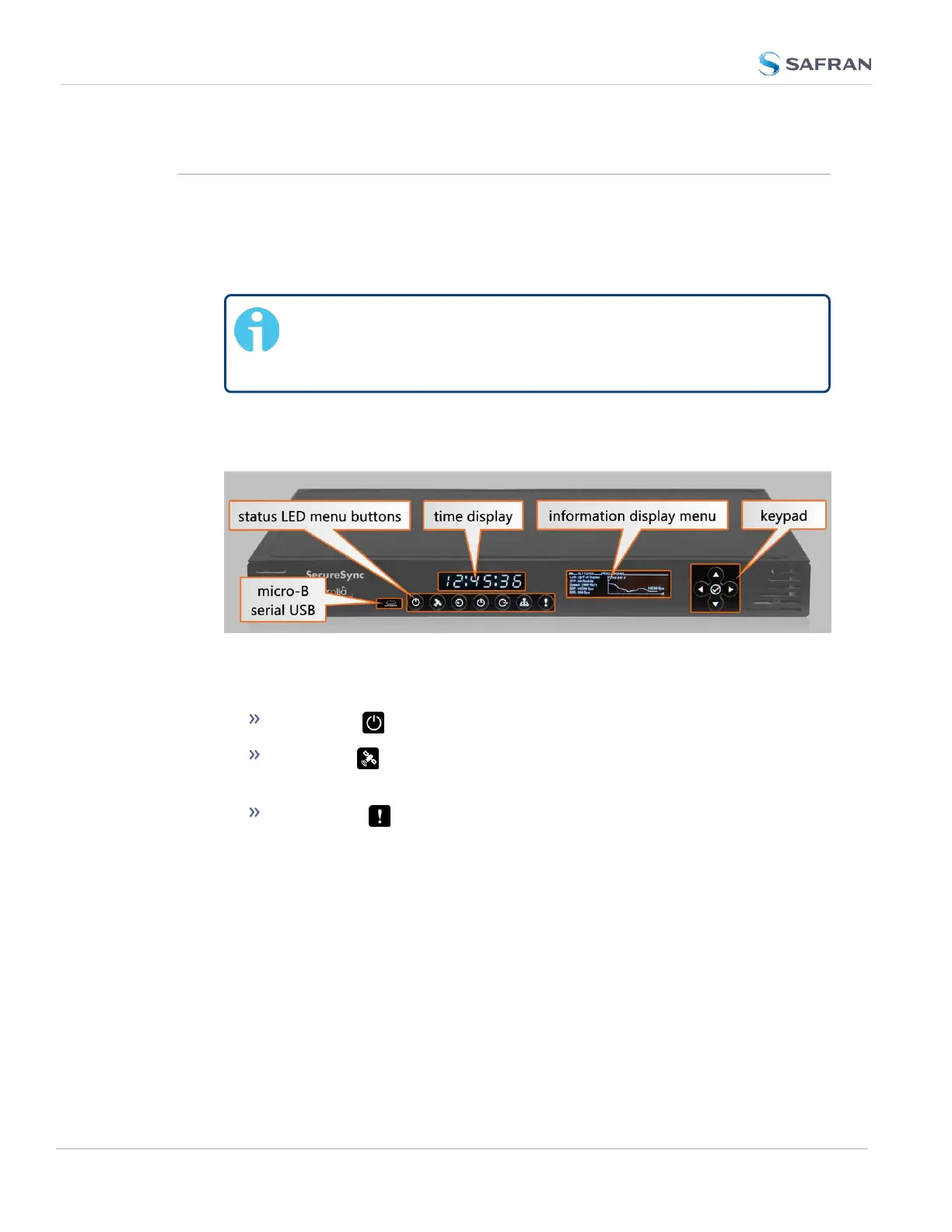
2. Observe that the front panel illuminates The time display will reset and then
start incrementing the time.
Figure 4-1: SecureSync front panel
1. Check the front panel status LED indicators:
The Power LED should be lit (not flashing).
The GNSS LED will be either OFF or flashing HEARTBEAT, since
synchronization has not yet been achieved.
The Alarms LED light should be OFF (startup behavior) or
HEARTBEAT (acquiring fix behavior). A FAST blinking pattern would
indicate the unit requires attention.
For additional information, see "Status LEDs" on page4 and "Status Monitoring
via Front Panel" on page302.
4.1.2 Shutting Down the Unit
To shut down the unit gracefully, it is recommended to employ the Halt com-
mand.
260
CHAPTER 4 • SecureSync 2400 User Manual Rev. 5.2
4.1 Powering Up/Shutting Down



 To Next Page