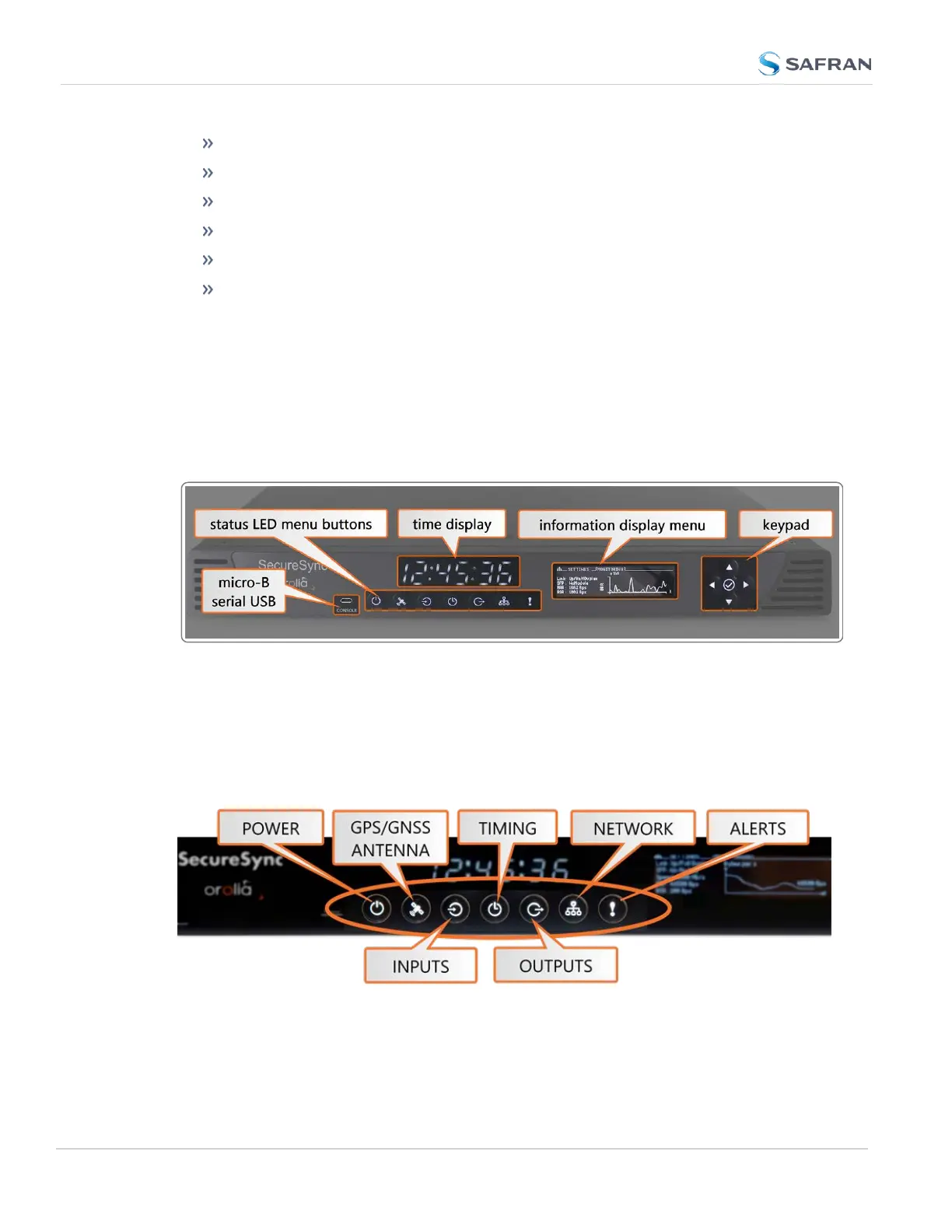
an LED time display
seven illuminated status LED menu buttons
a front panel control keypad
an OLED information display menu
micro-B USB serial console
intake for temperature-controlled cooling fans
The OLED information display is configurable using the front panel controls. The
micro USB serial interface and the front panel controls provide a means to con-
figure the unit’s network settings and perform other functions without requiring
access to the Web UI.
SecureSync units with the SAASM GPS receiver option module installed also
have an encryption key fill connector and key zeroize pin switch on the left-hand
side of the front panel.
Figure 1-1: SecureSync front panel layout
1.3.1 Status LEDs
SecureSync's front panel status LEDs provide a real-time status overview: Seven
(7) LEDs indicate the unit's current operating state.
Figure 1-2: Front panel LEDs
4
CHAPTER 1 • SecureSync 2400 User Manual Rev. 5.2
1.3 SecureSync Front Panel



 To Next Page