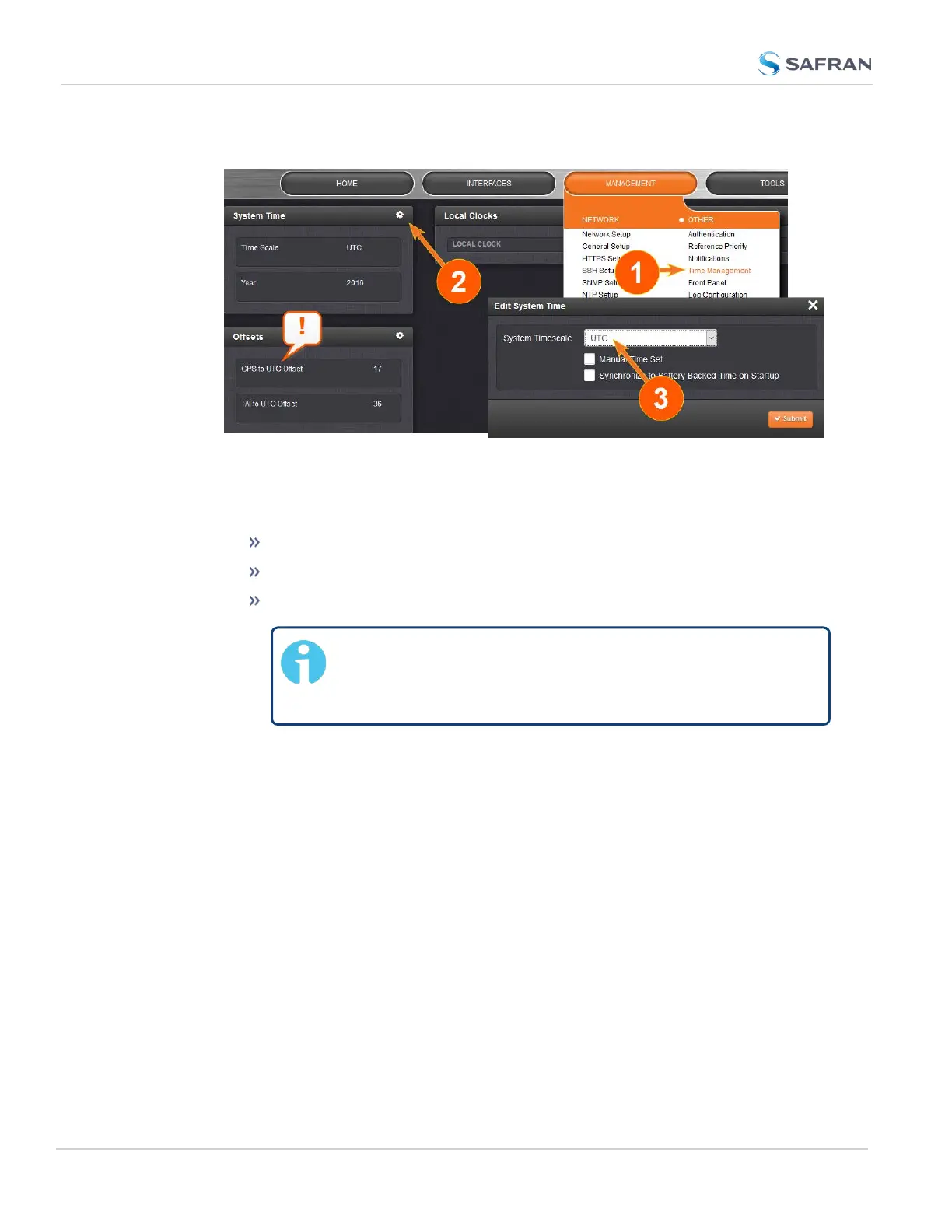
1.
Navigate to MANAGEMENT > OTHER: Time Management:
2.
In the System Time panel, click the GEAR icon.
3.
In the Edit System Time window, select the System Timescale SecureSync
will be in:
UTC: The network PCs will receive UTC time via NTP.
TAI: The network PCs will receive TAI time via NTP.
GPS: The network PCs will receive GPS time via NTP.
Note: When the Timescale is set to “GPS”, the GPS to
UTC Offset must be set correctly. As of 22-August-2023,
the offset between UTC and GPS is 18 seconds.
2.15.7 NTP Reference Configuration
SecureSync's NTP Service needs to be setup such that it utilizes the time source
("input reference") you want it to use. There are two options for an NTP Server to
derive its time from:
a. The NTP Service uses SecureSync's System Time, i.e. typically the GNSS ref-
erence (or IRIG, ASCII data input, etc.), and distributes that time over the
NTP network. This is called Stratum 1 Operation, because SecureSync will
be the Stratum1 (or primary) server. This is the most common con-
figuration.
120
CHAPTER 2 • SecureSync 2400 User Manual Rev. 5.2
2.15 Configure NTP



 To Next Page