transitioning from the hand-set time to a UTC-based external input reference.
See also "Input Reference Priorities" on page204.
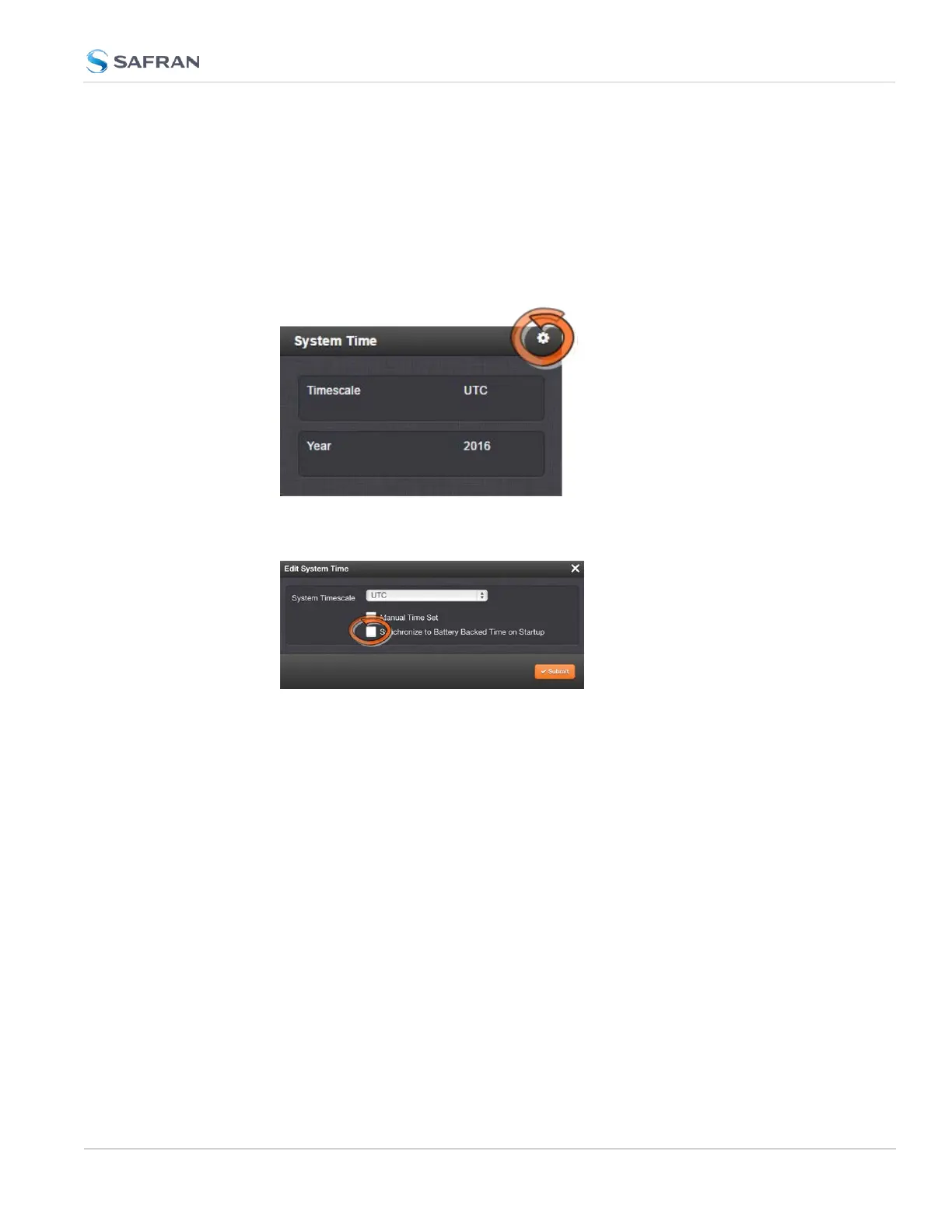
To use the battery-backed time as the synchronized time at start-up:
1.
Navigate to MANAGEMENT > OTHER: Time Management.
2.
In the System Time panel click the GEAR icon.
3.
The Edit System Time window will display. Select the checkbox Syn-
chronize to Battery Backed Time on Startup:
4.
Click the Submit button.
3.2.2 Timescale Offset(s)
Timescale offsets account for fixed differences between timescales, in seconds.
Timescale offsets may change because of leap seconds, see "Leap Seconds" on
the next page.
3.2.2.1 Configuring a Timescale Offset
To configure a timescale offset to the System Time:
1.
Navigate to MANAGEMENT > OTHER: Time Management.
2.
In the Offsets panel on the left, click the GEAR icon in the top-right corner.
3.
The Edit GPS Offset window will display. Enter the desired GPS Offset in
seconds, and click Submit.
3.2 System Time
CHAPTER 3 • SecureSync 2400 User Manual Rev. 5.2
195



 To Next Page