3.
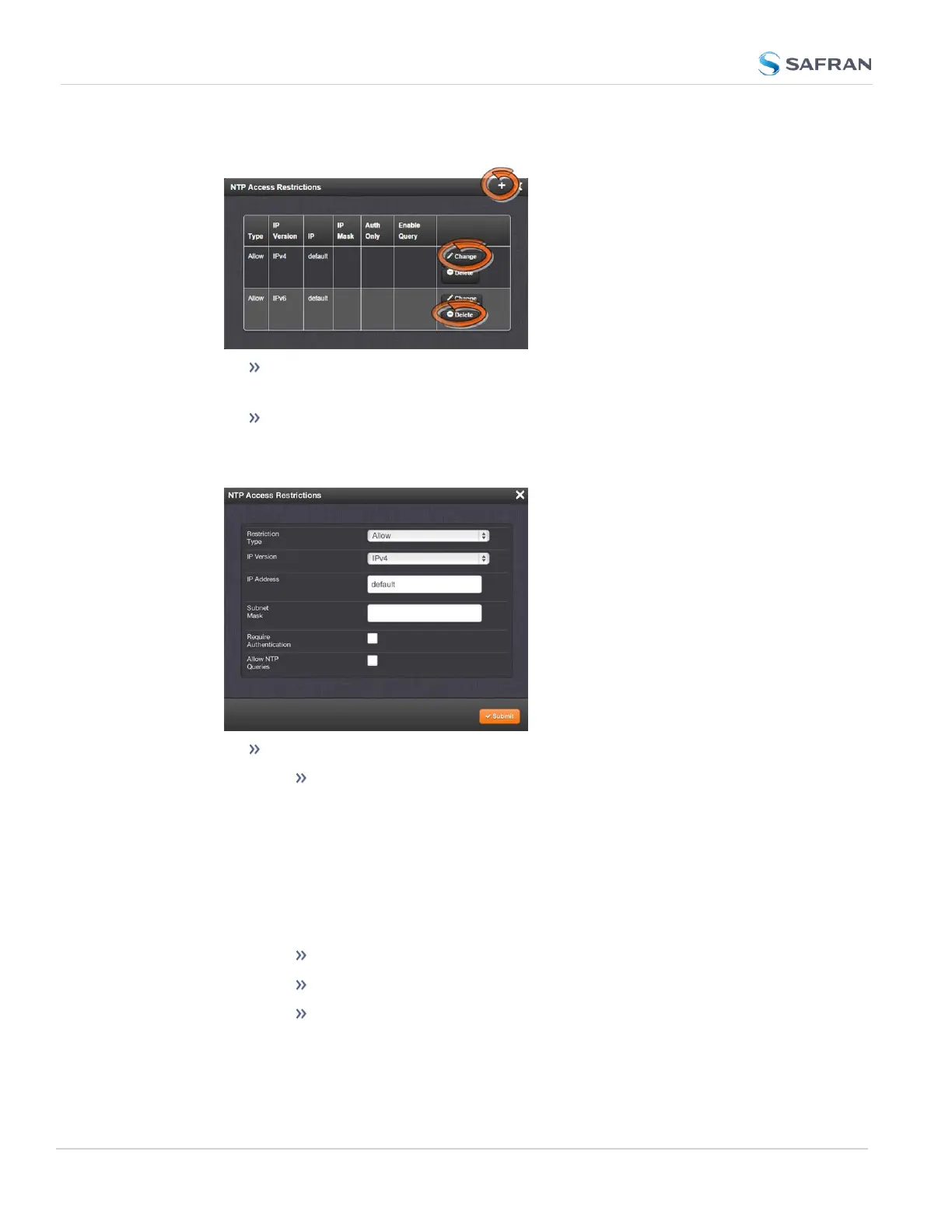
The NTP Access Restrictions Status window will display:
To ADD or EDIT an access restriction, click the PLUS icon or the
Change button, respectively, and proceed to Step4. below.
To DELETE an access restriction, click the corresponding Delete but-
ton, and confirm by clicking OK.
4.
The NTP Access Restrictions window will display:
Fill in the fields:
Restriction Type—Choose either Allow or Deny.
If you select “Deny”, the configured portion of the network will
not have NTP access to SecureSync, but the rest of the network
will have access to SecureSync. If you select “allow”, the con-
figured portion of the network will have NTP access to
SecureSync, but the rest of the network will not have access to
SecureSync. By default, SecureSync allows all IPv4 and IPv6
connections.
IP Version—Choose IPv4 or IPv6
IP Address—Enter the appropriate hostname.
Subnet Mask—Enter the appropriate IP mask.
134
CHAPTER 2 • SecureSync 2400 User Manual Rev. 5.2
2.15 Configure NTP



 To Next Page