Configuring Signature Control for an Output
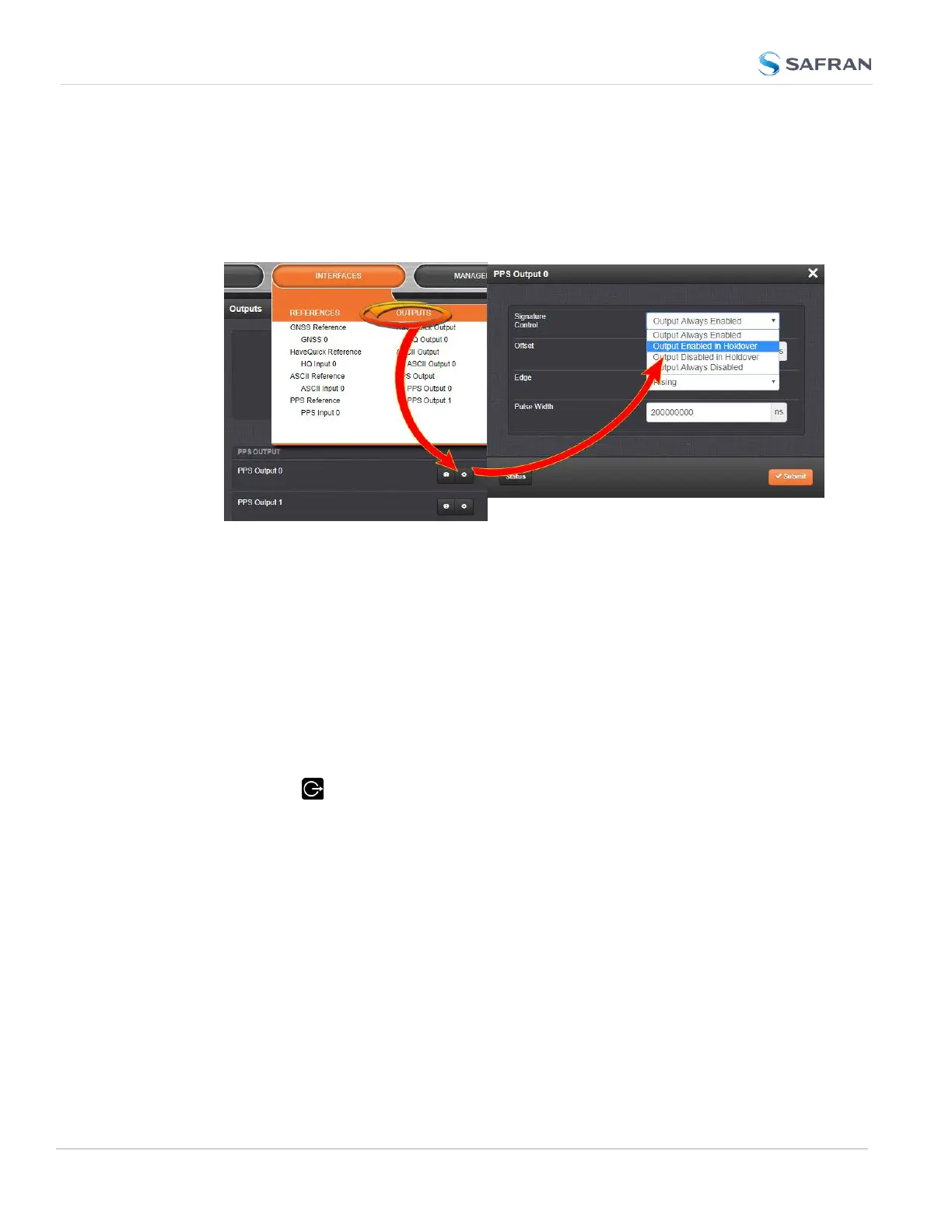
To review or configure the Signature Control setting for any output:
1.
Navigate to INTERFACES > OUTPUTS and click the output you want to
configure.
2.
In the Outputs panel, click the GEAR button for the desired output. Ehe
Edit window will open with the current Signature Control setting, and a
drop-down list to change it.
Changing Signature Control via the Front Panel
The SecureSync front panel allows you to change the signature control between
two states: Output Always Enabled and Output Always Disabled. For more
options and control over the Signature Control setting, you must use the Web UI
(see above).
On the unit front panel:
1.
Press the Outputs button.
2. Select the output you wish to configure.
3. Use the arrow keys to select ON (enabled) or OFF (disabled). Press the
enter key.
4. In the confirmation menu on the right hand side of the screen, press the
enter key again.
184
CHAPTER 2 • SecureSync 2400 User Manual Rev. 5.2
2.22 Signature Control



 To Next Page