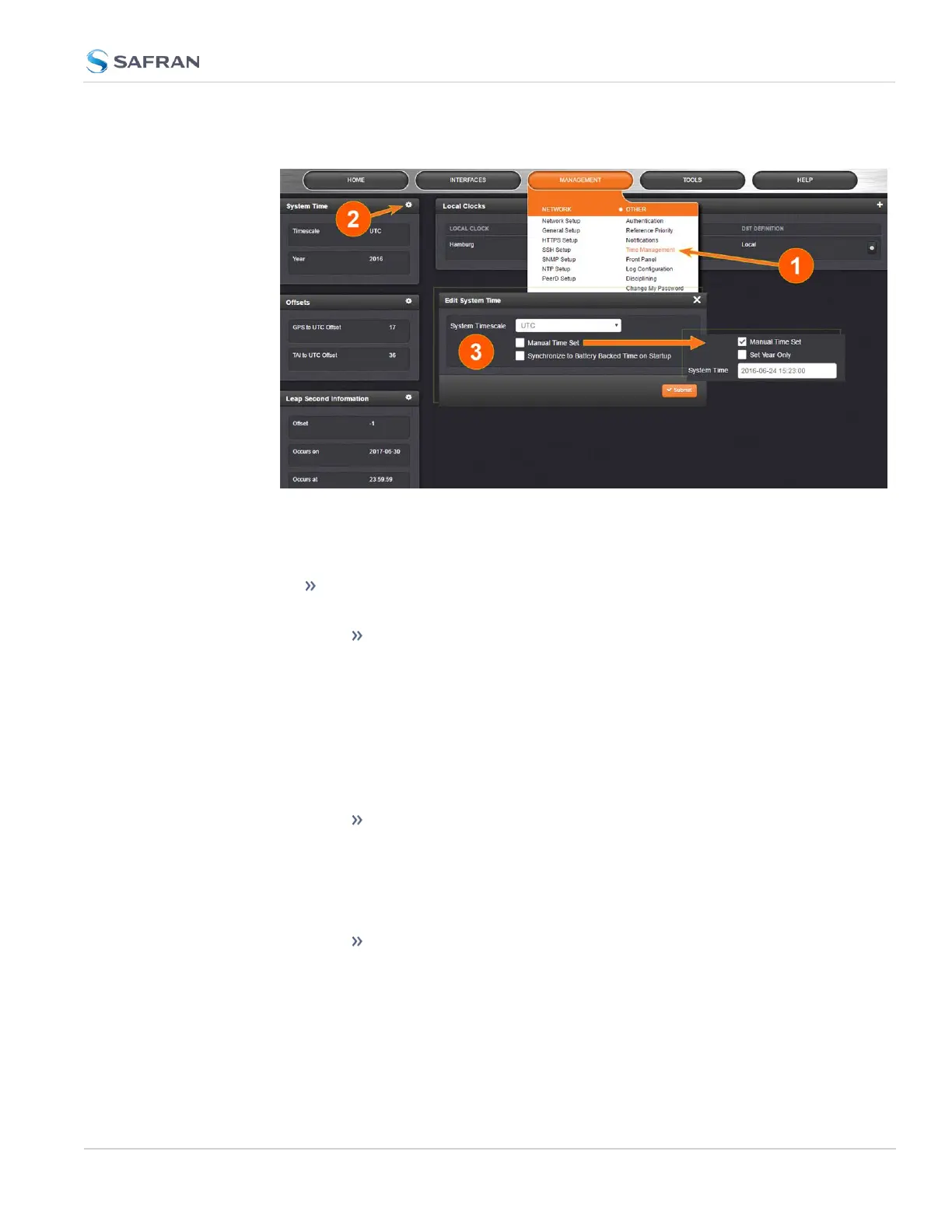
1.
Navigate to MANAGEMENT > OTHER: Time Management.
2.
In the System Time panel located in the top-left corner of the Time Man-
agement screen, click the GEAR icon.
3.
The Edit System Time pop-up window will display.
In the System Timescale field select a timescale from the drop-down
list. The options are:
UTC: Coordinated Universal Time (Temps Universel Coor-
donné); your local time zone determines the difference
between UTC and local time.
Note that UTC is not a time zone, but a time standard, i.e. it is
not used anywhere in the world as the official local time,
whereas GMT (Greenwich Mean Time) is a time zone that is
used in several European and African countries as the official
local time.
TAI: International Atomic Time (Temps Atomique Inter-
national).
The TAI time scale is based on the SI second and is not adjusted
for leap seconds. As of 22-August-2023, TAI is ahead of UTC
by37 seconds. TAI is always ahead of GPS by 19 seconds.
GPS: The Global Positioning System time is the timescale main-
tained by the GPS satellites.
Global Positioning System time is the time scale maintained by
the GPS satellites. The time signal is provided by atomic clocks
3.2 System Time
CHAPTER 3 • SecureSync 2400 User Manual Rev. 5.2
189



 To Next Page