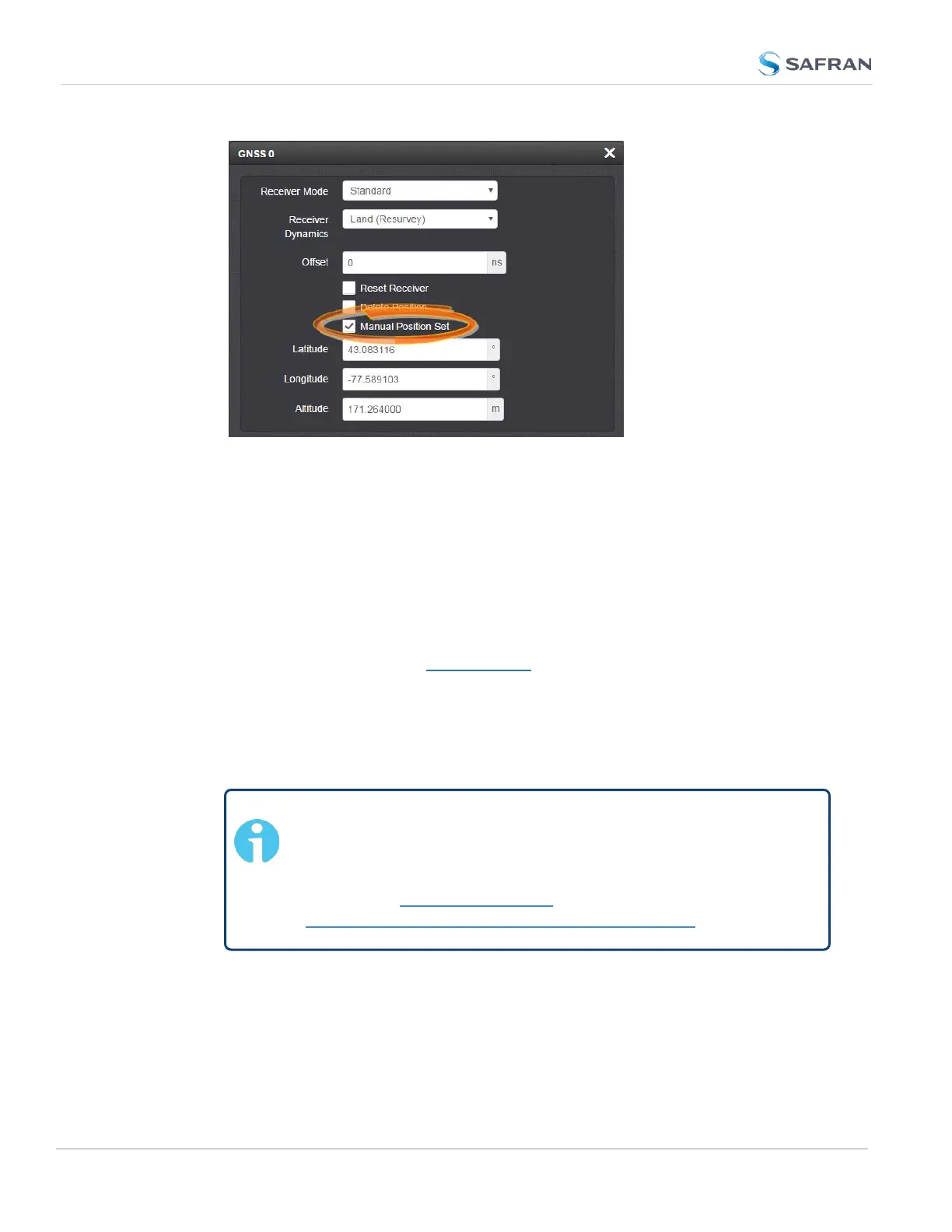
3.
Under Manual Position Set accurately enter latitude, longitude (both in
decimal degrees), and altitude (in meters [WGS84]) of your GNSS
antenna, SecureSync can use this data during the satellite track-
ing/adjustment process, which typically leads to a quicker "fix". It is recom-
mended to enter the position as accurately as possible.
Determining Your Position
To determine your GNSS position, using Google Maps™:
1. On your computer, open Google Maps.
2. In Google Maps, locate your building, and the location of your antenna.
3.
Right-click on the location. Select What's here? At the bottom, you will see
a card with the coordinates.
4.
Take note of your decimal position (e.g., 43.083191, -77.589718).
Note: Should you prefer to determine your position in a dif-
ferent way, and as a result, have your latitude & longitude data
in degrees/minutes/ seconds, you need to convert this data to
the decimal format e.g., by using a conversion tool, such as
Earth Point www.earthpoint.us, or
https://www.fcc.gov/media/radio/dms-decimal:
242
CHAPTER 3 • SecureSync 2400 User Manual Rev. 5.2
3.3 Managing References



 To Next Page