The Standard HTTPS Level allows the use of medium strength ciphers and
older TLS (Transport Layer Security) protocols,
while the High-Security Level is restricted to strong ciphers and TLS ver-
sion 1.2 exclusively.
While Standard Mode is the default setting, the High-Security Level is preferred
(unless you require the extra compatibility), since High Security turns off TLSv1, which
has known security vulnerabilities.
B r o w s e r S u p p o r t
Note that the High Security Level requires the use of current browsers - as of July 2016,
the oldest compatible clients include:
• Firefox
®
27
• Chrome
®
30
• Internet Explorer
®
11
• Safari
®
9.
(This is not an exhaustive list.)
To enable High-Security HTTPS:
1.
Navigate to MANAGEMENT > Network Setup.
2.
In the Actions Panel on the left, click on Web Interface Settings. The Web
Interface Settings window will open.
3.
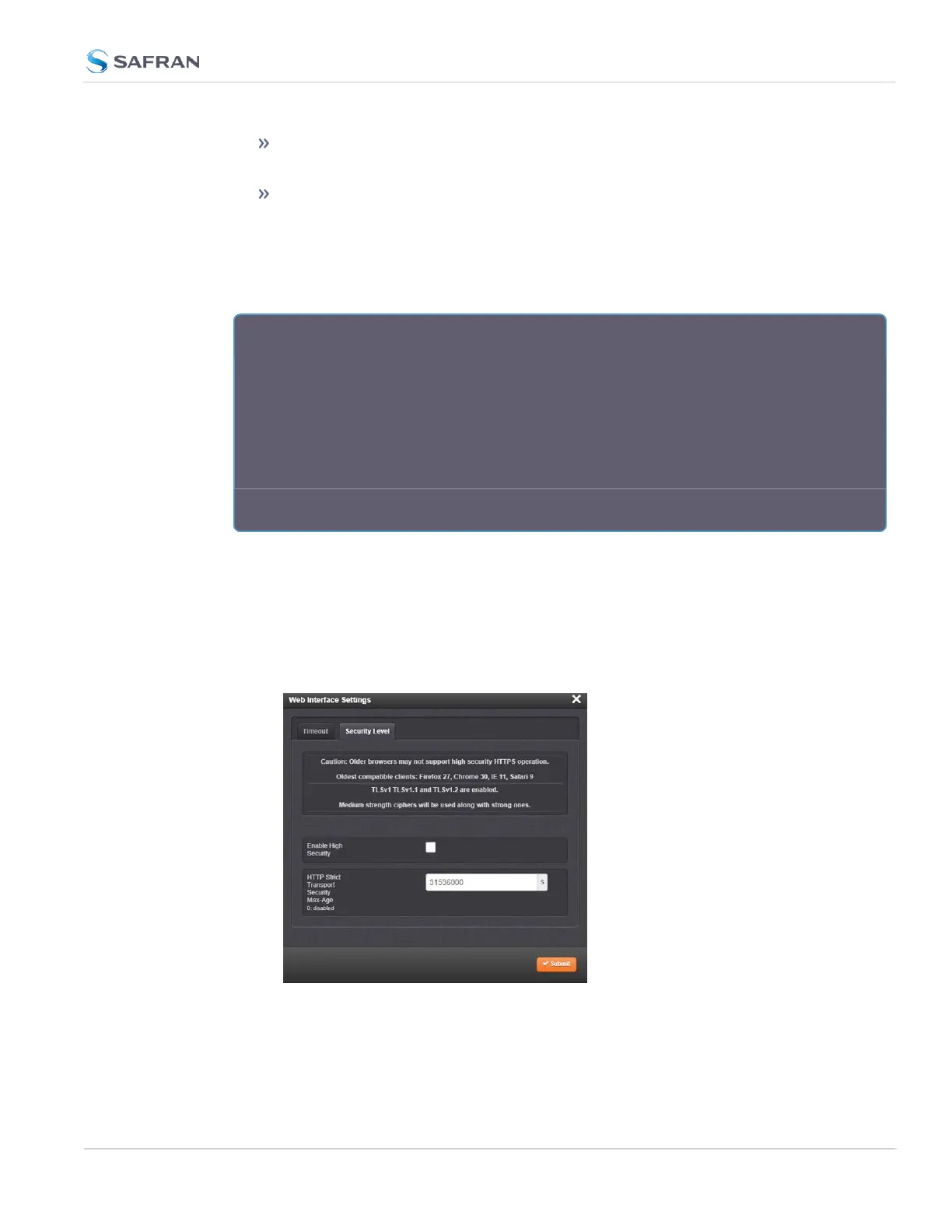
Click on the tab Security Level:
4.
Read the Caution statement and verify that you meet the requirements
stated.
5.
Check the box Enable High Security, and click Submit.
4.3 Managing Users and Security
CHAPTER 4 • SecureSync 2400 User Manual Rev. 5.2
297



 To Next Page