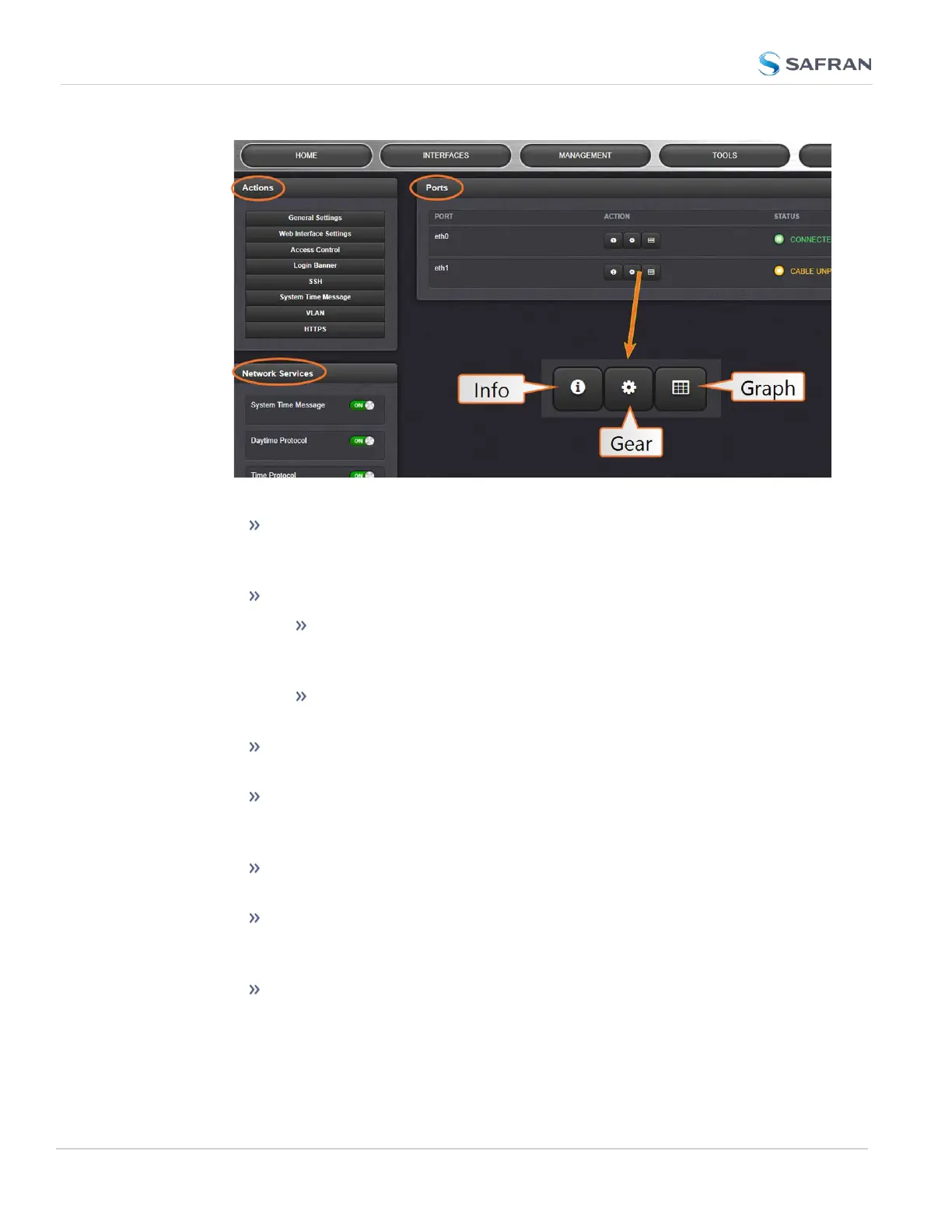
The Actions panel provides:
General Settings: Allows quick access to the primary network set-
tings necessary to connect SecureSync to a network. See "General
Network Settings" on the facing page.
Web Interface Settings:
Web interface timeout: Determines how long a user can stay
logged on. For more information, see "Web UI Timeout" on
page282.
Web Security Level: High security will not allow browsers to
use TLS below v1.3 (to prevent known security vulnerabilities).
Access Control: Allows the configuration of access restrictions from
assigned networks/nodes.
Login Banner: Allows the administrator to configure a custom banner
message to be displayed on the SecureSync Web UI login page and
the CLI (Note: There is a 2000 character size limit).
SSH: This button takes you to the SSH Setup window. For details on
setting up SSH, see "SSH" on page92.
System Time Message: Setup a once-per-second time message to be
sent to receivers via multicast. For details, see "System Time Mes-
sage" on page111.
VLAN: This button will reveal the VLAN Setup popup window. For
more information, see "VLAN Support" on page111.
74
CHAPTER 2 • SecureSync 2400 User Manual Rev. 5.2
2.14 Configure Network Settings



 To Next Page