Bravo-Brava
Electrical equipment
Radio equipment
55.
r
3f?L
v
L
/
—"N
5
■t
3RL
IPs
3RL
v
n
u
>l
H
i
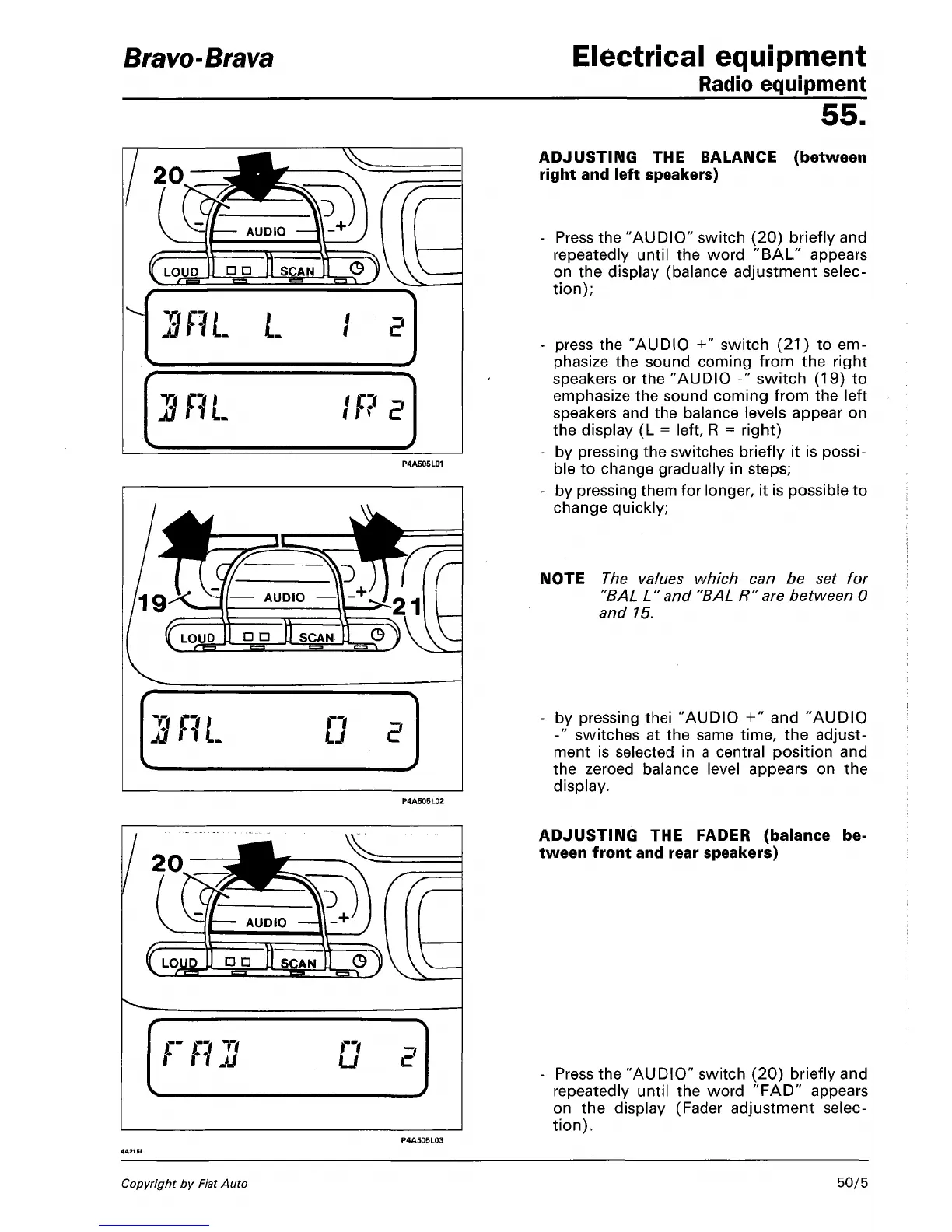
ADJUSTING THE BALANCE (between
right and left speakers)
Press the "AUDIO" switch (20) briefly and
repeatedly until the word "BAL" appears
on the display (balance adjustment selec-
tion);
press the "AUDIO +" switch (21) to em-
phasize the sound coming from the right
speakers or the "AUDIO -" switch (19) to
emphasize the sound coming from the left
speakers and the balance levels appear on
the display (L = left, R = right)
by pressing the switches briefly it is possi-
ble to change gradually in steps;
by pressing them for longer, it is possible to
change quickly;
NOTE The values which can be set for
"BAL L" and "BAL R"are between 0
and 15.
by pressing thei "AUDIO +" and "AUDIO
-" switches at the same time, the adjust-
ment is selected in a central position and
the zeroed balance level appears on the
display.
r
C O "'7
r n
JJ
v
n
u
-\
E
)
ADJUSTING THE FADER (balance be-
tween front and rear speakers)
Press the "AUDIO" switch (20) briefly and
repeatedly until the word "FAD" appears
on the display (Fader adjustment selec-
tion).
Copyright by Fiat Auto
50/5



 To Next Page