Electrical equipment
Radio equipment
P4A506L03
4A216L
50/6
Bravo-Brava
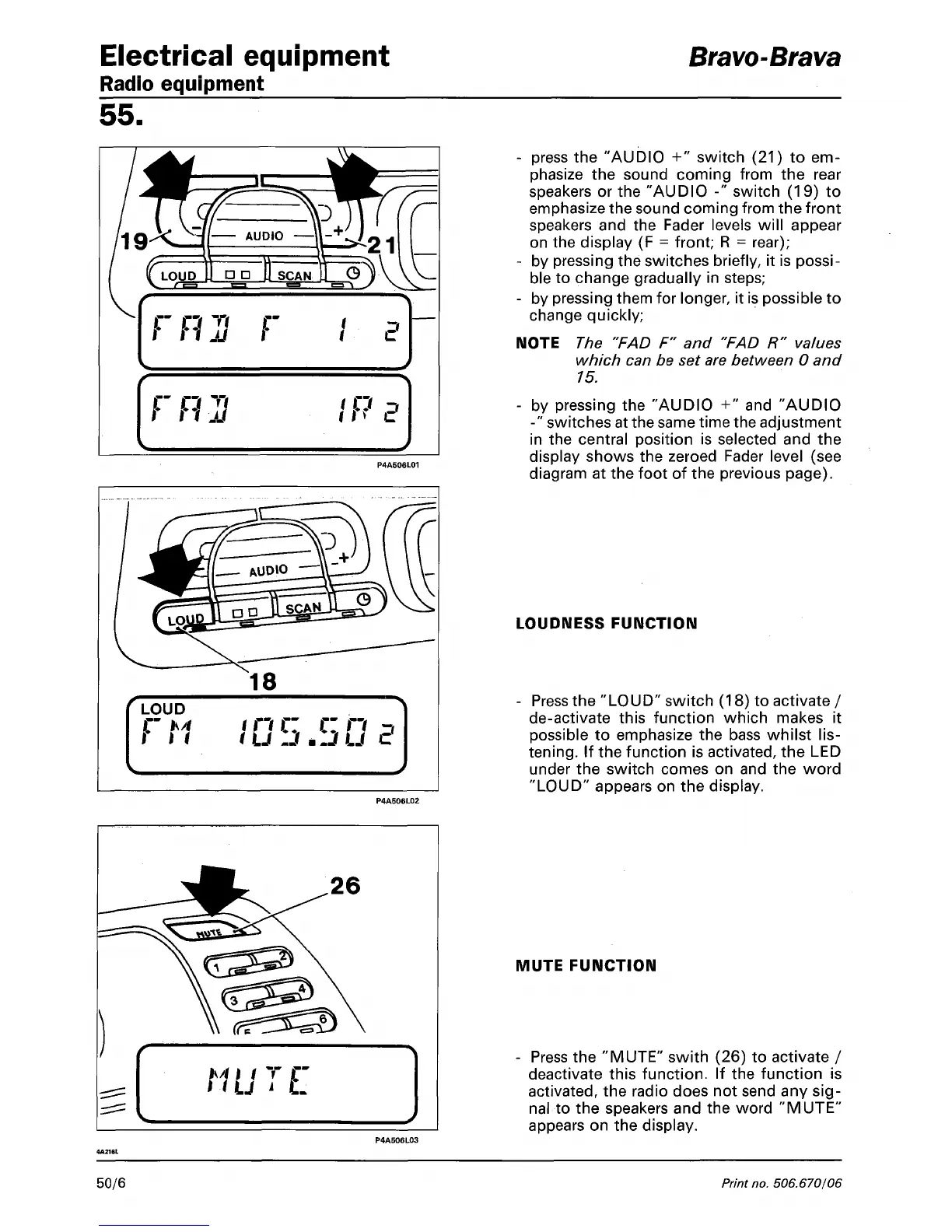
- press the "AUDIO +" switch (21) to em-
phasize the sound coming from the rear
speakers or the "AUDIO -" switch (19) to
emphasize the sound coming from the front
speakers and the Fader levels will appear
on the display (F = front; R = rear);
- by pressing the switches briefly, it is possi-
ble to change gradually in steps;
- by pressing them for longer, it is possible to
change quickly;
NOTE The "FAD F" and "FAD R" values
which can be set are between 0 and
15.
- by pressing the "AUDIO +" and "AUDIO
-" switches at the same time the adjustment
in the central position is selected and the
display shows the zeroed Fader level (see
diagram at the foot of the previous page).
LOUDNESS FUNCTION
- Press the "LOUD" switch (18) to activate /
de-activate this function which makes it
possible to emphasize the bass whilst
lis-
tening.
If the function is activated, the LED
under the switch comes on and the word
"LOUD"
appears on the display.
MUTE FUNCTION
- Press the "MUTE" swith (26) to activate /
deactivate this function. If the function is
activated,
the radio does not send any
sig-
nal to the speakers and the word "MUTE"
appears on the display.
Print
no.
506.670/06



 To Next Page