Bravo-Brava
Electrical equipment
Radio equipment
55.
RADIO FUNCTION
The
reception conditions vary constantly when driving. The reception can be interfered with
by the presence of mountains, buildings or bridges, particularly when the transmitter is far
away.
NOTE When the "RADIO" function is activated, the last station listened to before switching off is re-
ceived.
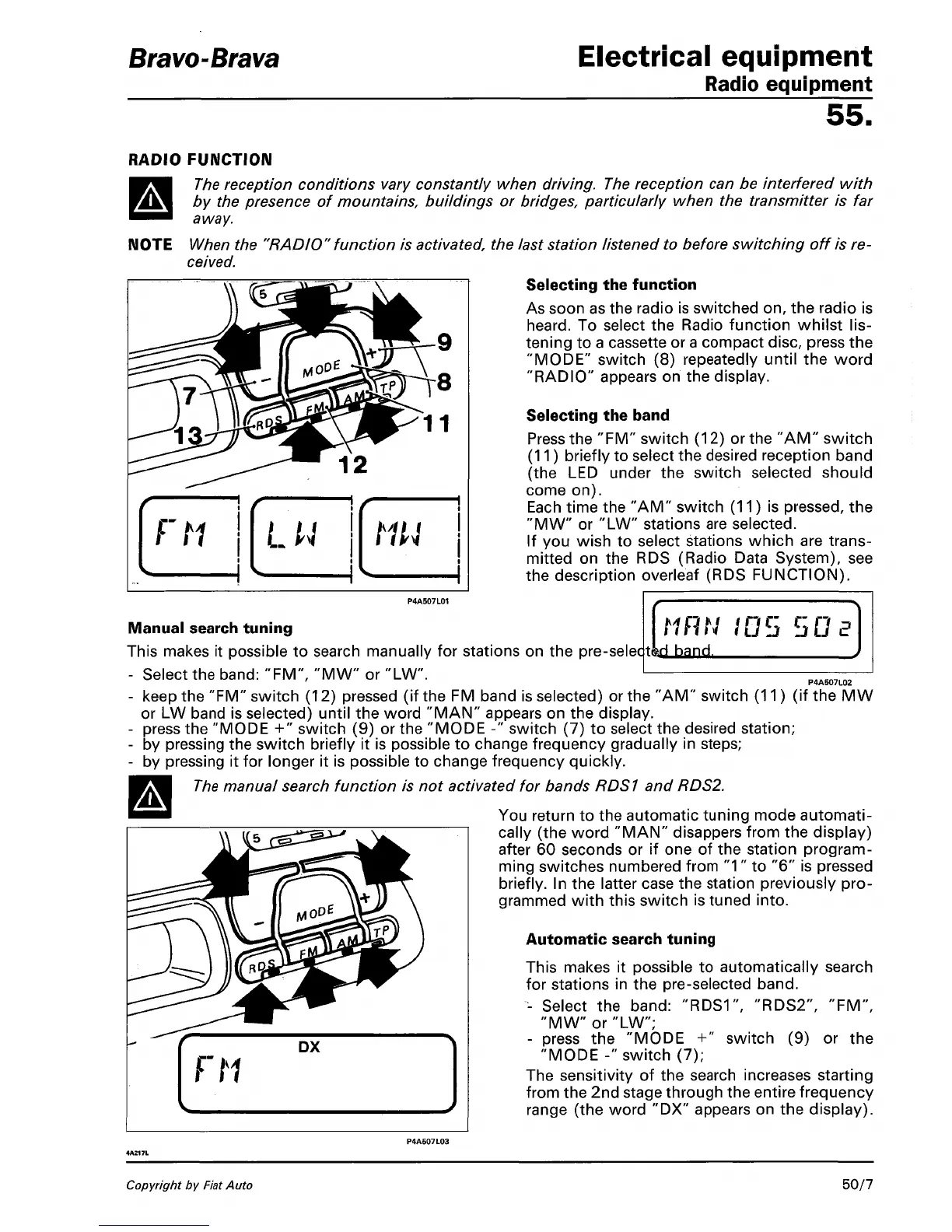
Selecting the function
As soon as the radio is switched on, the radio is
heard.
To select the Radio function whilst
lis-
tening to a cassette or a compact disc, press the
"MODE"
switch (8) repeatedly until the word
"RADIO" appears on the display.
Selecting the band
Press the "FM" switch (12) or the "AM" switch
(11) briefly to select the desired reception band
(the LED under the switch selected should
come on).
Each time the "AM" switch (11) is pressed, the
"MW" or "LW" stations are selected.
If you wish to select stations which are trans-
mitted on the RDS (Radio Data System), see
the description overleaf (RDS FUNCTION).
P4A507L01
Manual search tuning
This makes it possible to search manually for stations on the pm-sftler|tkri hand
- Select the band: "FM", "MW" or "LW
- keep the "FM" switch (12) pressed (if the FM band is selected) or the "AM
or LW band is selected) until the word "MAN" appears on the display.
- press the "MODE +" switch (9) or the "MODE -" switch (7) to select the desired station;
P4A507L02
switch (11) (if theMW
'MODE-'
by pressing the switch briefly it is possible to change frequency gradually in steps;
by pressing it for longer it is possible to change frequency quickly.
The
manual search function is not activated for bands RDS1 and RDS2.
You return to the automatic tuning mode automati-
cally (the word "MAN" disappers from the display)
after 60 seconds or if one of the station program-
ming switches numbered from
"1"
to "6" is pressed
briefly. In the latter case the station previously pro-
grammed with this switch is tuned into.
Automatic search tuning
This makes it possible to automatically search
for stations in the pre-selected band.
- Select the band:
"RDS1",
"RDS2", "FM",
"MW" or "LW";
- press the "MODE +" switch (9) or the
"MODE -" switch (7);
The sensitivity of the search increases starting
from the 2nd stage through the entire frequency
range (the word "DX" appears on the display).
Copyright by Fiat Auto
50/7



 To Next Page