Once SNMP is configured it will persist through reboot, and only needs to be
reconfigured after performing a "clean" update process (thus restoring the fact-
ory default condition).
Note: In order to configure SNMP, you need ADMINISTRATORrights.
To access the SNMP Setup screen:
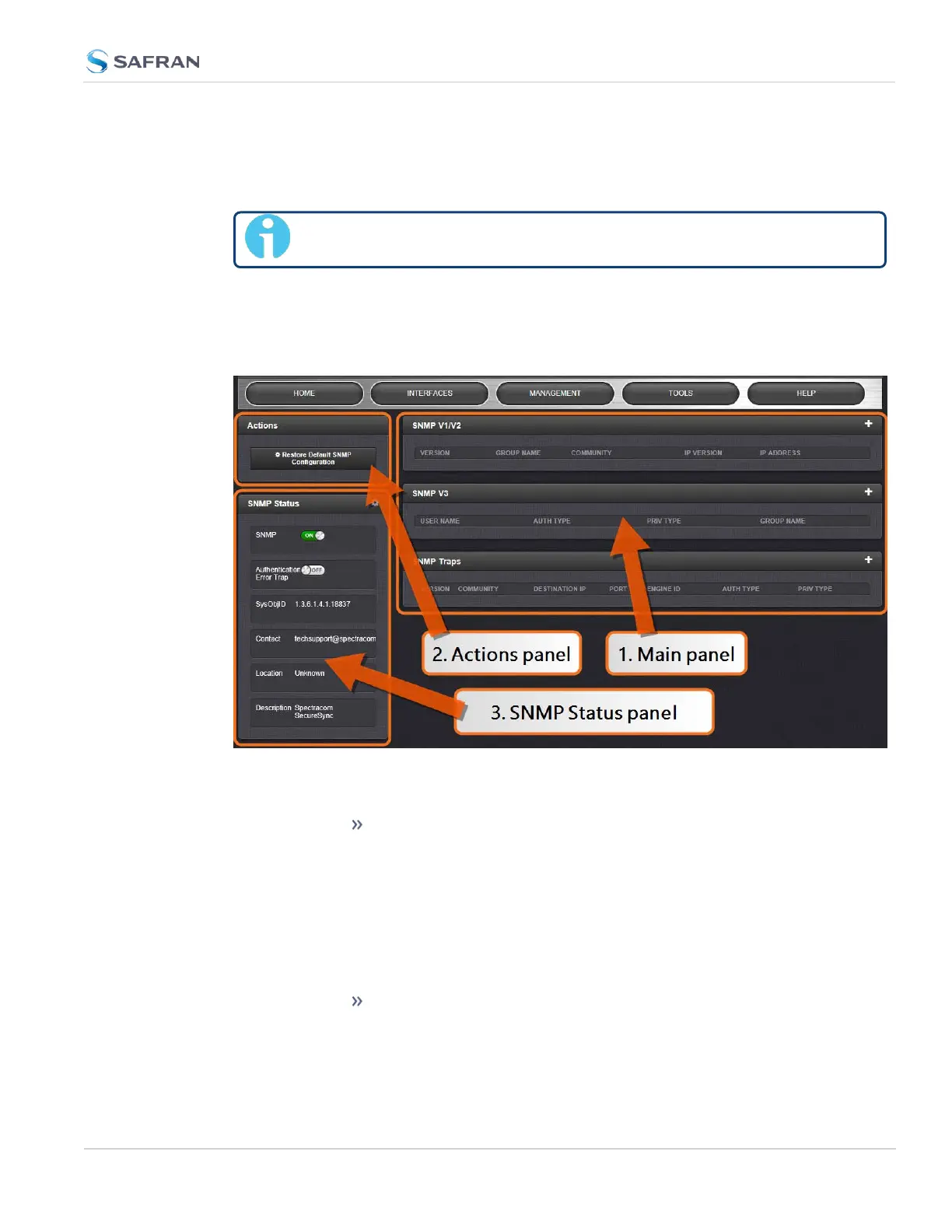
Navigate to MANAGEMENT > NETWORK: SNMP Setup. The SNMP screen will
display:
The SNMP screen is divided into 3 panels:
1.
The Main panel, which is subdivided into 3 displays:
SNMP V1/V2: This panel allows configuration of SNMP v1 and
v2c communities (used to restrict or allow access to SNMP).
This tab allows the configurations for SNMP v1 and v2c, includ-
ing the protocols allowed, permissions and Community names
as well as the ability to permit or deny access to portions of the
network. Clicking on the “+” symbol in the top- right corner
opens the SNMP V1/V2c Settings for Access Screen. See "SNMP
V1/V2c" on page105.
SNMP V3: This panel allows configuration of SNMP v3 func-
tionality, including the user name, read/write permissions,
authorization passwords as well as privilege Types and
2.14 Configure Network Settings
CHAPTER 2 • SecureSync 2400 User Manual Rev. 5.2
101



 To Next Page