b.
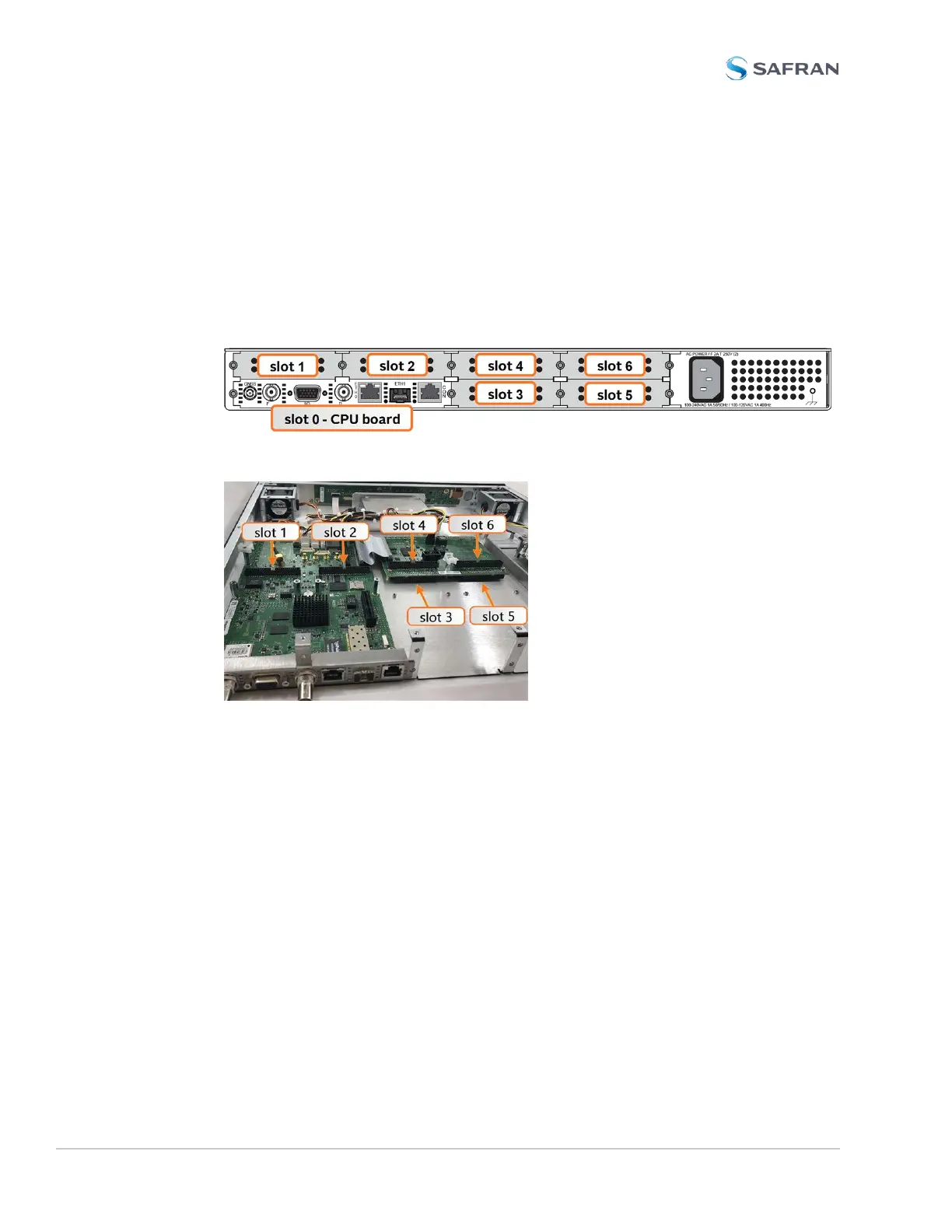
Inspect the back of the SecureSync housing, and select an empty slot for
the new card. If the card is to be installed in one of the upper slots (4, or 6),
take note if the corresponding lower slot (3 or 5) is occupied.
Slots 1 and 2 always have an occupied slot below them.
Units must be equipped with an Extension Board to fill option card slots
3, 4, 5, and 6.
Figure 5-2: Unit rear view
Figure 5-3: Unit internal view (from rear)
c. Identify your installation steps via the table below.
i.
Find your part number in the left-hand column. Some cards require
special installation steps or specific locations.
ii.
Choose your Installation Location (as determined above).
iii.
If using slots 4 or 6, select either the Bottom Slot row "empty" or
"populated"
iv.
Note or highlight the PROCEDURE STEPS [x] for your installation
scenario and follow the procedure step by step.
372 SecureSync 2400 User Manual
APPENDIX



 To Next Page