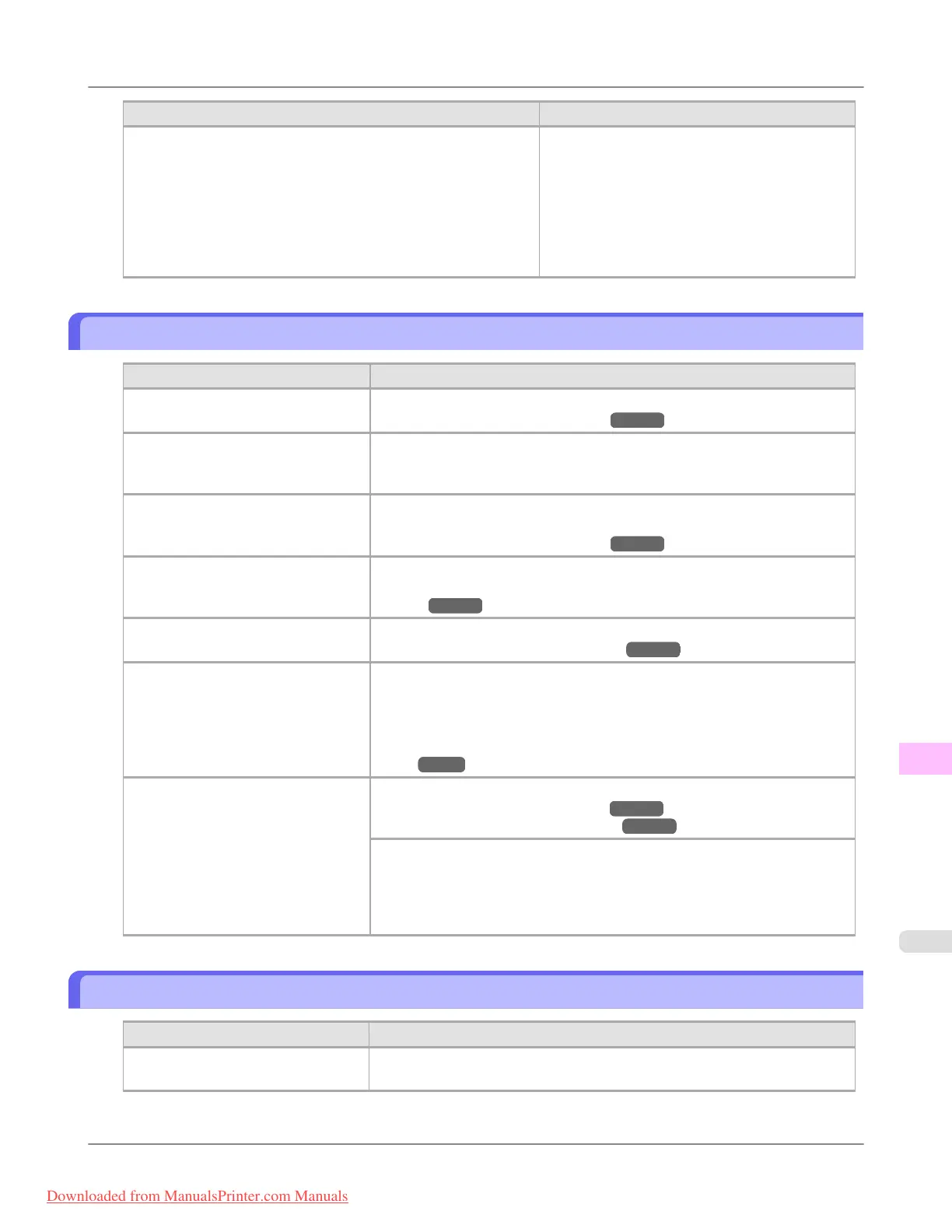
Cause Corrective Action
When reinstalling the printer driver, you changed the region selec-
tion of the Media Configuration Tool.
Changing the region selection of the Media Configuration Tool
deletes the region-specific paper information originally registered
on the printer before installation. Using paper with deleted infor-
mation when executing color calibration will prevent the resulting
calibration adjustment value from being applied to all other types
of the paper.
Prepare paper compatible with calibration in the
newly selected region and perform calibration
again.
Banding in different colors occurs
Cause Corrective Action
The paper feed amount is out of ad-
justment.
Adjust the feed amount.
(See "Adjusting the Feed Amount.") →P.845
Printing does not proceed smoothly
because print jobs are interrupted dur-
ing transmission.
Exit other applications and cancel other print jobs.
In the Control Panel menu, Adj. Pri-
ority is set to Print Length.
Setting Adj. Priority to Print Quality in the Control Panel menu and adjust-
ing the feed amount may improve results.
(See "Adjusting the Feed Amount.") →P.845
The Printhead is out of alignment. Adjust the Printhead alignment.
(See "Automatic Adjustment to Straighten Lines and Colors (Head Posi.
Adj.).") →P.839
The Printhead nozzles are clogged. Print a test pattern to check the nozzles and see if they are clogged.
(See "Checking for Nozzle Clogging.") →P.998
Streaks may occur if you set the Print
Quality too low.
Choose a higher level of Print Quality in the Advanced Settings of the print-
er driver and try printing again.
Printing in Draft or Standard mode is faster and consumes less ink than in
Highest or High modes, but the printing quality is lower.
(See "Giving Priority to Particular Graphic Elements and Colors for Print-
ing.") →P.51
The type of paper specified in the
printer driver does not match the type
loaded in the printer.
Load paper of the same type as you have specified in the printer driver.
(See "Loading Rolls in the Printer.") →P.777
(See "Loading Sheets in the Printer.") →P.802
Make sure the same type of paper is specified in the printer driver as you have
loaded in the printer.
1. Press the Stop button and stop printing.
2. Change the type of paper in the printer driver and try printing again.
Colors in printed images are uneven
Cause
Corrective Action
Line Drawing/Text is selected when
printing images in many solid colors.
In Print Priority in the Advanced Settings of the printer driver, choose Im-
age.
Troubleshooting
>
Problems with the printing quality
>
iPF8300 Banding in different colors occurs
12
1061
Downloaded from ManualsPrinter.com Manuals














 To Next Page