*1: A rough estimate of how much ink was consumed per job is displayed. Actual ink consumption may be differ-
ent. The average margin of error for estimates calculated according to Canon measurement conditions for ink
costs is ±15%. Canon does not guarantee the accuracy of these estimates. Estimates may vary depending on con-
ditions of use. Calculation of these estimates does not include ink consumed when cleaning printheads by force-
ful ejection of ink.
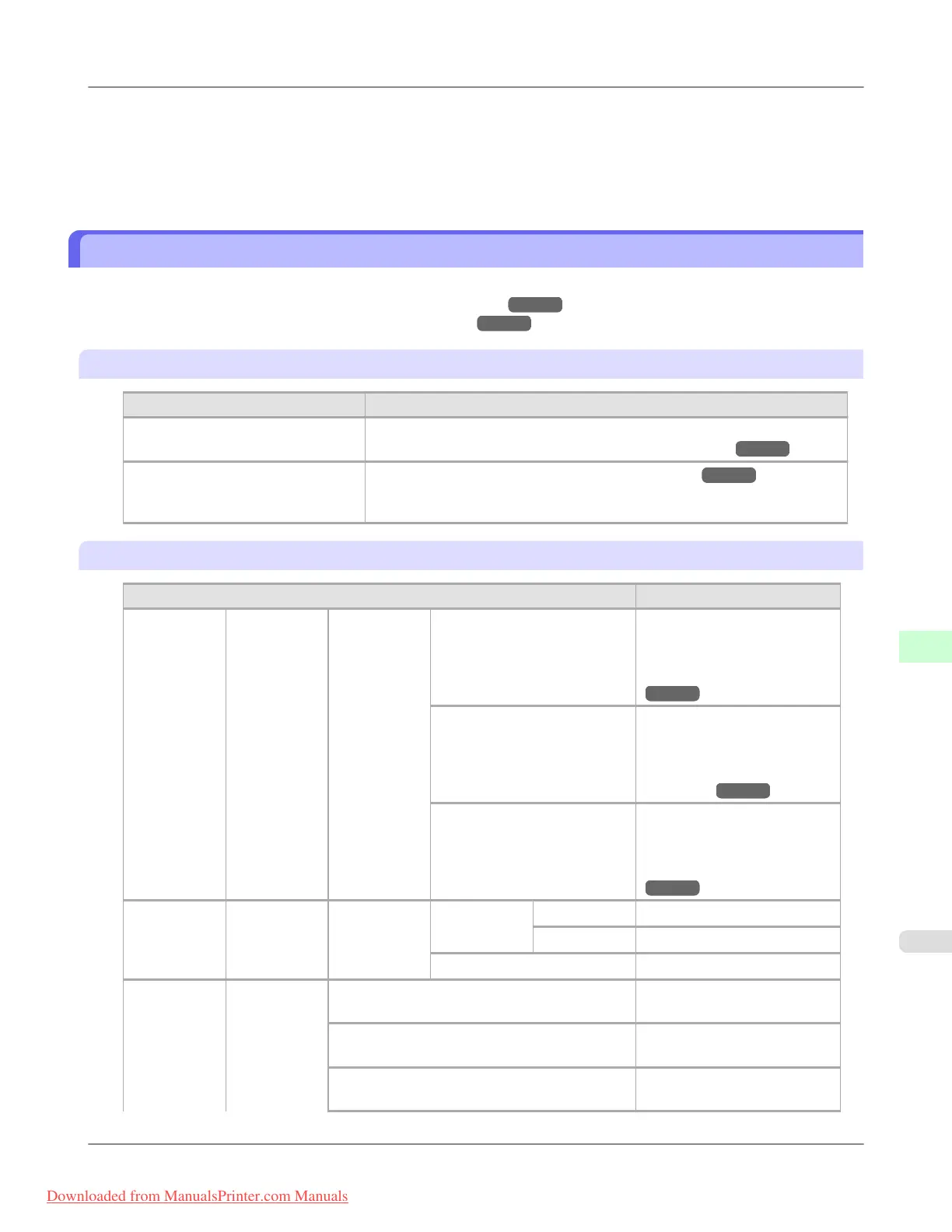
Menu Settings (During Printing)
Menu items are described in the following tables.
For instructions on selecting menu items, see "Menu Operations." →P.902
For details on menu levels and values, see "Menu Structure." →P.904
Ink Menu
Setting Item Description, Instructions
Rep. Ink Tank Replace the Ink Tank at this point. Follow the instructions displayed to com-
plete the required procedure. (See "Replacing Ink Tanks.") →P.984
Head Cleaning A Clean the Printhead. (See "Cleaning the Printhead.") →P.999
Execute Head Cleaning A if printing is faint, oddly colored, or contains for-
eign substances.
Job Menu
Setting Item Description, Instructions
Print Job Job List (Choose a
print job)
Delete Delete the current job or
queued jobs. (See "Managing
the Job Queue (Deleting or
Preempting Other Jobs).")
→P.719
Preempt Jobs Print the job first after the cur-
rent print job is finished. (See
"Managing the Job Queue
(Deleting or Preempting Oth-
er Jobs).")
→P.719
Print Anyway Displayed when a job being
held is selected. (See "Manag-
ing Pending Jobs (Printing or
Deleting Jobs on Hold).")
→P.722
Stored Job Mailbox List (Enter a pass-
word if one
has been set.)
Job List Print Print the saved job.
Delete Delete the saved job.
Print Job List Print a list of saved print jobs.
Job Log (Choose from
information
about the last
three print
jobs.)
Document Name Indicates the document name
of the selected print job.
User Name Indicates the name of the user
who sent the print job.
Page Count Indicates the number of pages
in the job.
Printer Parts
>
Control Panel
>
iPF8300 Menu Settings (During Printing)
9
923
Downloaded from ManualsPrinter.com Manuals














 To Next Page