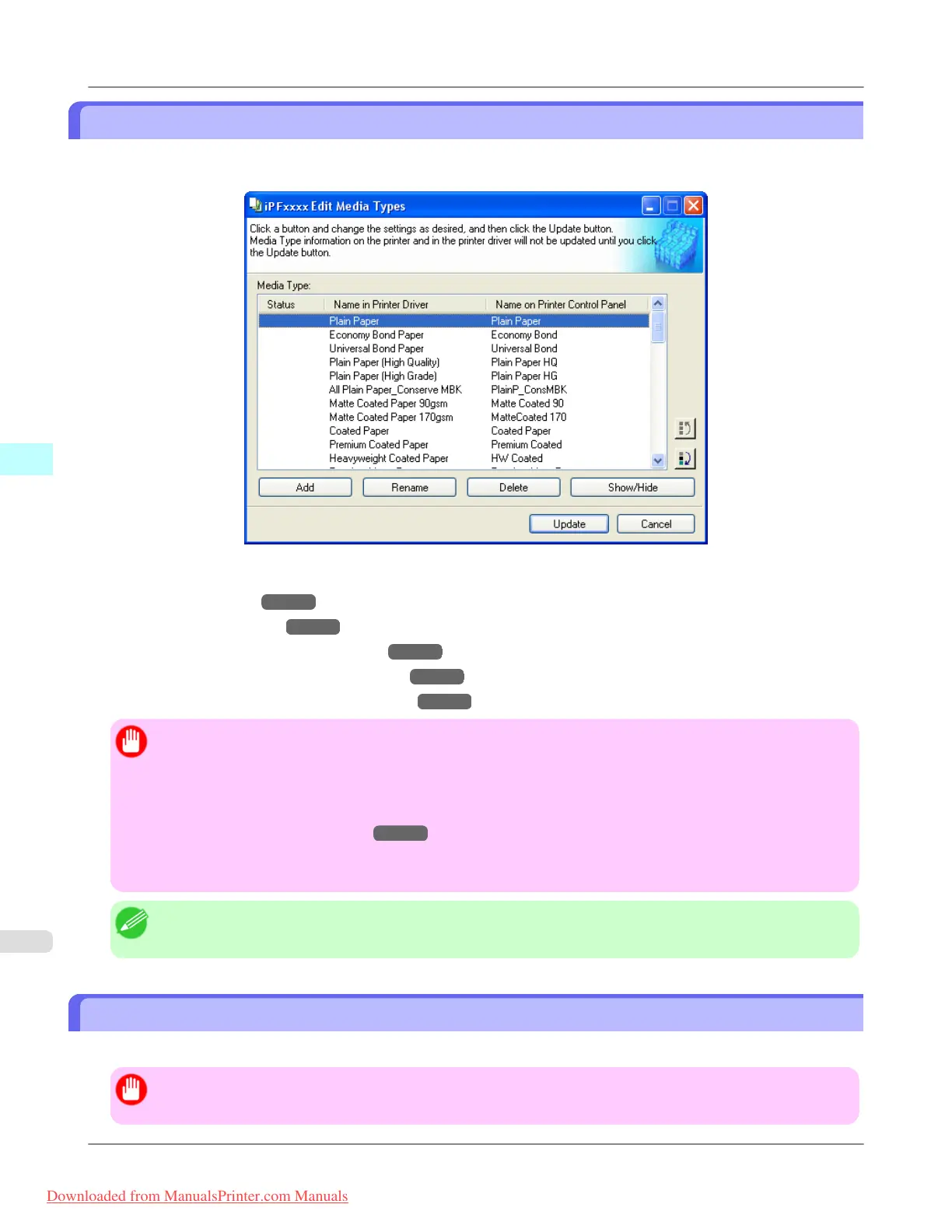
Editing Media Type Information
Click the Add Genuine Paper button in the Media Configuration Tool main window to display the Edit Media Types
dialog box.
This dialog box presents functions for the following tasks.
• Adding Media Types →P.446
• Changing Media Names →P.449
• Deleting Media Types You Have Added →P.451
• Switching Media Types Display Show/Hide →P.453
• Changing the Display Order of Media Types →P.454
Important
• When you update the media type information, perform the same update on all of the PCs that are using that
printer.
• Adding, deleting, toggling display/non-display, and changing the paper name of a media type can only be
performed for Canon genuine paper and feed confirmed paper. Refer to "Using Paper Other Than Genuine
Paper/Feed Confirmed Paper →P.458 " for details on adding, editing, and deleting custom paper. Cus-
tom paper displays Custom as the Status in the Media Type list.
• To add media types, download the media information file (.amf file) in advance from the Canon website.
Note
• It may not be possible to deleting, showing/hiding, and changing the display order under some conditions.
Adding Media Types
Media information files (.amf files) released by Canon are registered in the printer control panel and printer driver.
Important
• Do not perform printing on the target printer while adding the media types.
Windows Software
>
Media Configuration Tool
>
Editing Media Type Information iPF8300
4
446
Downloaded from ManualsPrinter.com Manuals














 To Next Page