C Text
Select this option to apply color adjustment to text.
Gray Adjustment Sheet
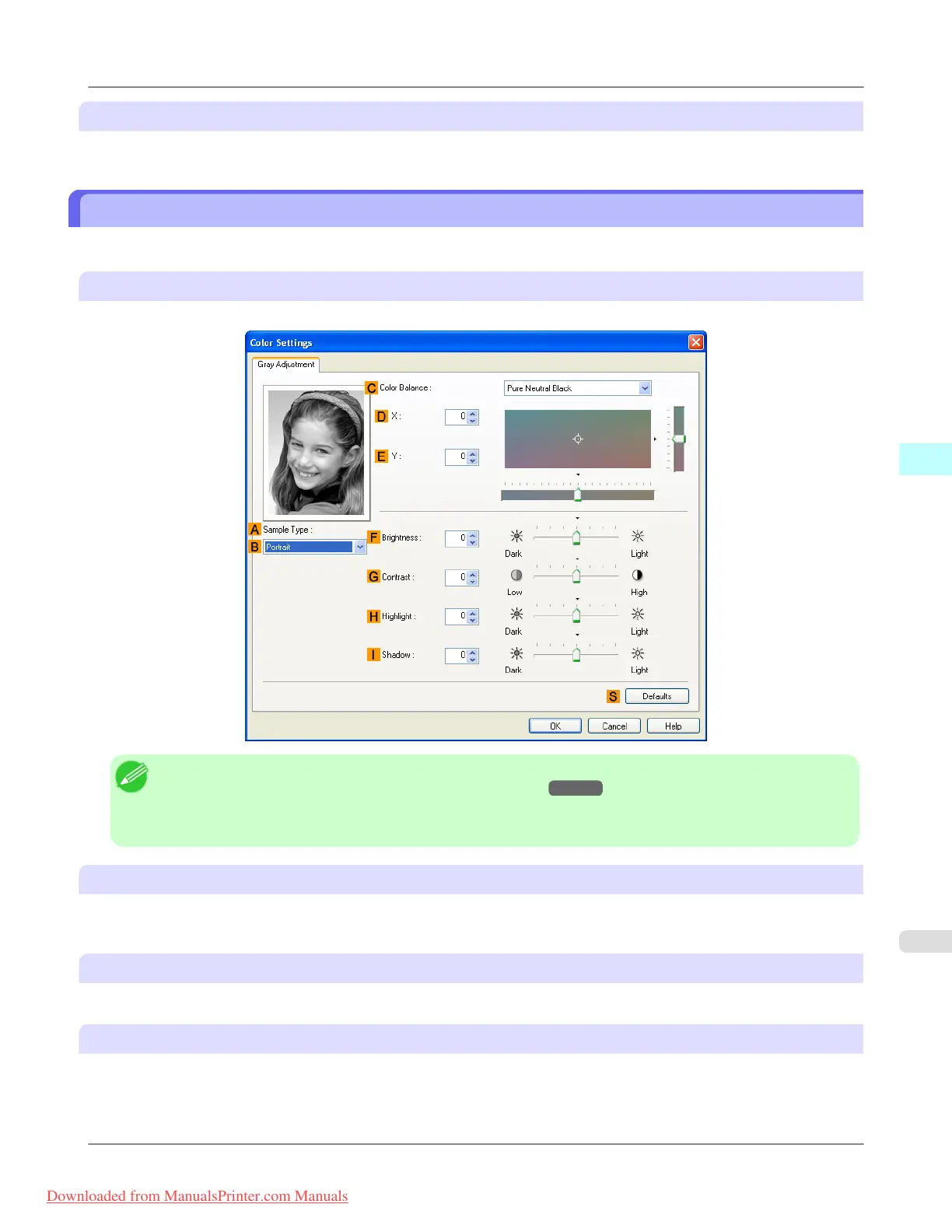
The following settings are available on the Gray Adjustment sheet.
Gray Adjustment
On the Gray Adjustment sheet, you can adjust the color balance, brightness, contrast, and other image qualities.
Note
• To display the Gray Adjustment sheet, on theMain Sheet →P.209 , select Monochrome (Photo) by Col-
or Mode in Advanced Settings, and then click Color Settings.
• Monochrome (Photo) is not available for all types of paper.
A Sample Type
The image at left is updated to reflect any changes you make to setting items on the sheet, enabling you to check the results
of adjustment.
B Sample List
Select a sample image, as desired.
C Color Balance
Click the list to select a color balance that suits the printing application.
Windows Software
>
Printer Driver
>
iPF8300 Gray Adjustment Sheet
4
225
Downloaded from ManualsPrinter.com Manuals














 To Next Page