Enlarge/Reduce and Print Matching Width of Roll Paper
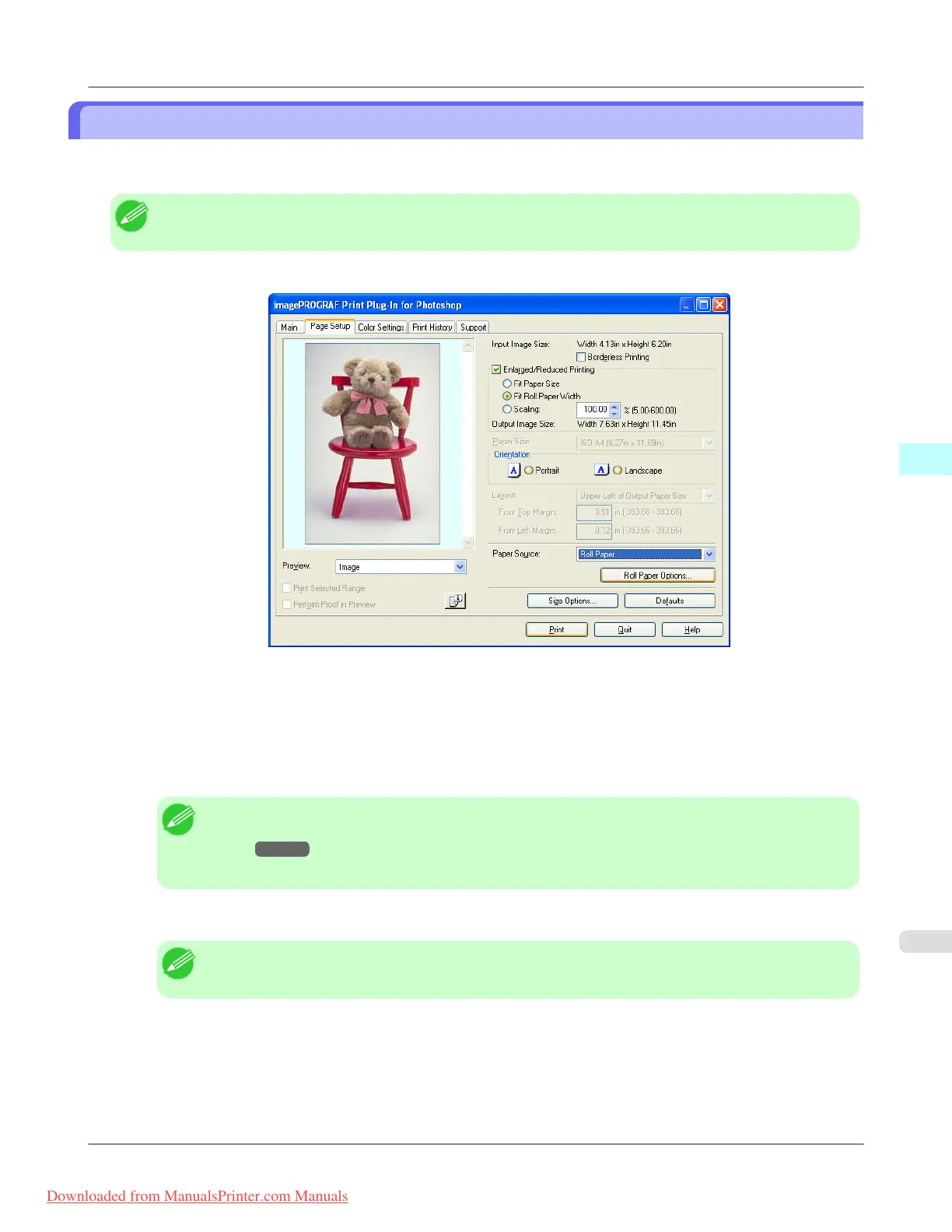
You can enlarge/reduce and print an image matching the width of the roll paper set in the printer. This is useful when you
wish to print an image that covers the entire width of the roll paper.
Note
• Printing will not occur properly when a print roll is not set to the printer.
1. Display the Page Setup sheet.
2. Select Roll Paper in Paper Source.
3. Click the Roll Paper Options button.
4. Set the roll paper options and click the OK button.
Note
• For more information about the Roll Paper Options dialog box, see "Roll Paper Options Dialog
Box." →P.326
• Click the Defaults button to return all of the roll paper option settings to their defaults.
5. Select either Portrait or Landscape as the media orientation for the image in Orientation.
Note
• This is not displayed when a checkmark is placed in Borderless Printing.
6. Select Fit Roll Paper Width.
7. Click the Print button.
The image prints covering the entire width of the roll paper.
Windows Software
>
Print Plug-In for Photoshop/Digital Photo Professional
>
iPF8300 Enlarge/Reduce and Print Matching Width of Roll Paper
4
349
Downloaded from ManualsPrinter.com Manuals














 To Next Page