C Matching Method
You can choose C Matching Method.
Various options are available depending on your selected A Matching Mode.
D Printer Profile Settings
Specify the printer profile as desired.
Note
• For details on settings items, see "Adjusting the Color in the Printer Driver →P.42 "
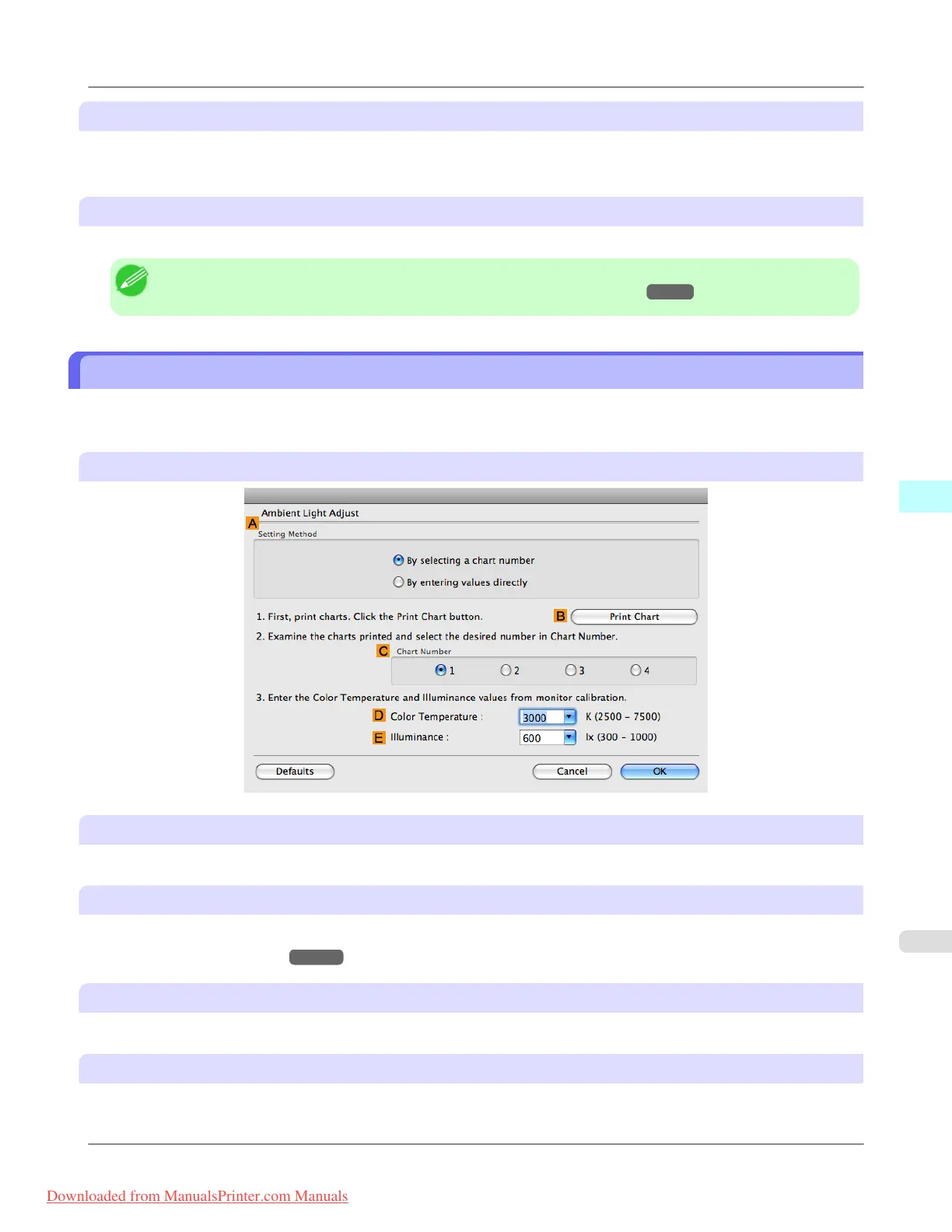
Ambient Light Adjust dialog box
The Ambient Light Adjust dialog box is used to select the setting method and to enter and select the information required
for the settings.
When you select By selecting a chart number in Setting Method
A Setting Method
You can choose configuration based on the printed Chart or based on using the i1 colorimeter.
B Print Chart
Click to start the Light Source Check Tool, for printing Chart.
• Light Source Check Tool
→P.499
C Chart Number
In Chart, select the number of the pattern with your desired colors.
D Color Temperature
Enter the D Color Temperature measured during monitor calibration. Displayed when the B Matching Method is set to
Monitor Matching on the Matching pane.
Mac OS X Software
>
Printer Driver
>
iPF8300 Ambient Light Adjust dialog box
5
497
Downloaded from ManualsPrinter.com Manuals














 To Next Page