E Illuminance
Enter the E Illuminance measured during monitor calibration. Displayed when the B Matching Method is set to Monitor
Matching on the Matching pane.
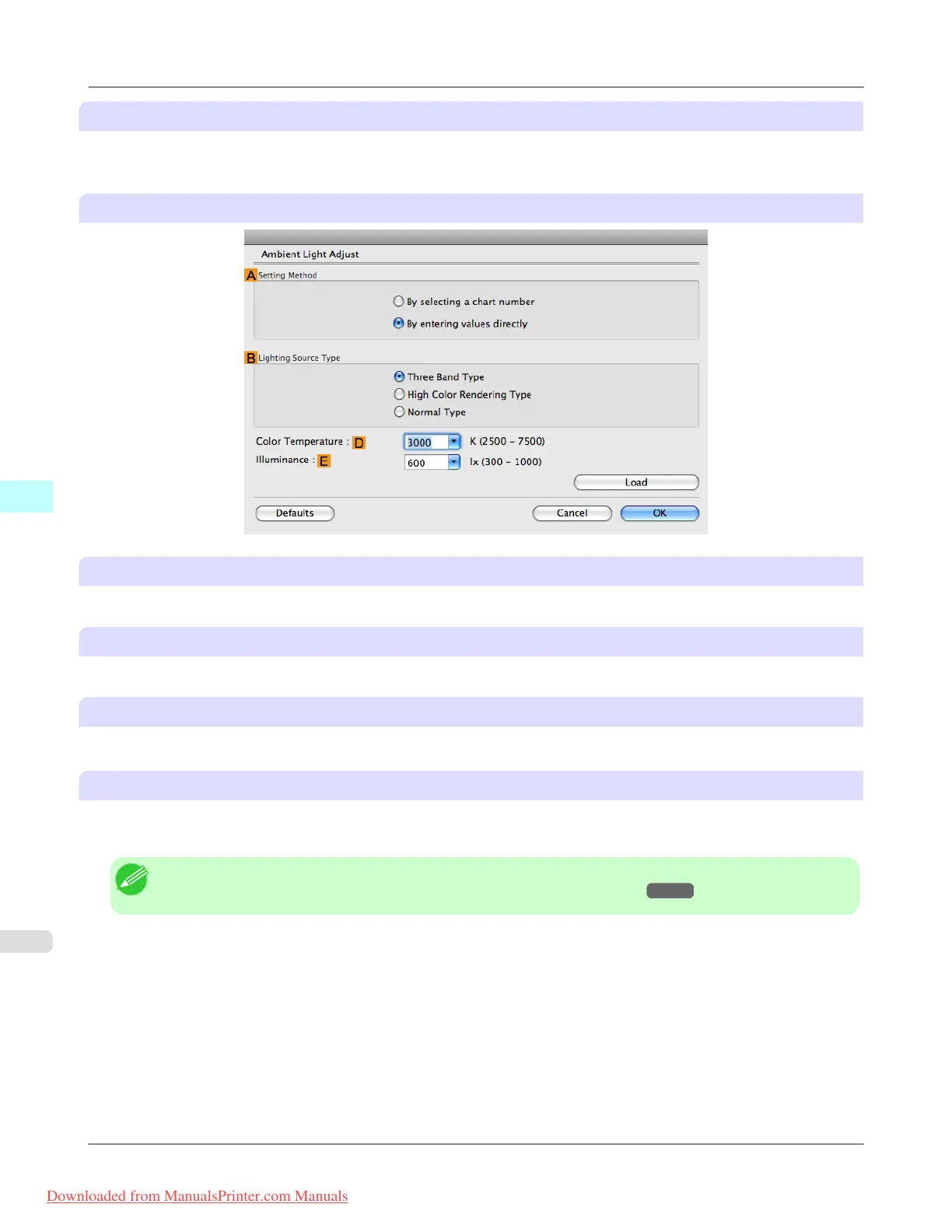
When you select By entering values directly in Setting Method
A Setting Method
You can choose configuration based on the printed Chart or based on using the i1 colorimeter.
B Lighting Source Type
Select the light source measured using the i1 colorimeter.
D Color Temperature
Enter the D Color Temperature measured using the i1 colorimeter.
E Illuminance
Enter the E Illuminance measured using the i1 colorimeter.
Displayed when the B Matching Method is set to Monitor Matching on the Matching pane.
Note
• For details on settings items, see "Adjusting the Color in the Printer Driver →P.42 "
Mac OS X Software
>
Printer Driver
>
Ambient Light Adjust dialog box iPF8300
5
498
Downloaded from ManualsPrinter.com Manuals














 To Next Page