Important
• When you update the media type information, perform the same update on all of the PCs that are using that
printer.
• Adding, deleting, toggling display/non-display, and changing the paper name of a media type can only be
performed for Canon genuine paper and feed confirmed paper. Refer to "Using Paper Other Than Genuine
Paper/Feed Confirmed Paper →P.694 " for details on adding, editing, and deleting custom paper. Cus-
tom paper displays Custom as the Status in the Media Type list.
• To add media types, download the media information file (.amf file) in advance from the Canon website.
Note
• It may not be possible to deleting, showing/hiding, and changing the display order under some conditions.
Adding Media Types
Media information files (.amf files) released by Canon are registered in the printer control panel and printer driver.
Important
• Do not perform printing on the target printer while adding the media types.
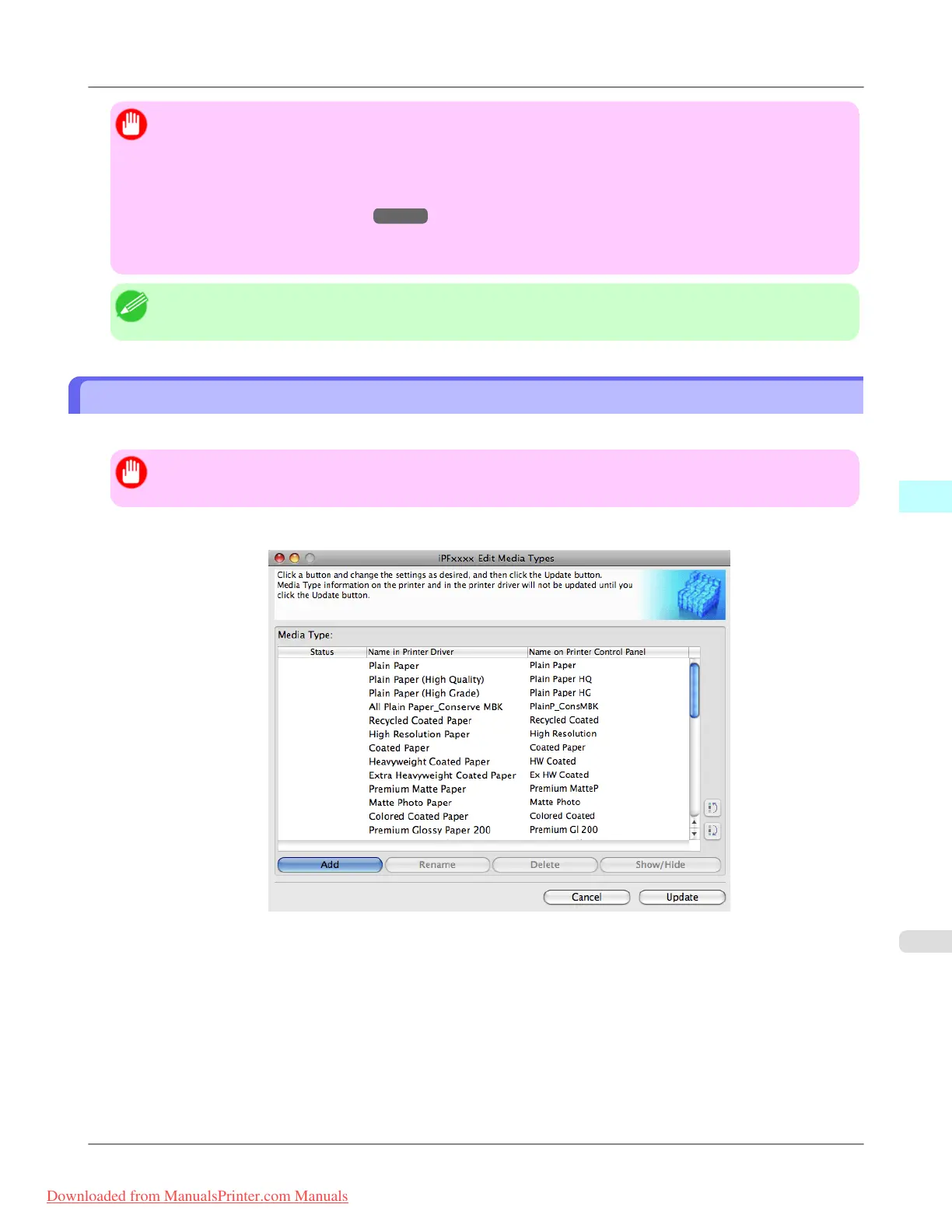
1. Open the Edit Media Types dialog box, and then click the Add button.
Mac OS X Software
>
Media Configuration Tool
>
iPF8300 Adding Media Types
5
681
Downloaded from ManualsPrinter.com Manuals














 To Next Page