Important
• When handling the roll, be careful not to soil the printing surface. This may affect the printing quality. We
recommend wearing clean cloth gloves when handling rolls to protect the printing surface.
• Use scissors or a cutting tool to cut the edge of the roll paper if it is uneven, dirty, or has tape residue. Other-
wise, it may cause feeding problems and affect the printing quality. Be careful not to cut through any barco-
des printed on the roll.
• Align the edges of the paper on both ends of the roll. Misalignment may cause feeding problems.
Note
• For details on supported sizes and types of rolls, see Paper Sizes or the Paper Reference Guide. (See "Paper
Sizes.") →P.771 (See "Types of Paper.") →P.768
• To view instructions as you attach the Roll Holder, press the Navigate button. (See "How to View Instruc-
tions With Navigate.") →P.899
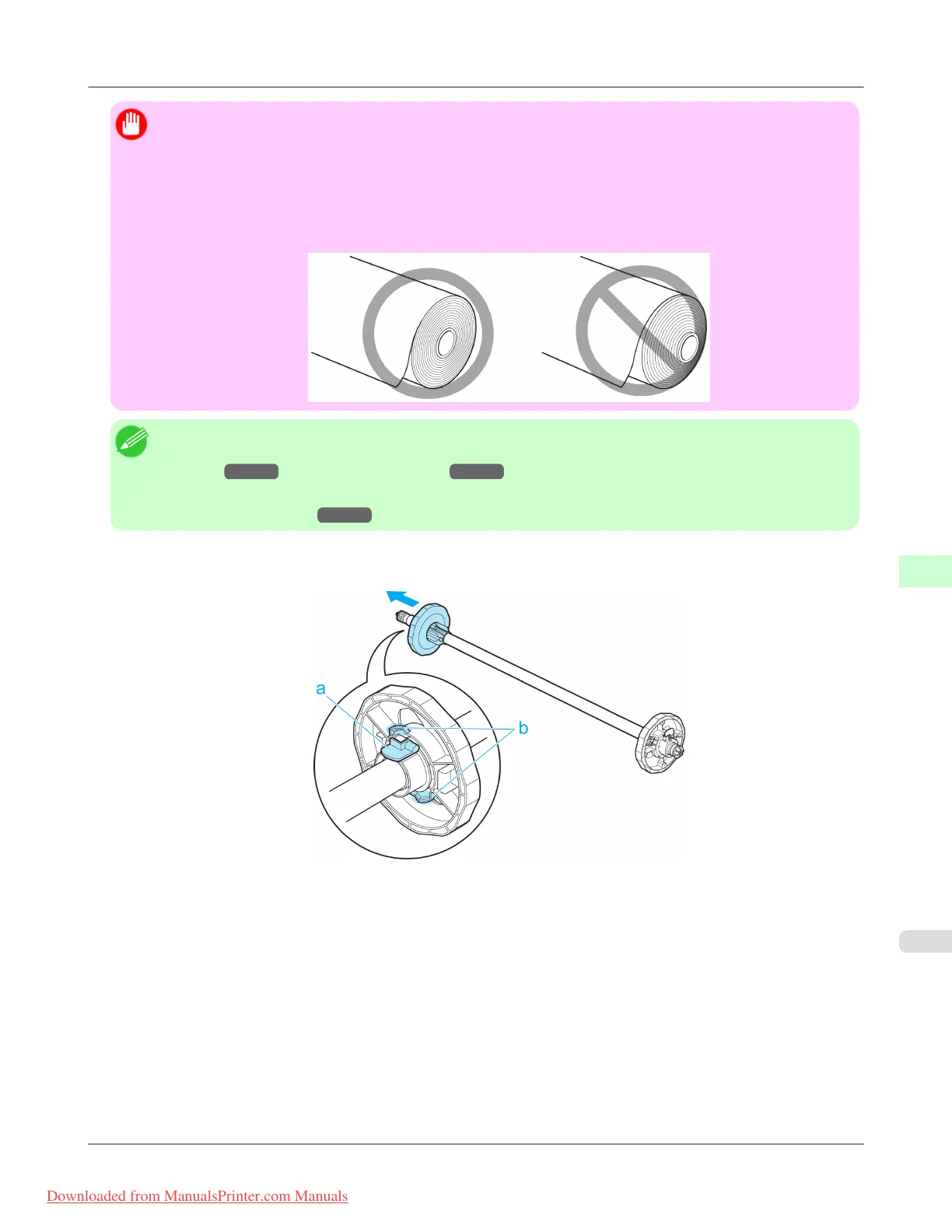
1. Lift the Holder Stopper lever (a) from the shaft side to unlock it. Holding the Holder Stopper at the position indica-
ted (b), remove it from the Roll Holder.
Handling Paper
>
Handling rolls
>
iPF8300 Attaching the Roll Holder to Rolls
7
775
Downloaded from ManualsPrinter.com Manuals














 To Next Page