D Monitor White Point
Enter the color temperature set on the monitor.
Displayed when the B Matching Method is set to Monitor Matching.
E Use ambient light adjustment
Select this option for adjustment of colors to suit the ambient light in the viewing environment.
F Ambient Light Adjust
Click to display the Ambient Light Adjust dialog box, which enables you to complete settings for printing to match the
ambient light.
• Ambient Light Adjust dialog box
→P.220
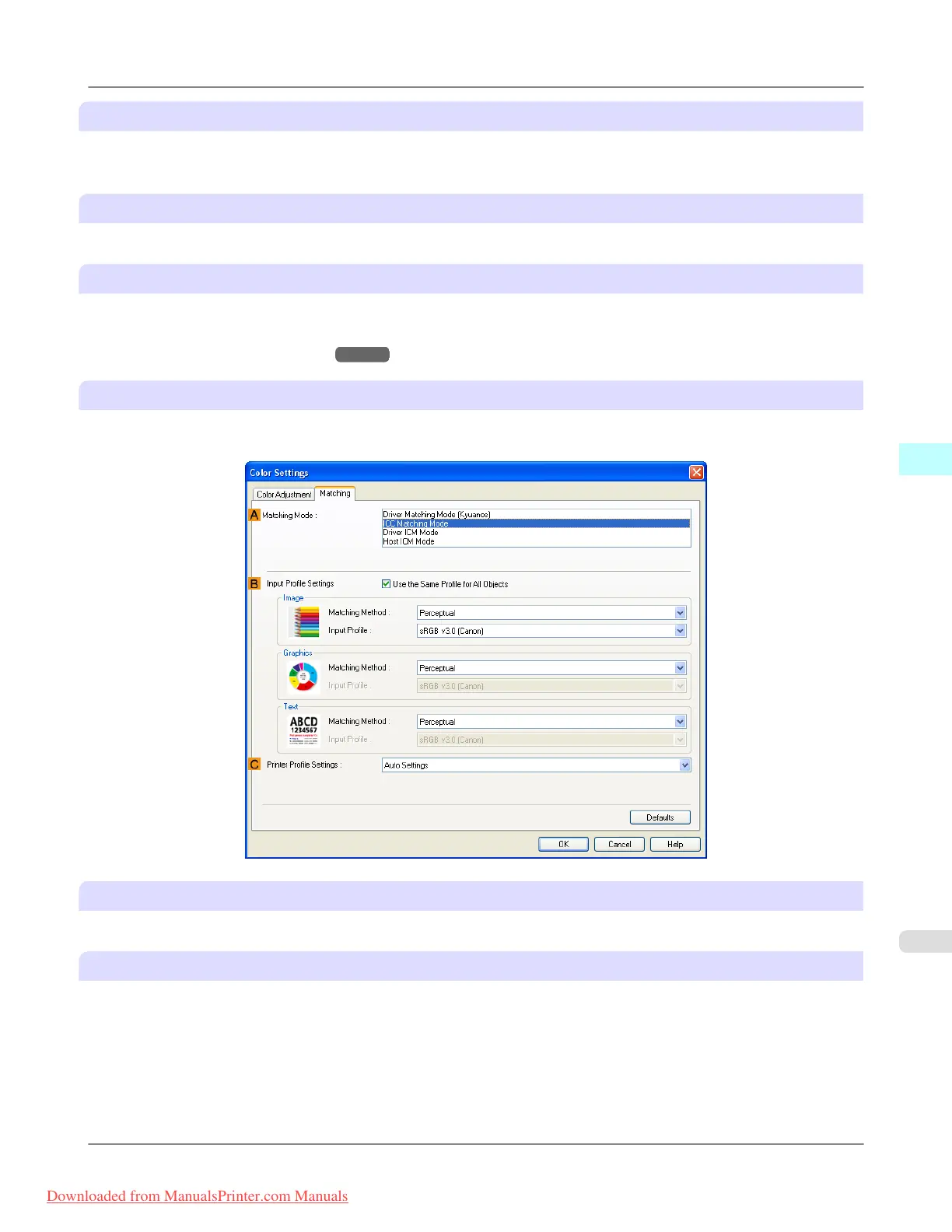
ICC Matching Mode, Driver ICM Mode and Host ICM Mode
The following options are available when you select ICC Matching Mode, Driver ICM Mode, or Host ICM Mode in the
A Matching Mode list.
A Matching Mode
Select the color matching mode to use, as desired.
B Input Profile Settings
You can select Image, Graphics, or Text. You can choose Matching Method and Input Profile.
Various options are available depending on your selected Matching Mode.
To apply the same input profile automatically for Graphics and Text, select Use the Same Profile for All Objects. To
apply separate input profiles to Graphics and Text, clear Use the Same Profile for All Objects and specify the individual
settings.
Windows Software
>
Printer Driver
>
iPF8300 Matching Sheet
4
219
Downloaded from ManualsPrinter.com Manuals














 To Next Page