Printer parts
Front ................................................................................................................................................................ 881
Back ................................................................................................................................................................ 883
Top Cover (Inside) ........................................................................................................................................... 884
Carriage ........................................................................................................................................................... 885
Ink Tank Cover (Inside) ................................................................................................................................... 886
Stand .............................................................................................................................................................. 888
Media Take-up Unit (Optional) ........................................................................................................................ 889
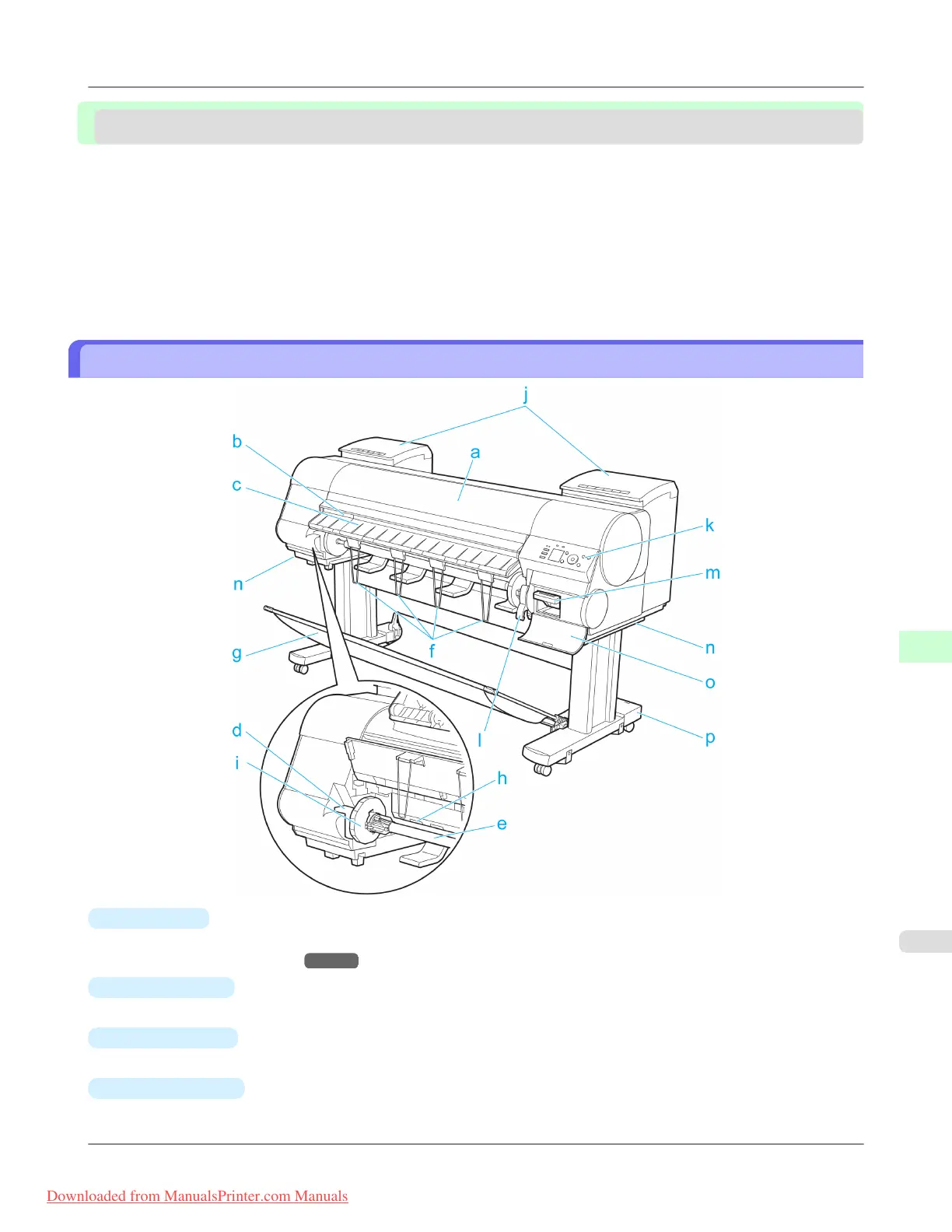
Front
a.
Top Cover
Open this cover to install the Printhead, load paper, and remove any jammed paper from inside the printer as needed.
(See "Top Cover (Inside).") →P.884
b.
Cutter Groove
Paper is cut (using the cutter or manually with scissors) over this groove.
c.
Ejection Guide
Guides printed documents as they are ejected. Raise the guide when loading a roll.
d.
Roll Holder Slot
Slide the Roll Holder into this slot.
Printer Parts
>
Printer parts
>
iPF8300 Front
9
881
Downloaded from ManualsPrinter.com Manuals














 To Next Page