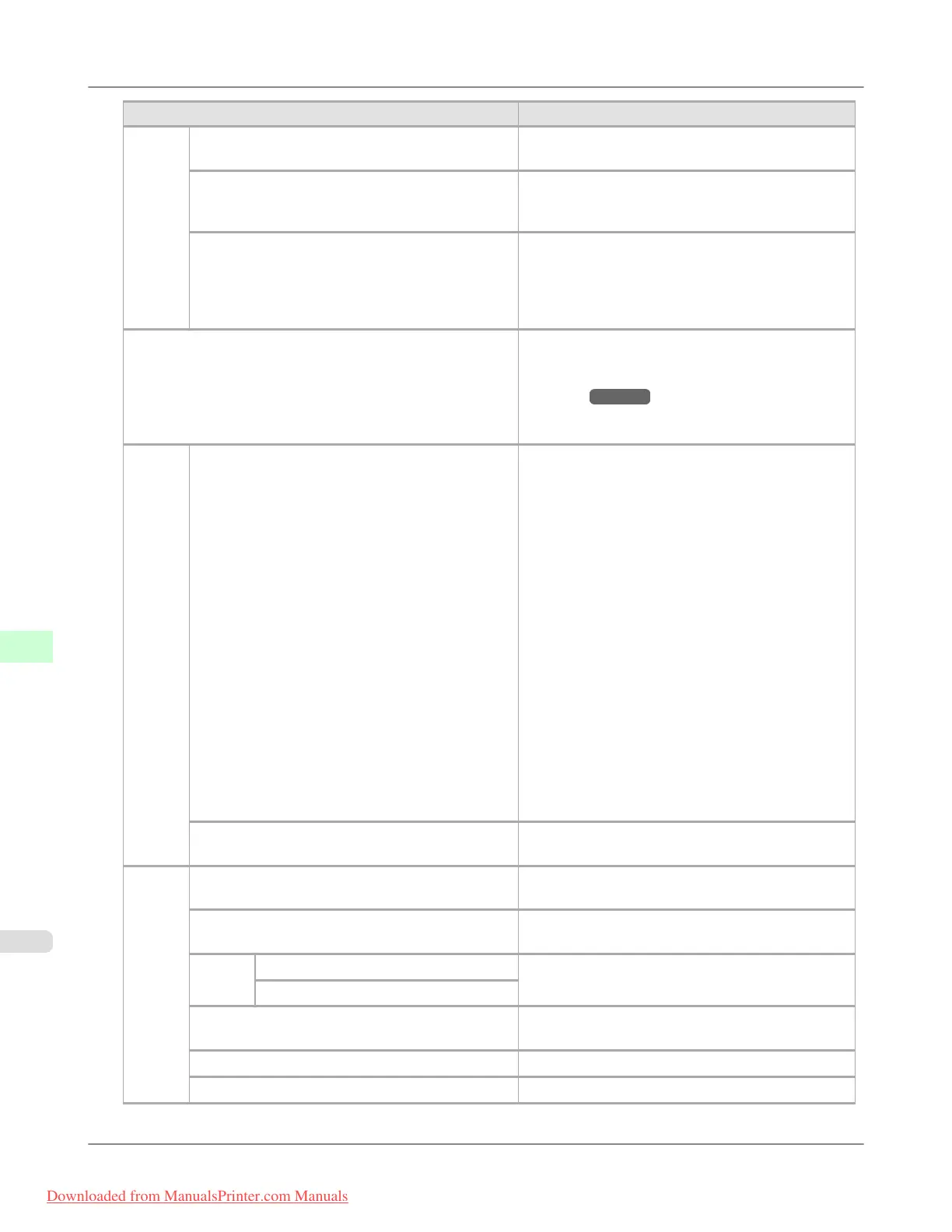
Setting Item Description, Instructions
Take-
up
Reel
Use Take-up Reel Selecting Enable allows use of the Media Take-up
Unit.
Auto Feed Available only if Use Take-up Reel is already set to
Enable. Rolls are automatically advanced to the po-
sition for attachment to the Rewind Spool.
Skip Take-Up Err Available only if Use Take-up Reel is already set to
Enable.
Choose On to continue with printing even if an error
occurs with the Media Take-up Unit. Choose Off to
pause printing if a take-up error occurs.
Prep.MovePrinter When transferring the printer to another location,
choose the level of transfer and follow the instruc-
tions on the screen. (See "Preparing to Transfer the
Printer.") →P.1031
Not displayed during a warning message that the re-
maining Maintenance Cartridge capacity is low.
Ad-
min.
Menu
Change Password By setting a password, you can restrict menu display
and configuration as follows. Enter a number in the
range 0–9999999.
• Viewing and configuration by
administrators only
IPv4 Settings
Change Password
Init.Admin.Pswd
• Viewing and configuration by
administrators, and only viewing by other
users
Interface Setup settings (except IPv4 Settings )
Date & Time
Date Format
Time Zone
Use RemoteUI
Reset PaprSetngs
Common Box Set.
Init.Admin.Pswd Choose OK to restore the Admin. Menu password
to the default values.
Printer
Info
Paper Info Indicates the current paper size, type, and related
printer settings.
Ink Info Indicates ink levels and maintenance cartridge ca-
pacity.
Head
Info
Printhead L Indicates information about the printhead.
Printhead R
System Info Indicates the firmware version, serial number, and
interface information.
Error Log Indicates the most recent error messages (up to five).
Other Counter Indicates the total printing volume of the printer.
Printer Parts
>
Control Panel
>
Menu Settings iPF8300
9
922
Downloaded from ManualsPrinter.com Manuals














 To Next Page