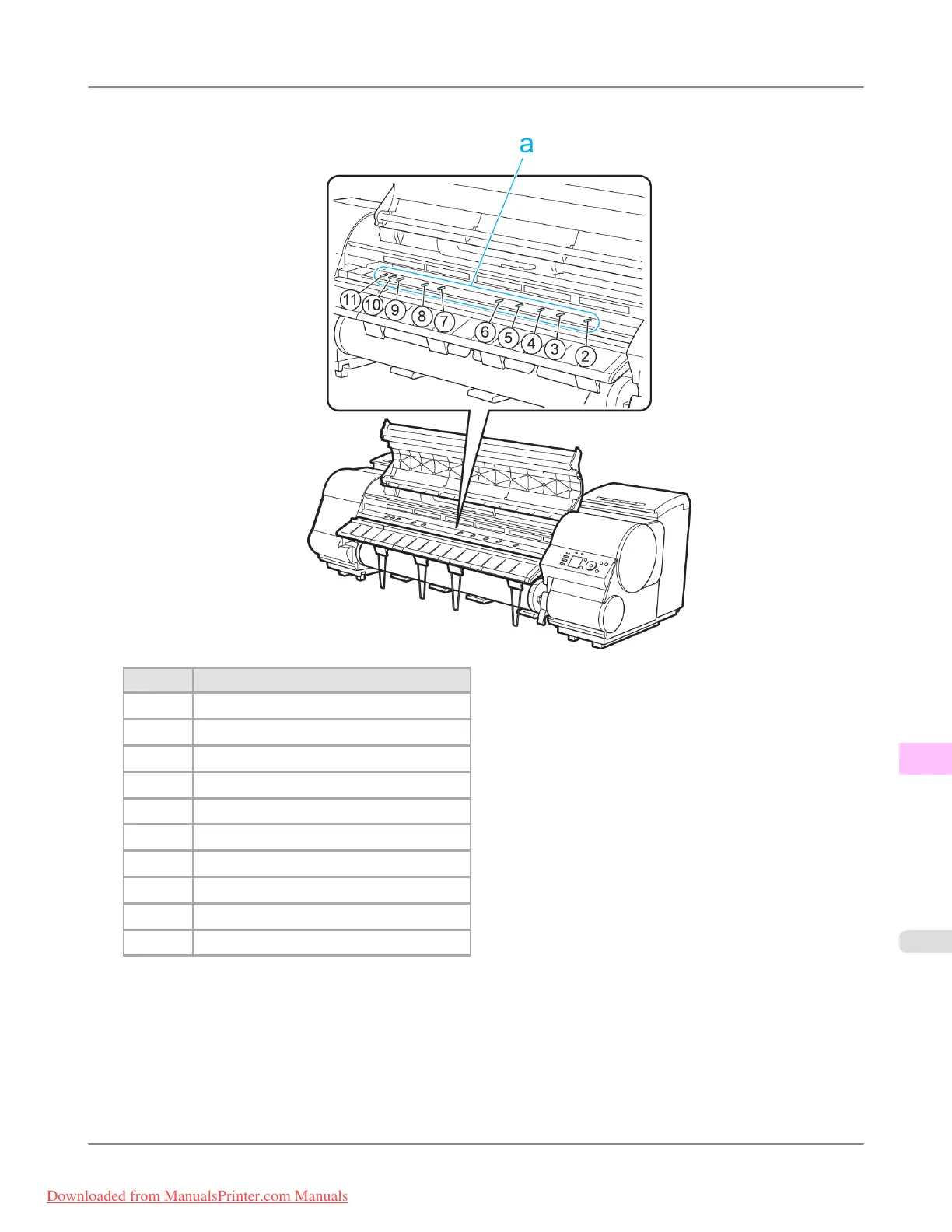
5. Refer to the following table to confirm the number on the Platen that corresponds to the size of paper for printing.
Number Dimensions
2 254 mm (10 in)
3 355 mm (14 in)
4 432 mm (17 in)
5 515 mm (JIS B2 or B3)
6 594 mm (ISO A1 or A2) or 610 mm (24 in)
7 841 mm (ISO A0 or A1)
8 914 mm (36 in)
9 1,030 mm (JIS B0 or B1)
10 1,067 mm (42 in)
11 1,117 mm (44 in)
6. Using the back of the Cleaning Brush, move the Switch to the side opposite ●, corresponding to the size of the paper
for printing.
In this case, note that you will move the switch in the opposite direction from the direction in step 4.
Troubleshooting
>
Problems with the printing quality
>
iPF8300 Setting the Blue Switch on the Platen
12
1065
Downloaded from ManualsPrinter.com Manuals














 To Next Page